Those elastic brushes look great, like a variation upon Laplacian deformation. 
1 Like
Only for sculpt for now right? I hope we see this also adapted to texpaint as well.
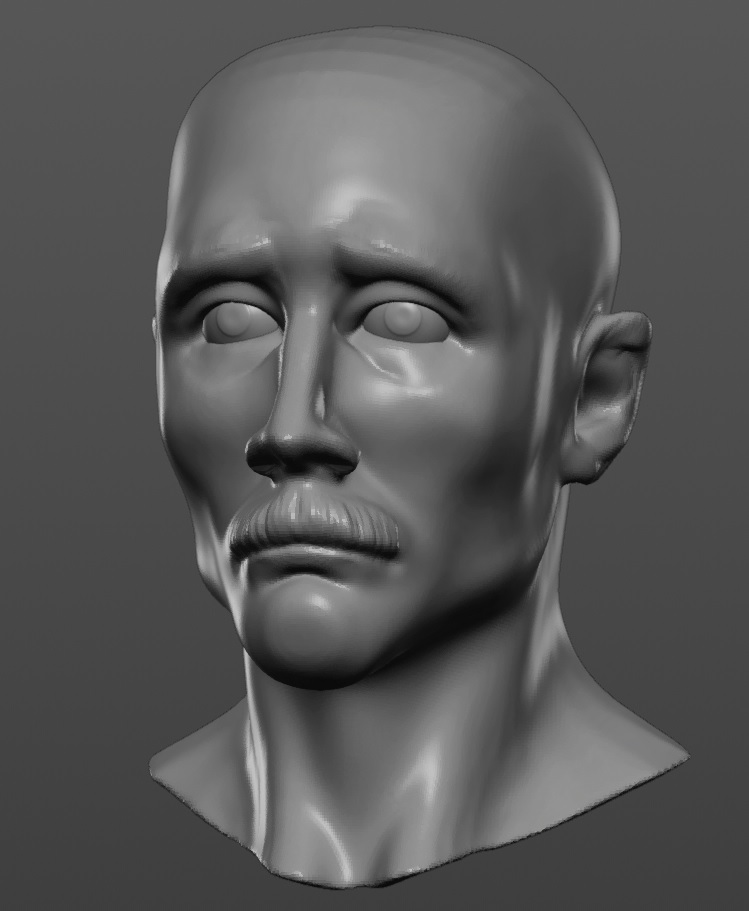
Yeah i can’t wait to try them, I did this quick sketch with the new cursor…etc the grab brush with smooth falloff has similar effect and it’s actually now fun to use, i tell you sculpting will be addicting once everything gets merged and polished.
7 Likes
You’re right, Sculptris Pro is an addition to Dynamesh, not a replacement, I didn’t formulate it the right way. But still, Dynamesh has been around for ages, while Sculptris Pro has been relatively recently introduced as a new way of sculpting with total freedom in ZBrush. And Sculptris Pro does have some advantages compared to Dynamesh:
- It doesn’t clog small openings, holes and other details.
- You don’t have to frequently reapply it to get rid of polygon stretching.
- It doesn’t smooth out the whole model a little each time you remesh.
- It gives you total, localized control of polygon detail.
The same goes for Blender Dyntopo. Even with the arrival of the OpenVDB Remesher, Dyntopo is still my preferred sculpting method. Right now there are two things I still really miss from ZBrush:
- An auto-retopologizer that is at least as competent as the brilliant ZRemesher. But that will arrive soon for Blender in the shape of QuadRemesher.
- The Remesh By Union tool from ZBrush, allowing you to get rid of all self-intersections in a mesh without the need to use a remesher like Dynamesh or OpenVDB.
4 Likes
This is exactly my point. They are entirely different workflows, yet can be used together, One isn’t a replacement for the other. They both have advantages and disadvantages over the other, but that’s what I love about Zbrush, it isn’t supposed to be viewed as a linear set of tools but as an entire ecosystem that works seamlessly together and non-linearly. That’s what a lot of people simply don’t get about Zbrush.
2 Likes
Agreed. I hope it will also remain this way in Blender, hoping the Pablo revolution will not overshadow Dyntopo development, but complement it.
All these improvements are pretty exciting and I really do want to attempt some sculpting in Blender, but I just can’t get past the fact that I won’t be sculpting using Zbrush right-click navigation. I know that I will always use Zbrush, no matter what, so having to sculpt using a completely different navigation method when jumping between Blender and ZB would just be a nightmare.
I know what you mean. I’ve simply synchronized Blender navigation to that of ZBrush. Not much changes are necessary…
- First of all I’ve got my Wacom pen set like this for Blender:
Tip = LMB
Lower half of pen side button = MMB
Higher half of pen side button = RMB
- And for ZBrush I’ve got my pen setup like this:
Tip = LMB
Lower half of pen side button = RMB
Higher half of pen side button = LMB double-click (but you can assign anything you like to that)
- Then in the Blender Preferences you make these changes to complete the navigation sync with ZBrush:
Keymap section ➔ 3D View ➔ 3D View (Global) ➔ Pan View ➔ Alt + MMB
Finally, in Preferences ➔ Navigation ➔ Zoom section you check Invert Mouse Zoom Direction
And voilá, you can use the exact same pen buttons and modifier keys (Control, Alt, Shift) to navigate in ZBrush and Blender. 

The only thing you’ll have to get used to is snapping to view axes during orbit (front view, right view, etc.) is done using Shift in ZBrush, and Alt in Blender.
4 Likes
are there still plans to remove dynatopo? I still prefer using that than the voxel remesher
Only problem is that I’ve been using Right-Click nav in ZB for years.  This would throw everything off. There would need to be a way to have an exclusive nav setup just for the sculpting workspace.
1 Like
It’s the thing I hate about ZBrush, you must adapt you to the software and not the opposite, it’s nonsense.
3 Likes
But if you’re using the same pen buttons, it doesn’t matter if Blender has assigned MMB to it, and ZBrush LMB, as long as you don’t have to change the way you navigate.
And if you like you can also enter all ZBrush right-click navigation in Blender. That’s how I did it prior to switching the mouse buttons on my pen.
@otsoa: Yep, that’s also one of the few complaints I have about ZBrush. 
Something like this and the add-on @Tonatiuh mentioned, as well as incorporating more options like you have in the remesh modifier, would hopefully solve that.
Is it possible to have different nav setups for different workspaces? I haven’t looked into it. I use my wacom solely for sculpting, nothing else. Even in ZB.
Hmm, that’s a good question, I haven’t looked into that. But if you swap the RMB with the MMB in your Wacom pen settings, the only two things that need to be changed in Blender prefs is Alt + MMB in stead of Shift + MMB for panning, and checking the Invert Mouse Zoom Direction option. That means you can keep 99.9 percent of Blender navigation controls and keyboard shortcuts as they are, and still have a seamless workflow transition between ZBrush and Blender.
Of course, the rest of the ZBrush workflow and UI is radically different from Blender. But so far the UI switch is bearable. It’s the viewport navigation that’s a hurdle if you don’t adjust it in Blender.
1 Like
Yes, this is how I have it set in ZB. That’s great, thanks for the help. I’ll definitely have a mess about with it.
1 Like
I forgot to mention that besides the viewport orbit axis lock difference (Shift in ZBrush vs. Alt in Blender) you also don’t have the ZBrush option to use Control for both zooming (holding Control) and panning (releasing Control). But you’ll be able to live with that.
1 Like
I think it was first planned to have that for 2.80 at least that what i have seen from the Conference talks, but probably the idea lost due to the shear amount of work…it’s possible to make an addon that sets up different keymaps per workspace, the problem is you have to do the keymap yourself or it could have just a simple template and let the users fill what they want for each workspace and of course you have the addons filter for the default.
2 Likes
Any news on vertex painting in sculpt mode (master)? 
Yes you can. At least according to the initial design of workspaces
1 Like