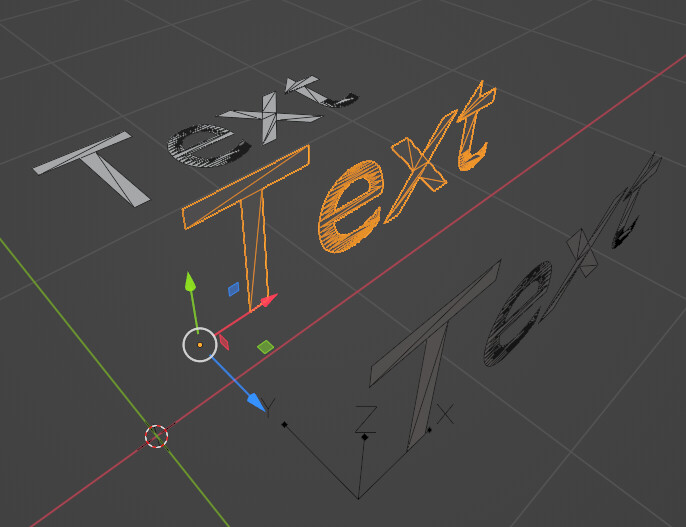
I want to transform and alter (live) text (not converted to a mesh) using global orientation.
The problem is that text is created facing the Z axis (back row of image) and geometry node transforms on the text are done using its local axis (center row of image) and it isn’t possible to reset the local axis when text is live.
What I want to be able to do is to manually orient the text so the top of the letters are aligned with the Z axis (ie. rotate 90 along X) and then be able to apply geometry node transforms using the global axis (front row of image).
Ah yes, you have answered my question as I asked it (thank you), so I am marking it as solved. Unfortunately, this does not solve my actual problem.
I am applying the geometry node modifier to existing text, not text generated within the modifier. And even when I convert the text geometry to an instance and plug it into a translate instances node and toggle “local space”, it has no effect. Perhaps this is not how these two nodes are intended to be used.
In any case, translating text isn’t actually my issue. Since this modifier is applied to text that already exists, I can just grab it and move it wherever I want it to be. My actual issue is that after rotating the text 90 deg along the X so it is upright, any further modifications I do to the text stick to the local axis and not the global one.
Specifically, I want a volume cube to conform to the bounding box of an object. I then want to be able to control the individual MIN/MAX values for the X Y Z axis of the volume cube to basically “crop” it.
My actual problem is that the individual X Y Z components use the local axis. So for text that has been rotated by 90 degrees on the X, it means the Y and Z inputs are flipped.
Below is a sphere object and a text object. Each has the same geometry node setup applied. Adjusting the Z value (in this case a negative value) for the sphere works as intended. But adjusting the Z value for the text does not. Both objects should limit the volume along their bottoms. Instead, the text limits the volume to the back.
*@zeroskilz: You will no doubt recognize the nodes you helped me with a few days ago to find the center of an object.
By the way, next time it would maybe better to start a new thread and rephrase your question correctly there, so others can also find the solution to that “new” problem.