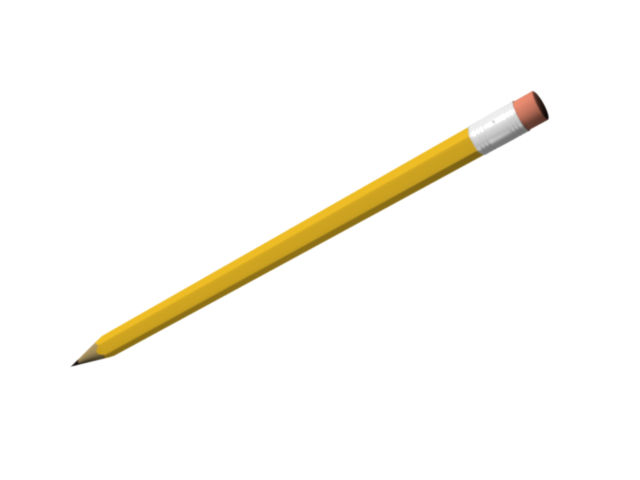
I’m fairly new to Blender, even tho I’ve tried it out before in the past, this is the first time I am taking it serious, in antecipation to 2.5 (which seems a much more solid build). One of the things I miss from Lightwave is SOLID DRILL / STENCIL… I used it a lot in ‘hard’ modeling to shape in new geometry or making precise cuts on geometry, etc… is anybody here familiar with Lightwave and the tool I am talking about?
Anyway, I miss the tool and I haven’t found a substitute in Blender.
How would you go about modeling, for instance, a regular no.2 pencil (please, I mean serious/solid modeling, not look alikes) in Blender? I will attach the image of a pencil I did in Lightwave. You’ll notice the ‘body’ of the pencil is 6-sided while the point is smooth and roundish and the transition is uneven, as it is in real-life. It was done (the uneven transition) in Lightwave using a simple stencil operation.
Ok. Here’s what I got from boolean. Not exactly the same result, tho. The way I would’ve prefered to do this is creating a line in zig-zag, then round it around itself, making a “ring” with the line (starting and ending at same point), then projecting it IN the mesh and cutting off the rest that I don’t need.
Probably is faster to start with a cylinder of 6 vertices, extrude, subdivide the mesh, add a cone, make a boolean operation as a modifier, apply the modifier, clean a little the mesh…
Sounds complicated but isn’t. I agree that right now, Blender tends to make things that should be somewhat simple a little more complicated, but you allways can ask for some feature, if needed.
I’ve done a little video, and tried to tackle the problem (or at least what i think it is), is not a complex issue, but the Blender way is somewhat different to lightwave or maya or 3DS.
It doesn’t have any sound, but should give an idea… In Blender usually one start with a basic primitive and you can model, or make non destructive modifications to objects, like modifiers (at least non destructive until you applies them to the mesh).
I tend not to use booleans even though the last video shows a very good example of using booleans in this case.
I started with a hexagonal cylinder. Then, after selecting the vertices on the tip of the pencil, I rounded them up by using “To Sphere” button in Mesh Tools, and I scaled them down to make the tip. Finally, I adjusted the topology fo the vertices around the base of the tip to obtain a smoother transition between the hexagonal shape and the round one. Off course, the level of reality depends also essentially on the use of good textures and lights. I hope it helps you.