Hello all this is my first post here.
Basically I want to create a pose able fish in blender using bones etc rather than mess around in ZB.
I have next to no experience with this and its making me a bit crazy as I don’t even know what to ask or search for in solving the issues.
My aim is to have strings of bones that enable body and fins to be posed.
My first goes at it have all resulted in some deformation but the whole body swings about when moving the bone chain.
Messed with vertex groups etc but the problem persists.
Obviously I must be missing some 101 basics here.
Can anyone help?
attached a couple of grabs showing what i am on about. [ignore the tail fin]
Cheers

While you’re learning, you’d be best off playing with fewer bones. Try it with two bones, then four bones, then how ever many.
It’s probably not weighted well. Drag the head of the root bone all the way to the head of the fish and weight with autoweights.
The mistake beginners make all the time with weighting is that they think that if they add bone weight, they’ll end up with fully weighted. They will not. You need to also subtract weight from the bones to which it should not be weighted. You can be weighted 1.0 to multiple bones, at which point adding weight to any particular bone will do nothing, but the mesh will still be weighted to multiple bones. (Kind of like how the head of your fish looks like it’s partially weighted to even your final tail bone.)
Thanks for your reply.
I tried just 4 bones then in weight painting painted the front of the fish a dark blue not zero but close [if this is what you mean]
still jumps side to side.

Link a .blend.
Got any recommendations as to where i can upload to and link from?
Everything you need is in this tutorial here go to 17:00 in the video if you want to get to the bone rigging part ;
Thanks again for the help,
here is a file http://pasteall.org/blend/index.php?id=52361
Cheers for the tut vid link polynut.
Look at these weights.
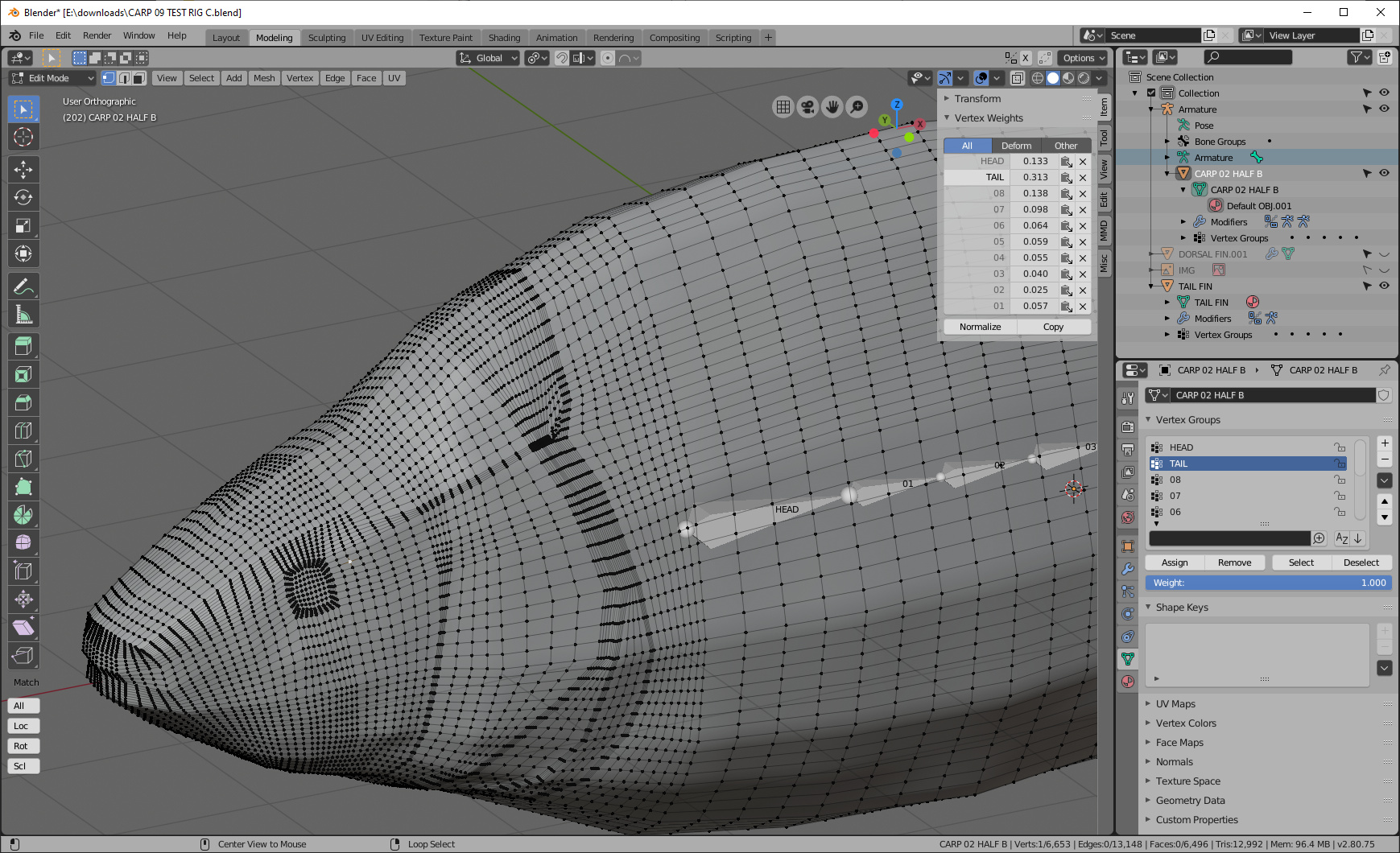
Notice how tail is weighted more heavily than head on this randomly chosen vert. Does that make any sense?
You should also apply your rotation to both your armature and your mesh before going further. That will require adjusting your mirror modifier.
This model doesn’t autoweight well for some reason. How I would weight this model is sequentially: assign all to head, linear gradient add 01, normalize all lock active, linear gradient add 02, normalize all lock active, etc. Your goal should be gradients that go from just behind the bone to just after the bone-- not gradients that span the entire fish.
You’ll want to check this out:
Hi bandages
Thanks for your patience , but you do have to assume I know nothing with this.
So I don’t get this:
Hi Metin
Thanks for that it looks a fun interesting thing.
I’m not going to assume you know nothing, because otherwise I’d have to explain for hours about Blender interface, modes, mouse navigation, etc. But I’ll help if you can be more specific about where exactly you’re having problems. Do you know how to use search menu? Select your armature in object mode and search for “apply object transforms.” Then get back to me about the next thing you’re having trouble with.
not sure if this will help but bendy bones might help , might need the plug-in though.
Ok I get your point , I do appreciate your time is precious.
I have applied object transformations as requested.
Not sure what assign all to head means?
Thanks for that, i did have a play with it but the issues I am having in general
are also present with this.
The picture shows the grand purpose behind this, digital versions of my carp sculptures.

not me mark , I’m retired and have nothing but time , I was doing a lot of rigging and left blender to pursue game modeling in skyrim and like a dummy dumped all my stuff to make room on my drive ,but there was a free add-on a while back that would fill the bill for what your looking for will see if I can find it but it will let your fish swim.
It means, select all your verts (in edit or weight paint mode), go to properties/object data/vertex group, select your head group from the list of vertex groups, make sure that the “weight” bar underneath says 1.0, and click the assign button right above that weight bar.
That would be FishSim. It really eases rigging and animating fish, using a modified version of the Rigify rig.
there was a version of jiggly armature also not sure if this is the right one still looking for the old post.
JiggleArmature-master.zip (88.3 KB)
also I was using 2.79b at the time and pretty sure it was a plugin.