User profiles for Blender

Hi

I’ve been looking around for a solution to what seems to be a pretty basic problem, but couldn’t find anything substantial. That means no clear cut solution that is either a plugin, native Blender setting or even manual workaround (well, on this one I have a solution but that’s a bit cumbersome, more on this later) to manage different user profiles within Blender.

The nitty gritty can be boiled down to this:
Blender seems to lack a way to manage and launch specific user profiles with dedicated sets of hotkeys, plugins, settings and whatnot. I can’t seem to find a solution that is not involving a lot of manual management and maintenance and different portable setups to keep everything tidy.

Now, the best solution I could come up with for this issue is to run Blender as a portable installation, and each portable installation has it’s own set of hotkeys, plugins and settings in general tuned for specific scenarios.

In my personal case I have 3 main Blender portable installations I use: one for regular 3D production work (I call this Studio), where the vast majority of the work is being done, one that is particularly tuned for 2D work and sculpting (which I call Pen) and one that is dedicated for modding (you guessed it, it’s called Mod).

I have a fairly substantial amount of plugins, pie menus setups, self made addons and hotkeys that are specific to the version of Blender I’m using, and this can be quite difficult to maintain, especially if Blender is under a period of quick updates. It’s not uncommon for me to skip several versions of Blender before I update because it takes a whole day or two to set up everything again in the newer version.

So here’s a practical example:

I have, let’s say, 10 plugins.
In Blender Studio setup, I use plugins 1 to 6.
In Blender Pen I only use plugin 7 and 8
In Blender Mod I use plugins 1 to 3, then also 7 and 10.
The rest are basically disabled.

In each installation I have a custom set of hotkeys, and plugin settings that are specific for that installation. A quick example would be some ZenUV and UV Packmaster settings that are specific for Blender Studio but different in Blender Mod.

Pie menus from Pie Menu Editor are also different in each version.

I hope by this point you can start to see how this can get complicated quickly, and before you ask:
Yes - I’ve tried already using a single version of Blender, having everything enabled at all times makes it take ages to load, and plugin conflicts can be a huge PITA.
No - a regular installation of Blender for easy updates is not an option in my specific case. I’ve had that be corrupted way too many times when updating that my only way to use Blender reliably is with the portable method.

So, the final question is this:
Is there a way to manage different user profiles in Blender, even if theoretical?
Meaning I don’t have to have 3 different portable installations but rather only one with all plugins and different hotkey/PME setups and settings for each profile? The goal here is to launch one single Blender, and on launch pick a profile which loads UI, settings, hotkeys, plugins, etc. based on the profile settings, so whenever I need to update Blender itself, I don’t have to make 3 separate folders.

Would a Blender plugin work to do something like this? Or that should be an external software, something like a Blender Launcher?

I know Blender does look at userprefs.blend, setup.blend and other files to launch, so would it be difficult to make a profile selection to pick and choose the behaviour of the software before startup?

I know this is my specific issue, but since I also use Blender professionally, I can see how this can be used to a much wider extent in industry pipelines too.

Let me know if you have ideas or suggestions, I’m all ears

I have not tried it but i think sync Blender has an option to load preferences.

Not sure if you have to restart though.

Workspaces are supposed to attempt to at least partially address that.

I have never managed to use them as a more complex setup is just too complex for me to put in the required effort as far. But it would be interesting to explore what can be done with them. Unfortunately one huge drawback is that they are saved with the file, I don’t understand this aspect of the design of the feature. seems like something that should be part of user preferences to me.

A solution with a custom add-on might be possible though. It would require Python scripting. What is the exact situation? What exact customizations would you like to have per profile? The whole user preferences?

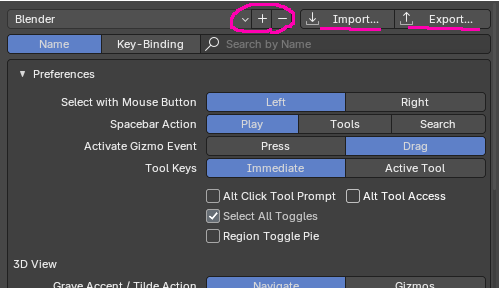
There is this as well.

App Templates can be great for customization, but you would have to load everything that you want in it with a script. An app template can define only user preferences settings and a startup file on it’s own. So writing a script for each use case seems to be quite a tiring task.

It is also possible to start Blender with different environment variable for user preferences set. You could make .bat files to start different versions. I think that’s absolutely the easiest way.

@echo off
mkdir "%appdata%\Blender Foundation\Blender\MartinsBlender" > NUL
set "BLENDER_USER_RESOURCES=%appdata%\Blender Foundation\Blender\MartinsBlender"
start "" "C:\Program Files\Blender Foundation\Blender 5.0\blender.exe"

Don’t worry about mkdir, it fails quietly if directory exists.
Then save that as a .bat file and that’s how you now start that Blender. You can configure it any way you want since all user preferences are now in the folder %appdata%\Blender Foundation\Blender\MartinsBlender" You can obviously put it anywhere you want, but it’s nice to have it in the same place all Blender preferences are kept for different versions.

As far as i understood templates every template has it’s own setup file. So one can choose any addon/extension to be enabeled or disabled in different templates. Then this should included hotkeyes…? Never tried too much myself because i have not soo much different workflow needs and can not really imagine how to change this “inbetween”.

image

The UI can be set as a template, but Addon’s activation and deactivation will require the use of the workspace. :thinking:

@WHOOLKAN

image

I don’t think it’s a big problem because the shortcut problem can be saved with various shortcut keys and replaced when necessary.
I think there is a way to choose from the preferences or to create and use Addon. :thinking:

Yeah it includes hotkeys. It says that it includes themes in the documentation, but I don’t think it does, at least conveniently. When I tried it, I didn’t manage to make it work with themes. I mean it can probably include anything and everything you want, but you have to code it in a script maybe?.. I don’t know. Anyway, even though changing a theme is trivial in Python just for something like user profiles coding a script seems too much work.

Edit: Oh, no, actually it does. It saves pretty much all settings. I must have mixed something up when testing. So that might be the best solution.

No, actually when you save preferences from it, it overrides default. I don’t know. It’s buggy and unclear.

While in app template, if you save your user preferences it overrides your actual user preferences

This is ridiculous design. Thankfully I have a recent backup…

Hello,

I know your struggle, even though I find it hard enough to maintain one blender config on different machines. There was no solution I found working out for me. So I stored my whole 4.5 (now 5.0) config folder on GitHub. That was the best solution for me since 4.1 and worked well between Windows and Mac. But it had its issues:

  • certain addons contain files larger than 100mb which is a no no for GitHub
  • keymaps from addons were behaving strange: they were there sometimes 3 times and had to be removed manually, just to reappear
  • when closing Blender I got a “Blender crashed” notification, always
  • and other tiny annoying things

So I decided to spend days again and again during the last 4 months to vibe-code my blender configuration.
With one command I:

  • set my preferences
  • set my workspaces
  • set my properties
  • set my hotkeys
  • set my repositories
  • install my extensions from a private GutHub repo
  • install all my addons from a private GitHub repo
  • set up my asset browser
  • bundle all vanilla assets to one “vanilla” catalog so it stops polluting my asset browser

… and probably a view things I forgot. Each of that bullet points is its own python script and I can run them all with one operator.
So I can start fresh with each update on any machine.

It was very interesting to do this and also challenging. I had headache a lot. It solved a huge thing for me.

Maybe this helps you. Good luck.

I spend the vast majority of my time (95%) in the layout workspace for pretty much doing anything. I use ZenUV so even when I need to do unwrapping I can bring up the UV editor with a shortcut and collapse it with the same, so besides the very rare cases of swapping to compositing or shading, workspaces don’t really help me much.

Templates might be an idea, I should try to play around with them and see if I can make anything usable out of them.

The situation itself is the need of significantly different setups and behaviours within Blender.
I run Blender in portable mode, so each installation is completely self contained and they can’t interfere between each other.
My “Modding” Blender installation has a number of plugins that are only used in that package, it’s own UI layout, startup file setup, own hotkeys, asset library directories etc.
My main “Work (or Studio)” Blender installation is the more general purpose one and the one I use the most, with the main plugins and UI, startup file, hotkeys and whatnot.
The “Art (or Pen)” is the third one I use, where the plugins used are very minimal and barebones, completely different UI setup and hotkey setup and fine tuned for graphic tablet use, basically a 2D drawing and 3D sculpting setup.

Each one is it’s own self contained portable installation so if I want to experiment with one, I can just clone the folder, mess stuff up and not worry about it since the original folder is untouched.

Having profiles within Blender means that I don’t have to maintain 3 separate versions. Ideally I would have a single version (always in portable setup) with all the plugins and the different sets of hotkeys, UI setups and so on. Switching from one profile to another would swap and enable/disable stuff without needing to launch another Blender.

This means that if I install a new plugin, it sits along with every other one, but I can choose to which profile have it enabled or not.

Fundamentally speaking, user profiles would mean that there is one single folder for the Blender core files, one single folder for the plugins, multiple hotkey files, userpref/startup etc and they all get hot-reloaded without relaunching Blender.

And that would be the most reasonable solution, of course, because it would cover most of the things I need. Not to be a complainer, but I prefer much more doing that sort of setup in a GUI rather than through lines of code :smiley:

Hmm, I should mess around with those for a while and see where they work and where they don’t.

Speaking of:

Yeah it’s a bit ridiculous, that’s exactly why I have the portable setup, when I’ll be testing this stuff I can do so on a cloned package

If all else fails, I might have to try your method, thanks for the tip.

I understand that completely. I like to code and I make tools for work for myself in Python all the time, however this really doesn’t seem like something that should require scripting. Preferences may require adjustments in time in different setups and having to script all changes every time seems like unnecessary complication and a hassle. I do think however, that starting with environment variable temporarily changed should work for your use case. It might even be a logical feature request on Right-Click Select to add a way to specify user preferences location with a command line argument so that OS shortcuts that start different setups would be easier to make.

Yeah it would be so simple just to export your settings as a json…