How can I use a compositor for the video editing in Blender and not just 3d modeling?
Add workspace (+ at top right) → Video Editing → Video Editing
or
File → New → VideoEditing
…in Sequencer (lower part): Add → Movie and for the video rendereing set output path as usual in Output Properties.
And of course See also Docs-Blender Manual: Video Editing …
For a more simple step by step tutorial you may look into something like:
I might try that, but I meant the actual compositor( cuz I am trying to add a glare effect to the video…)
And where is that ‘‘video rendering’’ button?
Could you please screenshot?
Usually “rendering” is refered to the action to do some drawing or painting and in the digital domain to start the process to compute the wanted result.
And in blender it’s the same as ever:
Menu → Render → Render Animation
or
Ctrl-F12
And in the compositor you add any clip via: Add → Input → Movie Clip and use any other node to add some transformation or mix it with another clip or the rendered scene…
But for non-linear video editing you have to use the video edition workspace or the video sequencer editor tab…
So there is a difference between the compositing (only for the “actual” frame) and the video editing feature ( clips are re-positionabel in time… therefor or non-linear ) .
1 Like
The compositor and the video editor in Blender are two entirely-separate tools, and this forum thread is not the proper place to try to explain the difference.
The request from Pro_Mickey_Artist is very clear, the answers on the other hand are very confusing and not a solution in any way. Did anyone figure out, if this is possible to use the Video Editor in combination with the Composition ? i am using Blender 4.5 LTS and i fear this is not possible at all.
Yeah it’s available in blender 5.0 :
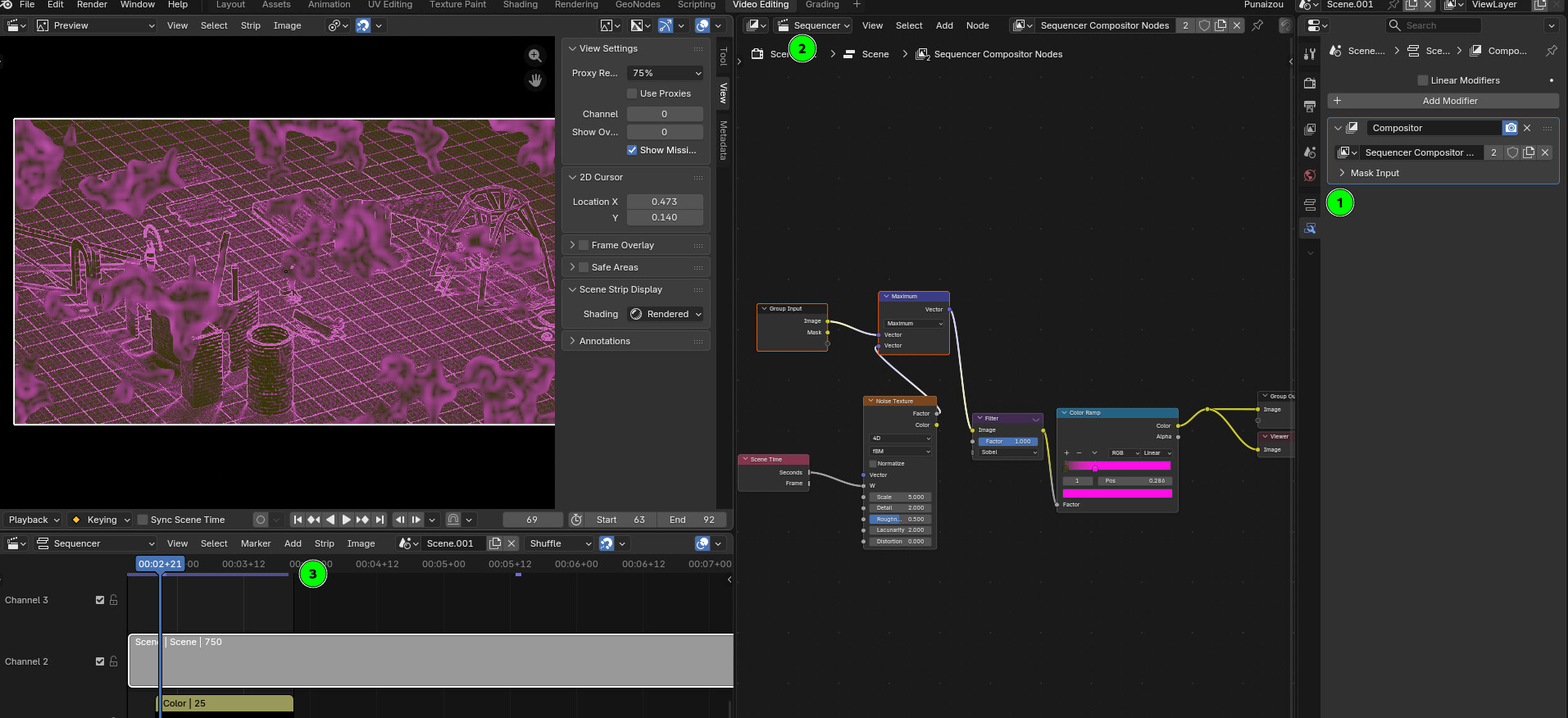
You can add node to any strip using modifiers in 1
Then set the compositor to sequencer in 2 and bam !
It’s very good, even if actually it’s still a bit slow to operate. From my super quick test I just did thank to you it seems difficult to really work with it… It’s probably the fact of sending data from sequencer to comp to sequencer that need some optimizations.
At least there is a cache system that you can show in 3 that renders everything on the background so you can hit play and see the cached result in realtime.
Anyway, so it’s possible but it might still have a few rough edges before it became really useful. But it’s super promising ! It’s great to see as this really look like the way to go !
In my screenshot I apply a filter on top of a scene done in EEVEE, it’s the final image composited without any intermediate render ! Very powerful ! Now I’m crossing fingers for some bits of optimizations at some point !!
2 Likes