It was created by me and JF Matheu to not only to fix all the little things that bothered me about UVs in Blender but also to see how far we could push active tools in Blender, which helped pave the way for RetopoFlow 4.
Also, because of this project, I was able to talk with Daniel Bystedt and the Blender modeling developers to help advocate for a way to improve / fix Blender’s UV sync select for everybody. That change will hopefully be coming in Blender 4.5.
Next on our list is to allow you to use other packers like UV Packmaster or unwrappers like Ministry of Flat from within the tool, as well as add the Cut UV tool to the UV Editor.
It seems like operations in the UV Editor are pretty well covered by other add-ons already, so we’ll mostly focus on the 3D View side of things, but if there are any UV Editor features you’d like to see, we’re happy to listen.
I recently found out about this addon, and honestly it looks pretty amazing Jonathan!
I can see your team has also been keeping this addon updated all the way to Blender 5.0, though I can’t find much videos about it at the moment - most of the updated info currently comes from the written documentation, afaik. I sent the team a message by email, asking about some key features I’d like to know more of before I decide to purchase. I’m aware there is a sale going on right now that includes this addon so, I’d appreciate any response that you could give before time runs out. Thank you!
I’ll answer here if that’s ok, just so that the result is searchable for other people wondering the same things.
How does UV straightening work?
Straightening UVs from the 3D View is something I really wanted in the tool. But it was really only ready towards the end of the v1 release, so it was not in any of the beta videos. It also does not work yet in Blender 5.0 (but will very soon).
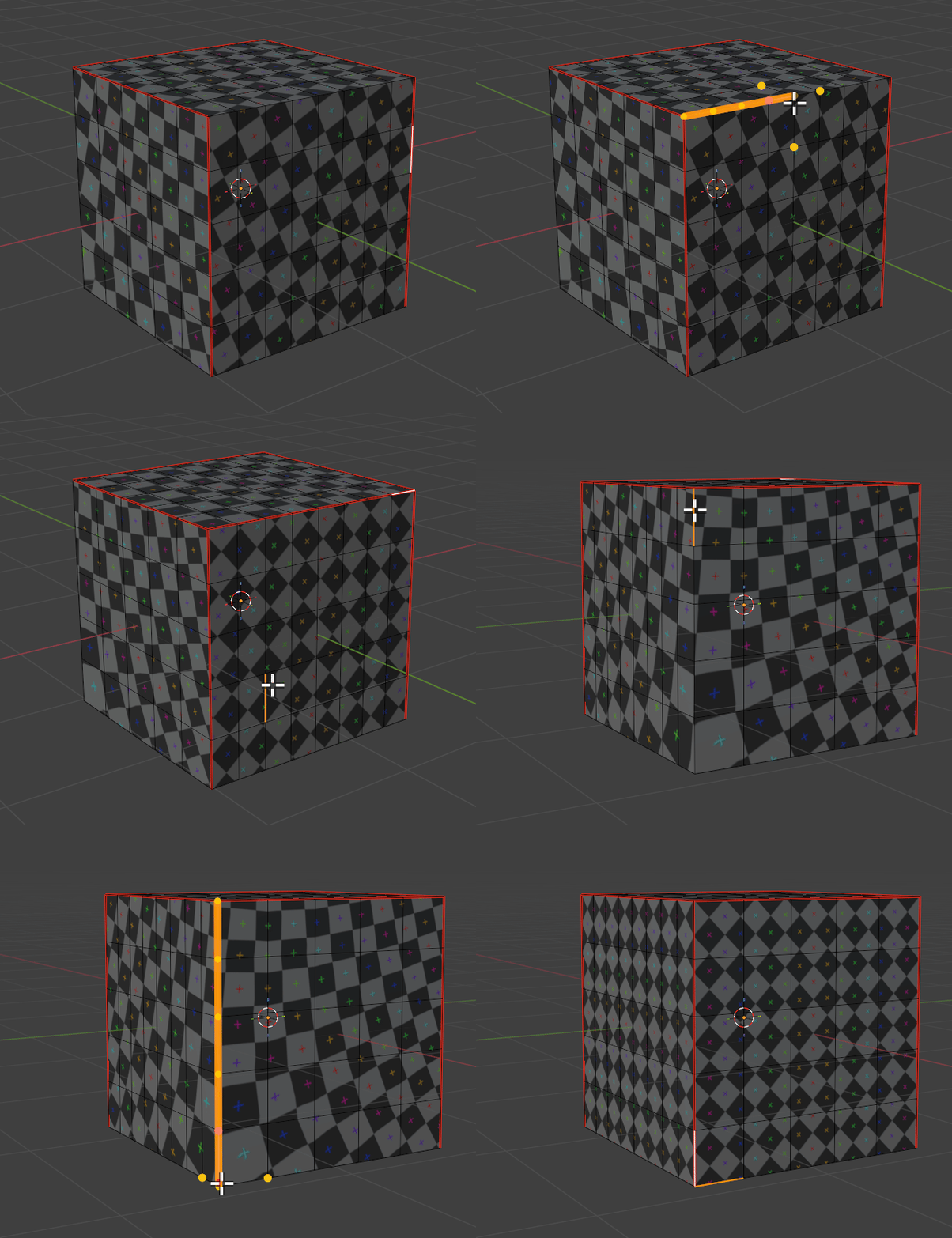
The idea is that it’s context aware and straightens whatever you select.
If you select a single edge, it will just rotate the island so that the edge is vertical or horizontal.
If you select multiple connected edges, they will be straightened and then the rest of island will be unwrapped.
If you select a quad or set of connected quads, they will be straightened into a grid and the rest of the island will be unwrapped around it
If you select a set of connected quads that forms a ring, they will be unwrapped to be a straight line.
If you select non-quad faces, it will do its best guess based on the bounding box of the selection
It should be pretty easy and intuitive, but if you run into trouble just shoot us a message so we can know where it needs improvement.
Besides straightening, everything else works in Blender 5.0 and the new UV API. I do need to overhaul the docs and make new videos. My main focus for a while was getting Retopoflow 4 out there, but now I should have more time to devote to UV Flow and the others. JF is also working on adding the Cut UV tool to the UV Editor, which should be amazing.
There is no official way It requires quite a bit of careful hacking and we are seriously abusing the system to force it to work in a way that was never intended. Even the very basics like knowing when the tool was switched to is not there by default. The API is both incomplete and undocumented. You can check the source code for this or Retopoflow for how we do it, but maybe I will ask Dr. Denning or JF to write up an article since they know quite a bit more about the nuances than I do. I work on the UI / UX design, planning, and the easy high level tasks while they were the ones who implemented the real core functionality and understand it at a deep level.
Hi Jonathan, thanks for the fast response ! Alright, I’ll see if I can give it a try in Blender 4.5 so I can use the straightening feature. Thank you again for the detailed answer.
Does your team have any general ETAs for when you think you could port over all features to 5.0? Or the Cut Tool to the UV Editor?
Great! I can’t give any hard promises but we should have straightening in 5.0 by the end of the month and the Cut UV tool in the UV Editor before Q2 of next year.
Alrighty, had some time to try this (version 1.0.2 with Blender 4.5). I’m sure I must not be doing things properly though…
The idea is that it’s context aware and straightens whatever you select.
If you select a single edge, it will just rotate the island so that the edge is vertical or horizontal.
It seems to straighten some edges without issue, but doesn’t work at all with others. Afaik the addon is simply using Blender’s native functions wrapped in a more intuitive UI, so perhaps it’s something wrong with Blender, but it’s strange to me that after executing the action with the problematic edge, another edge is getting selected.
Also, selecting edges in general seems to be a bit more problematic than it should be when using this Cut UV tool:
I understand my own keymaps could cause conflicts sometimes and it’s on me to fix that (see when the box select shows up in the vid above), but normal clicking (at the beginning of the vid, 5 clicks and only one edge was actually selected), double clicking, or even the custom hold-drag select method (seen at the end, had to really exaggerate things to finish the wanted loop selected), seem to be a bit cumbersome at the moment. Do let me know if I’m doing things incorrectly though ofc
Thanks for the videos! That incorrect result when straightening an edge definitely looks like a bug. The new UV API in Blender 5.0 is significantly improved, and we are rewriting everything to use it, which should resolve a lot of edge cases like this. But if you are able to share a file where one of the edges repeatedly gets the wrong result, we can make sure to fix it in the 4.5 version as well.
Which selection keymap do you use for Blender? UV Flow has a few alternate keymaps that you can choose between in the preferences, which can be better for Right Click Select or Industry Compatible users. Does one of the others work better for you?
One thing to note is that tagging seams and selection are totally different actions. For example, using B to box select, Ctrl RMB Drag to lasso select, or Shift LMB to toggle select will all perform selections without tagging the seam. The tool actions, on the other hand, will mark the seam and also select that edge.
But it looks like, in the video, tagging an edge that is just on the horizon of a face is not as reliable as it should be. I just tested this and notice the difference between where Blender’s cutoff is (the angle at which it’s considered occluded) and UV Flow’s. We’ll take a look at this and try to better match Blender’s behavior. In the meantime, viewing it slightly more dead on should make it work.
I also notice that you are not seeing any dots on ‘next target to draw to’ vertices when dragging to draw seams. Which version of the add-on are you using and on which OS? We recently fixed this for Mac but it looks like you are on Windows. Are you using OpenGL or Vulkan? It should be looking like this:
This is extremely helpful feedback, so please let me know if you run into anything else!
Blender version is 4.5.0, though I could update to the latest 4.5 version if it helps.
As for the keymaps, it’s not entirely clear to me what options I have to change the keymaps as you decribe. In the addon’s setting, the only apparent choice I have is to choose the mod key with which to clear seams, but nothing regarding selection keymaps:
Afaik I would need to go to Blender’s Keymap section and hunt down all the individual keymaps from the list above connected to the Cut UV tool, choosing an alternate method that wouldn’t clash with my keymaps (it’s similar to Industry Compatible). Skimming through the documentation I didn’t see an apparent section explaining how to customize the addon for RCS/IndustryCompatible either, but lmk ofc if I missed this.
Following up on the tagging issue, I found that it is because we test whether the cursor is over the mesh or not and do different things based on that. For example, clicking an edge will tag it as a seam while clicking in empty space will deselect all. The issue you found is that if you are near an edge but technically over empty space, it will trigger that other action instead. We will fix this by sampling some pixels around the cursor when over empty space rather than exactly at the cursor location, which should fully resolve the issue.
In the addon’s setting, the only apparent choice I have is to choose the mod key with which to clear seams, but nothing regarding selection keymaps
The whole keymap is based around that key, so changing it switches between the different keymap presets for all of the tool actions including selection. All of the hotkeys are listed below that option. If you have Blender hotkeys that conflict with any of those, then that’s when it would be good to pick a different one. But the above issue about box select is just due to your mouse being considered over empty space while click-dragging, and we will get that fixed very soon - so you might not need to adjust it at all. Just an option if you do find a conflict.
Yep, I’m on Windows with Vulkan, full details here
Thank you! I am testing with Blender 4.5.3 on Windows 11 and Vulkan and am seeing the dots when I draw as usual, but I will try a few other setups as well.
I recently bought it and context-aware uv straightening is an interesting feature which would’ve saved me back when I was less experienced with blender.
I’m glad that’s been helpful! It’s definitely my favorite feature lately.
There’s no set schedule for updates. It’s basically bugfix releases as needed and then working on new features whenever we have availability. If there are a lot of feature requests it gets bumped up in priority. The current WIP for the next version is bringing the Cut UV tool to the UV Editor for interactive splitting and stitching and the first iteration of a much better Smart UV Unwrap.

 It requires quite a bit of careful hacking and we are seriously abusing the system to force it to work in a way that was never intended. Even the very basics like knowing when the tool was switched to is not there by default. The API is both incomplete and undocumented. You can check the source code for this or Retopoflow for how we do it, but maybe I will ask Dr. Denning or JF to write up an article since they know quite a bit more about the nuances than I do. I work on the UI / UX design, planning, and the easy high level tasks while they were the ones who implemented the real core functionality and understand it at a deep level.
 ! Alright, I’ll see if I can give it a try in Blender 4.5 so I can use the straightening feature. Thank you again for the detailed answer.

 Yep, I’m on Windows with Vulkan, full details here:

