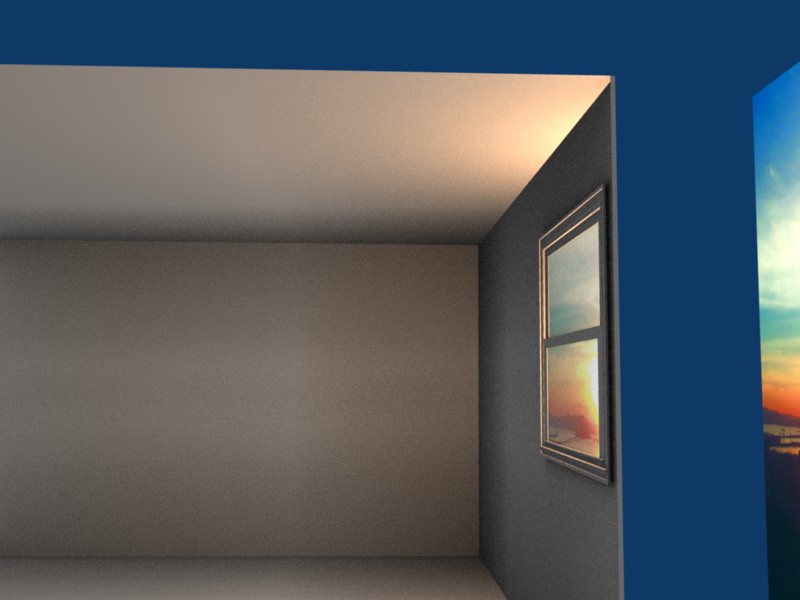
How can I get volumetric lighting to shine thru the window in the provided scene? I decided to model something, anything, and it turned into a corner of a room with a window. I got a decent looking background, hell its only for killing time right, and threw in an area light to get the effect shown below.
However, when I try to thrown in a spot to get a volumetric lighting effect, one of two things will happen. Either the spot is to big and you can see the light thru the walls, or the halo doesn’t take the shape of the window…instead it stays in the conical shape of the spot light. Is there another way to get the volumetric lighting without having it look retarded?
NOTE: Keep in mind this is not a WIP…though it may end up being one. It started as me just waisting time and ended up with me trying to get the effect I’ve described. So this render, while cheesy, is only to show what’s going on in the scene. The view for the window is just a uv mapped plane with a tiny emittance value. It’s a decent distance from the window. The area lamp is between it and the window pointing into the window, of course.
PS. to be honest I’d actually like an explaination as to why the view for the window can be seen at this angle. Is it because of the IOR value of the window? It’s pretty neat…but I’m not sure how its happening.
yafray might do a better job for this
give it a try and let us know
yafray doesn a reel photon calculations and should produced the effect your looking for i think
or let me knowi can give you a few wiki and yafray pages or sites
Salutations
Thanks to both of you. I will def throw this into yafray just out of curiosity. I haven’t used it but to do one test and that looked nice lol. I’m also in the process of checking out that tutorial. Thanks for the link!
Ok I read thru AnyMations tutorial, and while it seems I’d be able to do it easily that way…I’d also have to take out the actual window glass. I’m reluctant to do that because if you check the above screenshot, the background image for the window’s “view” is visible even at that angle. While I’m not entirely sure why its visible at this angle (I think it has to do with the IOR), I know that if I removed the window entirely to use AnyMations methods that the background view wouldn’t be visible at this angle.
While this was only a time killer speed model, it is starting to provide some excellent learning. Before I even think about removing those windows I want to know how I created the effect of the background being visible at this angle. If I’m not mistaken…doesn’t yafray handle caustics effectively (and I assume because it handles caustics that the volumetric lighting wouldn’t need to be “faked” so much)? I know there is a renderer that does…I believe it to be yafray.
Each link in the previous post works fine on this pc. I’ll let you know if I have issues when I get home. But at least you know that its an issue on your pc.
edit-this machine is running ie6 so take that info into account when troubleshooting your issue
i have you tried to save procedurals pages texture then go into the folder and click on the file to see if it will load up the file or try to access the adress and give a message that the adress does not exit
that’s what is happening with my saved page they are there but are not loaded up in internet explorer - and it’s only with these pages all the other pages are working fine?
so strange problem with these pages!
no I just clicked on the link you gave lol. Generally I don’t bother with saving web pages to any specific folder besides the folder automatically made by IE for favorites