I can’t seem to find the menu/tool bar at the top. all i have is yellow lines. this means I can’t save it either. help??
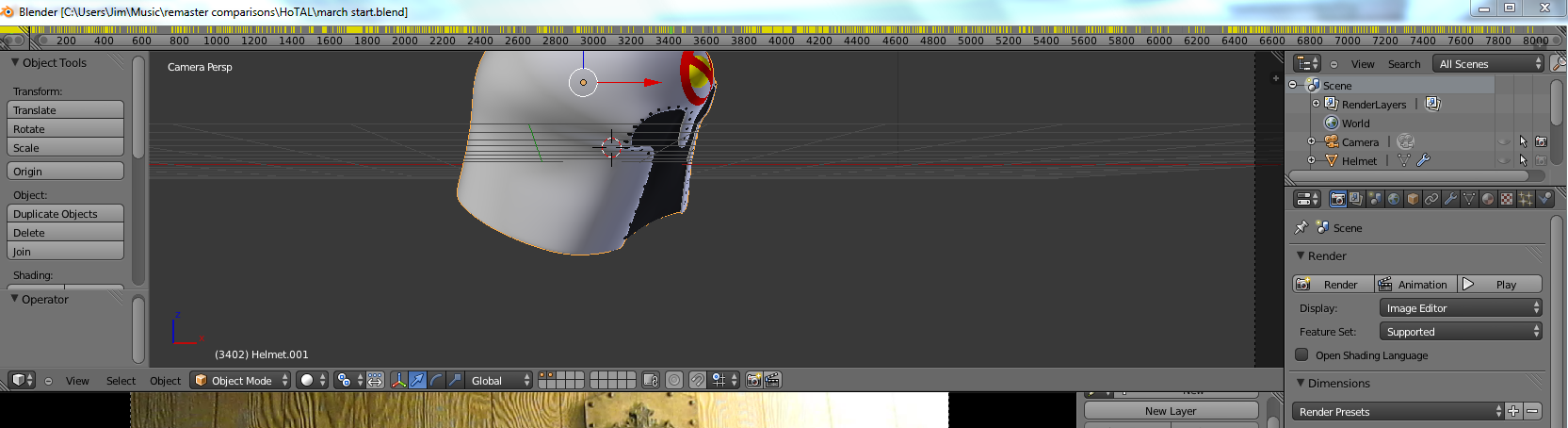
All the yellow likes are keyframes in your animation. Instead of the info bar, you seem to have accidentally replaced it with a timeline window.
To fix this, place your cursor on the line between the timeline and the main 3D view windows, click and drag downwards. This should make our timeline window a little bigger so we can see what to do next. Grip the lower right corner of the timeline window, and drag it to the left until it darkens that other area in that area, let go. It should replace that extra area in the left corner.
Then. look at the bottom-right hand side of the timeline window. You should see a tiny + icon, click it and the main toolbar for the timeline window should appear (animation controls, stop, play, etc). Then, click on the Clock-like icon on the far left hand side of the toolbar, it should bring up a list of window types, choose Info. Scale the info window back to it’s regular size.

And also, just press CTRL-S to save. You don’t only need the info bar… Just a thought.
that did it thanks!