Where is Mute control rig button in diffeomorphic 5.2.0.3018

Hi! I’m using Diffeomorphic DAZ Importer + Rigify.

I have:

  • Original DAZ rig: S
  • Rigify control rig: S_RIGIFY.001
  • “Keep DAZ Rig” enabled

I animate with Rigify and want to export the animation back to DAZ Studio.

The Diffeomorphic documentation mentions “Mute Control Rig”, but I cannot find this command anywhere in the current UI or with Blender F3.

What is the correct current way to bake the Rigify animation onto the original DAZ rig before exporting the animation to DAZ?

Thanks!

Hey, have you tried using Blender’s built in Bake Action instead? I think you can just select the original DAZ rig, go into Pose Mode and search for Bake Action with F3. Make sure Visual Keying is enabled, then disable the constraints after baking and see if the animation still works.

Not sure if it’ll work perfectly with Rigify but might be worth a shot.

Yeah, I tried using Bake Action that way, but unfortunately, the animation doesn’t transfer correctly. I’m not sure if it’s my fault or if I missed a step, but I really want to do it the proper way - exactly how the Diffeomorphic developers intended it to work.
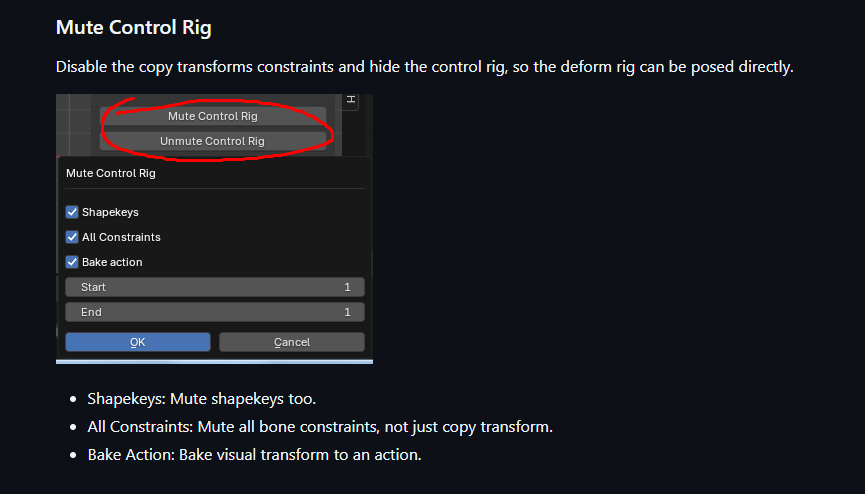
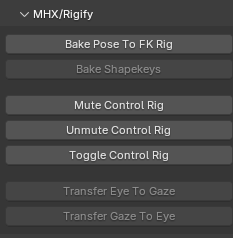
Nevermind, I figured it out!


You just need to go down to Add-ons → DAZ Importer and turn on the ‘Pose Tools’ feature.