Not working with 2.82. After hitting bake, it deletes ALL current keyframes from the entire project. Scary!
Yikes! I’ve been using it with 2.82 extensively. Is it possible you have the additive option enabled, which will have pushed your existing animation into an NLA strip?
Just re-read, is it even affecting keyframes on unselected objects?
Thankyou for investigating this! I’ been trying to skip any viewlayer that wasn’t the active one but wasn’t having any luck. I’ll look more into your method!
1 Like
Where’s the additive option? I tried to find it and I can’t seem to locate it anywhere.
It deletes all keyframes on all objects in the entire project. Completely wipes everything clean and only the new bake keyframes appear.
i guess i should clarify, are you using blender’s normal “bake action” operator, or specifically calling it from the bone panel as shown below:
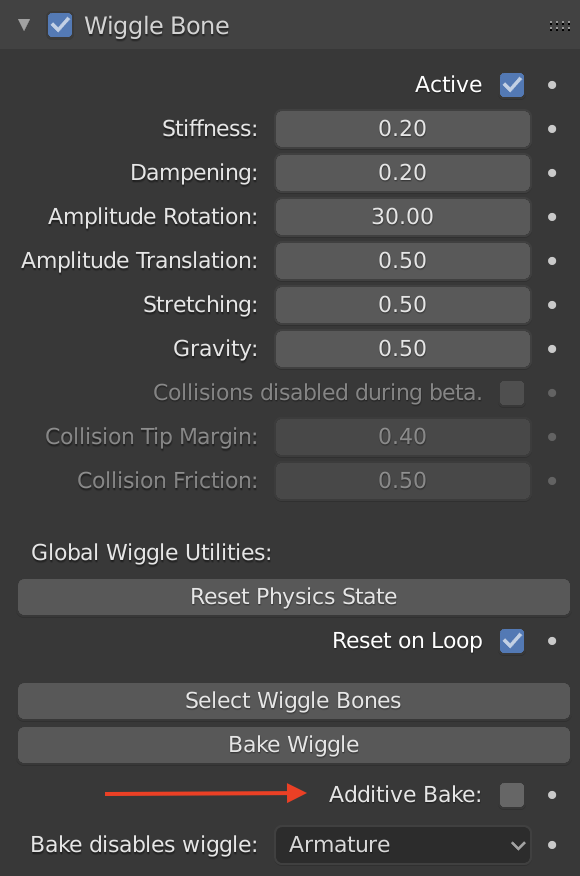
if you’re calling it from the wiggle bone panel, the only thing it should be doing in addition to calling the regular bake operator are some convenience automations on the active object. if its happening with the regular bake action, is there any possibility you have hit select-all prior to running the bake or anything?
if you are able to duplicate the issue in a test file, you can post it and i’ll see what i can do to track down the issue!
I do not have such options. I am using the bake button on the addon.
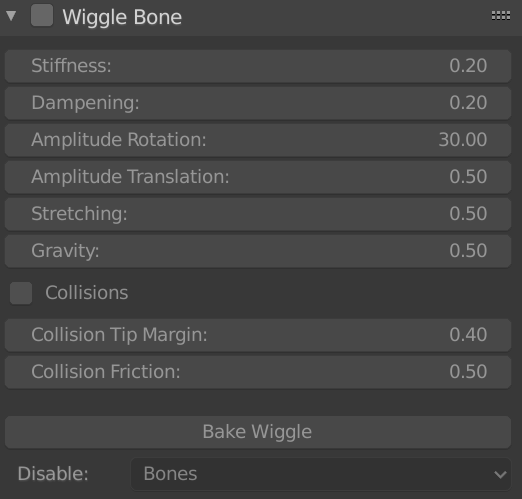
This is what I have. Using version 1.4.3 which I thought was the latest.
I did try with the same file with 2.81 and it’s still doing it. Must be the project or some other option inside it, because it was working fine in 2.81 just yesterday with a different project. I did end up using the LNA and pushed the entire animation there as an action, then tried baking the wiggle again and that worked. Not a real fix but it worked. I must be doing something wrong or there’s something wrong with this project. Will let you know if I have any issues as I test more with other/new projects in 2.82.
hey again! i just made some progress on the multi view layer issue. i tried @Daimler 's approach of comparing the depsgraph view layer to the context view layer, and initially it wasn’t working - however it turns out this is is because of the frame_change_pre handler, doesn’t have a depsgraph option for this logic. if i disable the frame_change_pre handler, it seems to work!
the frame_change_pre handler is what allows un-keyed bones to still jiggle, but i have a feeling i can clean up the logic that is causing problems on bake, so fingers crossed i should have a solution soon!
3 Likes
try this one instead:
wiggle_bones1_5_b14.py (47.7 KB)
If you’ve got multiple view layers in your project, thats also a known issue for baking that i’ve been trying to sort out - although the messing up all scene objects sounds like something new
4 Likes
This add-on is amazing! Would it be possible to have this on GitHub so we can keep track of updates?
Congrats on the work btw. 
6 Likes
Thank you! Nice work!
Please collision fix 
I use your addon and it’s really great, easy to use and amazing results
Thanks a lot !
ill try to get one of my developer buddies at work to hopefully help get me set up on github!
in the meantime, i updated the first post with a proposed fix for the multiple view layer baking issues. things are definitely getting pretty quirky with all these work arounds, but do let me know if it at least addresses the worst issues. @DJTHED i tried it with your file from way back when, and it seems to bake properly now!
8 Likes
wow… this is amazing… you are genius!
Thank you so much! I think one issue in particular if fixed would improve it a lot:
When you start the animation at say: frame 30, the Wiggle Bones go crazy until they are “harden”, making the whole animation inaccurate. It only works well when starting from frame 0.
Making it only calculate from the start (independent if it’s from 0 or 30) would be amazing!
2 Likes
currently there are several ways to achieve what you’re looking for. the wiggle physics by default reset on the start frame of the timeline (with an option to disable if you want to produce clean loops), so you can change the start frame if you’re working on sections in the middle of your animation and want the wiggle bones to start from there without freaking out.
if you’re jumping more randomly around the timeline and want the ability to reset the wiggle from wherever you are, i included a “reset physics state” operator in the jiggle panel. i just checked and you can also add this to quick favourites so you can trigger it easier!

i’m guessing the ideal would be for this to happen ‘auto-magically’ - and i might be able to figure something out  but in the meantime those other options are there to help with your work flow!
1 Like
ok, i’m glad you made me try this, because its actually way more enjoyable to use when you can freely jump around the timeline without thinking about the physics going haywire!
i had a random crash at one point so test this with caution in case i’ve done something dodgy, although it held up pretty well when i was jumping around a production file.
wiggle_bones1_5_b18.py (49.0 KB)
4 Likes
This is a very usefull add-on!
I was thinking if there was a possibility to have an option to choose which axis have the rotation wiggle/Jiggle.
In this example I had to duplicate the bones and use a copy rotation (without the X axis) and a translation constraint because I wanted the effect to be there when the belly goes side to side but not when it goes front to back (only the translation and no rotation).
3 Likes
makes sense!
offhand i would think it could be possible. trying to envision how fine grained the settings should be - is it a simple axis lock toggle, or should there be an axis influence slider so for example a bone can jiggle half as much along the x axis as the z axis, etc.
1 Like
also here’s a couple minor fixes to the last version that made it easier to jump around the timeline:
-the jumping behaviour accidentally over-rode the “reset-on-loop” option, so it was breaking making looping animations. i’ve tried to address it, but its starting to become complicated logic to know when frames are dropping in playback, looping back to the start, or users clicking around a timeline - people can let me know how this appears to be working in practice. (it should always be fine for bakes and exports, that enforce going sequentially frame-by-frame)
-i’d been getting an intermittent crash on some files when jumping on the timeline; i tweaked a potential infinite loop that could have been causing it. but please let me know if you come across any weird crashes still!
wiggle_bones1_5_b20.py (49.3 KB)
6 Likes
Well you might not have to do it actually. I don’t know why but I forgot about the limit rotation constraints and when I tested it before I just locked the axis in the transform channel thingie which of course did nothing since it’s there just so that animators can’t move stuff…