ive been generating some crashes in the version I use, will try this out and report back as to how their made.
downloaded earlier and the odd crashes associated with the timeline seme to have rsoped
Please always state which version you´re using, if not the latest one.
Hi i really like the addon and it works pretty good.
The only problem i have is that all the other armature keyframe channels dissapear after i bake the physics.
Maybe im doing something wrong but idk It does it with additive bake on and off.
I’m using blender 2.82a and the addon version from 7 days ago.
I made a small video to show what im experiencing.
https://www.youtube.com/watch?v=2BE1D4XT_AM
this was something i discovered recently as well. additive nla baking seems to be broken as of 2.82. even using the regular bake command outside this addon, it now will always force the baked keyframes to be replacement ones. they probably assumed the old behaviour might confuse people if they baked into an additive strip, but it was very useful for this particular application 
Additive baking actually (kind of) fixed the problem, without it on it straight up replaces my keyframes but with additive bake on it just pushes the existing keyframes down in the nla.
So i can still edit them but its just a little hidden.
Maybe i’m stating the obvious tho im kind of new to the whole animation blender thing.
I am Having the Same Issue Could you tell me if you find a solution?
I would like to bake an animation I’v been working on but the “Wiggle Bone” doesn’t seem to be part of it when I Render it.
also nice work this is a really great addon.
never-mind i am an idiot i found a solution.
Using Bleder 2.82 I have the same issue (other armature keyframe channels dissapear after I bake the physics), but I cannot find these down in NLA… am I missing something?
are you using the additive toggle? if for whatever reason that’s not working, you can always push your current animation into an nla strip manually before baking. also, your previous keyframes should likely still exist as an action that you can retrieve by searching in the actions list after baking.
apologies i haven’t had much time to work on this tool as i’m trying to finish off a project for work, but i also wanted to note an issue i have been running into in production: in some cases every jiggle variable (even non user exposed ones) seem to be getting keyframes assigned to them and it breaks physics on the bone. if you’re encountering issues like that, you can verify in your dope sheet if a given bone has a bunch of unexpected channels for variables, and remove them to get the jiggle bone working again
i think one scenario where this seems to happen is when copying and pasting poses with auto keying turn on. even if the keying set is limited to loc/rot/scale it still seems to set keys on these jiggle variables.
2 Likes
Ok, I found keyframes in another action in dope sheet in action editor.
But you gotta be carefull, if you have 2 armatures in pose mode, and switch selection between them, when you bake something in one, it affects other armature even there are no wiggle bone selected…
Hi @shteeve - and thanks for this very cool addon!
I’ve been trying (unsuccessfuly) to get this to work as one would expect. I’m using a character rigged with AutoRig Pro (for game production, so we export it to UE4), and whenever I setup wiggle bones, they look amazing in the viewport. I can configure them, get them just right. Beautiful.
But:
I’ve tried getting the wiggle out in FBX, in a bunch of different ways, but it just won’t reproduce what I see in the viewport when the wiggle scene/armature/bones are enabled.
- If I just export the FBX without baking anything, of course the animation doesn’t get exported. That one was obvious.
- If I bake the animation in to the current action (non-additive, destructive), the “intensity” gets reduced almost 95% from the visual result I was seeing when everything was enabled. I can see some jiggling, but it’s very minimal.
- If I bake additive to NLA, just for testing (I’d still need to create a single action for UE4 export), I can see that the additive wiggle layer has the same exact minimal action as then that is baked on top. No changes at all.
So it seems like when I bake, all of the fun jiggles get reduced to the most minimal effect possible.
Do you have any ideas as to what it’s going on?
Thanks!
In case this is related to an existing bug that I THOUGHT was squashed but maybe I am misremembering:
Do you have more than one View Layer for the scene in question? It was the case that the beautiful wiggles were being subdivided by the number of View Layers or something like that.
Also - make totally sure you have the most up to date version of Wiggle Bones installed!
@giacometti777 Hi! Thanks for the reply!
I’m not sure if I’m having more than one ViewLayer – the concept of viewlayers themselves is kinda weird for me, I’ve only switched to Blender a few months ago (from Maya), so I don’t know all of the features yet.
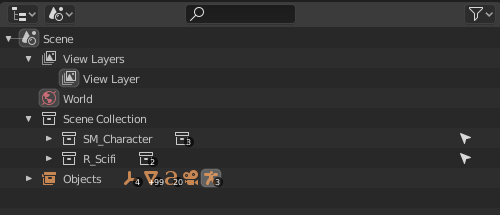
That’s my scene setup. From what I gather, it’s only the one view layer.
Any ideas?
1 Like
looks like you’ve got just one view layer, plus that issue was hopefully solved in the latest version. i know jiggle intensity being different on bake can sometimes be the result of previewing the viewport with drop frames. otherwise, in case there are any other overlooked issues, i don’t know if you have a minimal file you can share that demonstrates the issue. is it even happening in simple test rigs for you or just the auto-rig pro rig?
Thanks for the reply, @shteeve -
I’ve only tested with AutoRig pro rigs, since it’s what I’m given for work (I’m an animator myself, but I can barely rig or skin at this point, much less in Blender).
So I’ve taken a look at the viewport preview sync settings, and indeed I’m finding something. In order for me to work properly, I’m doing AV Sync, so I can keep up with my 60FPS animations (dropping frames of course, but that’s not a big issue for me). It seems that the physics calcuate based on that dropped frame situation, so what I see is much more exaggerated than what gets baked – because that simulation is done frame by frame, and as such, it’s much more controlled.
If I put the viewport in no sync mode, I seem to be having more consistent results between the viewport and the bake. Is this proper functionality?
I would love to send you my files, but unfortunately I’m under NDA so I couldn’t do that
Hello! Great job with the addon!
Is there any documentation anywhere to help first timers like myself? 
unfortunately that is expected behaviour. however, i did think of a “hack” which might at least help mitigate the problem. in the scene properties, i have an option called “frame rate scaling”, which when checked gives you an option to enter a “base frame rate” which can be set to more closely align to your viewport playback frame rate. its not perfect because its not actually changing the sampling rate, but instead scaling the influence of the jiggle parameters internally to try to compensate.
i would try the following:
- get the jiggle physics the way you like using AV Sync in the timeline with frame rate scaling DISABLED
- observe your playback frame rate in the viewport
- ENABLE frame rate scaling, and enter the playback frame rate you are getting in the viewport as the “base frame rate”
- bake the jiggle with the frame rate scaling enabled, and see if it more closely resembles your viewport results
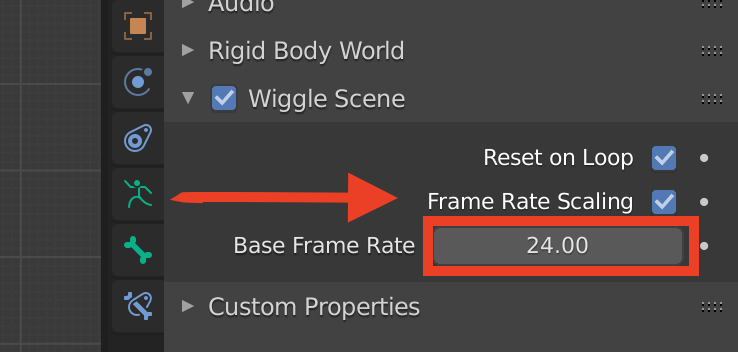
edit: one other little note, that you may already be aware of - the viewport frame rate can also vary greatly with a number of settings; solid vs material preview, isolating visiblity to just the objects/characters your’e working on, and a particularly surprising one for me at least - whether you have any dope sheet / graph editor / nla windows open and what they are showing (the more keyframes visible, the slower the viewport will run on my system)
3 Likes
Ooooh, nice trick. I’ll definitely give it a go. I did use that option, but I put 60 FPS, thinking that I was supposed to make it match my scene’s framerate. So I’m going to try to get the desired result by using AV-sync, look at the actual framerate I’m getting, input that and see what happens. I’ll let you know when I try it.
Thanks!
1 Like
Thank you shteeve, this addon is super helpful