You are totally right, but that will never change for blender sadly.
Devs already said that there will not change blender to make plugins possible.
Yeah, that’s fine to be honest. It’s not like I am pissed about it and want to change it. It’s just an answer to the question name of this thread is asking 
Actually what it’s describing is that the NLA editor is intended to fill this role, and currently there’s one small feature that should be added to fill out that role.
That feature being default values for animated data.
This is something that comes up when you start mixing tracks together that don’t each last the entire duration of the animation, AND if those tracks don’t have hold or hold forward set (something which would actually occur infrequently if you merely used the NLA editor as a layering tool). When a track ends and hold is off, no more animation data is present for a value that was animated, so it sits on whatever value it previously had, but this can lead to instances where the value of that element, before and after the track, is actually dependant on the last frame viewed, or any other factor, rather than actually having a defined value to stay at as directed by any animation data. The suggestion presented was to have default values set in some way so this uncertainty and inconsistent behaviour does not occur.
You can easily get past by adding a track on the bottom of the list, with hold forward on, and one key for any value you want to have a default.
I can only tell you to learn to use the NLA editor and leverage it. The workflow is different, slightly, but no worse. If you really know how to use the NLA editor, it’s trivial to use it for animation layers.
A few tips:
- Use the ‘push down’ or ‘stash’ buttons in the action editor to turn the current object’s current action into a strip.
- Select a strip and press ‘tab’ to edit it.
- Either stretch the strips to the entire timeline by modifying the “end frame” under “Action Clip” in the N menu, or:
- Hit the ‘sync’ button whenever you add keyframes in a strip you’re editing that are out of bounds of the strip. (or keep the checkmark there ticked and it’ll do it for you, pop in and out of edit for it to update)
- Select a track (keep mouse in the left panel) and press pgUp or pgDwn to reorder ‘layers’ (this is easier than trying to drag strips through eachother which is admittedly incredibly frustrating)
I actually didn’t know about the [Tab] to edit a strip. That’s quite useful, so thanks for that tidbit.
But that aside, I still have to agree with everybody else in saying this is a work around that feels clunky compared to the workflow of just simply clicking one button to add an animation layer.
To have one “animation layer”, the user has to create an NLA Editor window, turn the current action into a strip, create an action that spans the desired range, make that into another strip and line it up, set the Blending to “Add”, then keep entering edit mode of strips to make modifications. When changing original animation past the initial range, make sure to keep changing the strips spans to match desired range.
Of course, any additional layers require repetition of above steps.
I can’t tell another animator that Blender has animation layers, but just something we can be “hacky” with to create some semblance of it, thus the reason for constant forum discussions, add-on attempts, rightclickselect proposals, Aligorith’s addressing of the issue, etc. over the years.
Maybe not by outright litigation but natural discouragement that comes from overextending bounds and trying to make too many people happy all at once. Although who knows, I’ve heard rumors about the aggressive tactics of some of these companies which is why I think it’s somewhat possible they may try some funny business to stay in the game. There was already someone here in this thread that mentioned that Ton’s intentions were not to try and compete with the big names or try to push themselves into big budget hollywood. They are focusing more on the indie niche and if some big names do switch over that better but it’s not their primary demographic. Nothing wrong with that except that there are some drawbacks that I mentioned previously.
If you intend to make animation layers this should be open and thus moot. It’s terrible to suggest that because you have to open up a toolset to access it’s tools, the tools are therefore insufficient.
There’s no graph editor in the default animation workspace, do you consider the graph editor poor because it’s not in the workspace? No. You might consider the animation workspace poor, but that’s a different discussion.
If you’re working with “animation layers”, we assume you’re interface is setup for that, so you’ll already be in the action editor (there’s an argument to be made for the buttons to be available in the dopesheet, but that’s a different discussion), so, turning the current action into a strip is one button.
Also, you only have to set the action blending to add (there’s also an argument to be made on what it’s default should be, but that is also a different discussion), you can keep animating as normal without adding additional strips. Your current action acts as the top strip.
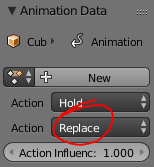 This is in the NLA properties panel, at the top.
Lining up? What lining up? It’s all already lined up because you wouldn’t have had to move strips around, if you’re not using the NLA editor for anything but layers.
Tick the checkbox that does all the resizing for you then.
It feels more like people want it to work and look just like it does in maya (or insert other software here), it doesn’t, therefore it’s worse. But they fail to learn the tool as well as they might have learned the one they’re comparing it to. If you’re going to compare two tools, you need to know both of them work inside and out.
1 Like
Actually no i don’t have to. If i am a beginner and i can watch a 5 minutes tutorial about Maya’s animation layers and understand the concept perfectly while spending considerably more time trying to understand Blenders way, and failing to do so, i can extract some valuable information from all this.
You can call me a slow learner, and i can call Blenders way clunky and non-intuitive.
It won’t stop me from eventually learning and using it, but i already know that i would prefer a Maya/XSI kind of renderlayer system simply because i would spent less time learning it.
Have you ever used a video editing software before?
If you did, then you know already most of how the NLA editor works.
I am sick and tired of people coming in and proclaiming that blender is ‘unintuitive’ and ‘behind’ when in reality they just refused to actually spend the time learning how it works.
Then they proclaim Blender should change to suit all the other software
Then they claim the people who actually spent the time to learn how blender works are the ones trying to be overly controlling of it’s development.
You need to come into blender with a different mindset - you claim it’s unintuitive, I say you’re stuck hanging onto your preconceptions from other software. It works differently to other software, get over it, that’s not going to change, it’s core systems are designed differently.
If you take the time to learn blender a huge number of things it does are incredibly consistent throughout, and as such unbeleivably easy to figure out.
It took a long time for myself before I ever needed to use the NLA editor, but when I finally did, it was unbeleivably easy to figure it out, because I understand how blender’s ui and systems work, I knew what things meant, I knew how to properly look them up, I knew what I was looking for, and I knew where to find it.
0o00o0oo says they never knew about the ‘tab’ functionality. That tells me that they never, not once, opened the edit menu in the NLA editor, and just looked at the functions that were available. How can you expect something to be easy to use, if you never try the simplest things to learn them?
You don’t want to spend the time learning blender? fine, go use your maya animation layers.
But don’t sit here and tell me that blender doesn’t have functionality it blatantly does, and then tell me it’s hard to use and unintuitive when its no harder to use than any other tool inside the package, and works incredibly similarly to other software most people in the creative field would have been exposed to before.
1 Like
It will not, Blender is great, but it cant handle the large datasets used in the film industry, try loading a scene with billions of polygons, hundreds of 16K maps, and render it in 8K, Blender would probably crash before it could even load the scene!
Also, Blender uses the wrong version of Python, the industry runs on the old version, Blender on the new one, medium/large studios wont port all their tools to the newest Python just so they can use Blender IMHO!
This said, Blender is a great 3D application, certainly the best bang for the buck, but it wont put Autodesk out of business just yet, one that might hurt Autodesk is Houdini though, the latest release is pretty amazing!
I’m not sure if you had the opportunity to watch “Next Gen” on Netflix? Made over 95% in blender, this includes rendering. As such it can work in the film industry.
But I do agree that on super insane scenes it is not perfect yet. Though I’ll have to make a scene with few billion polygons and report back to you.
Now I’m defintely NOT in the camp of saying it is “perfect” but hearing all the complaints made by Maya and Max users of how often they crash. I’m happy that blender is an open framework, where a studio (such us the one that made next gen) got their own resources and tweaked/fixed part of blender that caused them trouble and shared most of the code back with the core blender team to improve it even more.
So Perfect ---- HELL NO
Can it be used in film Industry ----- HELL YES
1 Like
If I had to choose between the opinions of the developer on a certain feature and the opinion of a user, I would lean towards believing what the developer has to say (because they know how the code works and because they actually were involved in the design of the feature).
Assuming you’re trying to say my opinion and what was stated in the quote of the developer are not the same - they are.
I made it easier to read what the quote said, which was that there are some internal variables needed to track things, and a defaults system for animated data “currently missing to support [Animation Layering]” in the NLA editor
Which is one good reason the BF having taken the important step of improving the patch review process and helping to get more volunteers on board. You can look at Godot as an example of just what a good system brings, hundreds of patches from several dozen different developers or more. If Blender had Godot’s level of patch submission, then a lot of areas could get some needed attention on a regular basis.
And I do agree that the initial version of 2.8 will likely not bring Blender into the ranks of the most powerful 3D apps, especially since important projects such as everything nodes, the fracture modifier, and the interactive engine/game engine hub won’t be in yet, but the mailing list data shows a record breaking development rate in the last half-year and there is promise if they can manage to continue that.
the fracture modifier its not a big deal when you can have as a separate build,
everything node from the other side will be another game changing feature for blender
The issue might be that you called the problem “one small feature”, whereas it doesn’t appear so. Aligorith has had it on his roadmap for over two years now, but apparently hasn’t been able to tackle it because it isn’t a simple task. Not only that, the developer(s) probably have to work out streamlining the clunky workflow and various other problems connected with it to an extent which I’m likely not even aware of.
Case in point, William points out that animation layering with NLA is a lacking feature the developers themselves know about but there just haven’t been enough free time (which puts this question to rest).
One thing I found interesting is William points out animation layers and the Child Of Constraint as two examples where Blender is lacking, and those are the ones that coincidentally came to mind when I was thinking of where Blender is lacking in my post above. For all other animators for whom these are some of the key issues with Blender, this is great news.
Actually, I’m not ignoring it. I find the clunky import/export functionality of Blender an issue and have for years. See, despite you not working this way, nigh on every studio I have ever encountered uses the most powerful tools they can afford for any given element of the pipeline and imports/exports data into/from those apps. Blender is notoriously behind the eight-ball on this front too.
Let’s take the concept of texture mapping a high definition sculpt. In ZBrush, it is a matter of rotating, panning, and zooming into a view you wish to paint some colours onto and pressing a button to use ZAppLink or Photoshop Interop. Your designated editor opens the PSD generated, you paint in Layer 1 to make changes using the tools vastly superior 2D painting tools, you save, return to ZBrush and click “Pickup Now”. Done. Try that with Blender.
That’s just an example I played with Monday night. There are more, far more, examples of clunkiness in the import/export process. So no, I’m not ignoring it, I didn’t mention it because you’re of the opinion it’s not needed. It is needed, it kind of sucks balls in Blender, and a lot of people would consider that easy import/export options are part of the whole “how powerful is this software” question.
I don’t argue that Blender is versatile. It is. But in terms of, as per the OP, “brute force power” - it is lacking compared to others. A swiss army knife might be able to open bottles of wine in addition to having a small saw I can fold out, but I’m still going to reach for that dedicated hand saw when the branch is thicker than my wrist. It’s just a more powerful tool for the job.
Heh, thanks for the welcome back, xrg. Had a few life things making time on the forums not worth some of the stress it brought (you know what some of the usual suspects were like). Getting a little space to breathe and so dipping my toes back in the “commenting about Blender use”, even though I never stopped the practice of actually using it. Had planned on waiting until the new keymap landed so I could celebrate Ton finally getting out a Blender which had left-click select working properly throughout… but still waiting. 
Good to see you’re still around. Always enjoyed your perspective. A fan without being a fanatic. It helps balance out the cynics like me.
1 Like
Have you ever developed something, written code?
Features that have a small impact (which this does) to the user, are very often annoyingly difficult and time consuming to implement.
The reason it hasn’t been tackled? It’s a small issue from a user perspective and it would take a lot of work to design a system for defaults from the dev perspective.
He says it’s “lacking”, and gives no reasons as to why, presumably I can take the previous reason - but as I have stated, that reason is a minor issue from a user perspective. And it doesn’t affect an animation-layer type workflow AT ALL, it comes into play under a very specific set of circumstances that occurs rarely, and only when you’re using the NLA editor more like a VSE than a layering system.
No-one gets a free pass on arguments just because they are a developer. Also - he merely states that it “should be improved”, yea no shit the developers are looking to improve on the software they’re developing. Just because something can be improved, doesn’t mean it doesn’t work well already, it merely means it could work better.
If you’re going to wait to use a tool in blender until the devs say it can’t be improved, then give up right now.
Blender does have a workflow for this. The uv/image editor has an edit externally and reload file function. The main difference, from the sounds of it, is that blender expects you to know and sort out where you’re saving the textures and their names, whereas zbrush generates it all for you. This, like I have been talking about, is a difference in workflow, not a “power” difference.
Does zbrush save the uv layout on a layer? That would be a nice feature to have. That’d be “power”.
This is still comparing apples to oranges, the whole comparison premise is stuffed.
Sorry, but if the devs. decided to take the road of not implementing something because Blender already has “some” sort of way of doing something similar (but in a notably more difficult and clunkier way), then it wouldn’t have even half the features it does now.
The arguments I see here remind me of the posts from the old guard as to why we shouldn’t have Ngons, GI, raytracing, ect… More or less being in opposition to the majority of features that came because you could already fake it or create without it (even though the result would take many times longer or be an order of magnitude more difficult).
The BF and this community has fortunately been going beyond the days when people would choose not to acknowledge any of Blender’s weaknesses in favor of hiding behind the “a bad artist blames his tools” chestnut. If you could now produce a result in 100 clicks and ten minutes, but some features were proposed to reduce it to 10 clicks and one minute, would you accept? I would accept because the creation of better and more powerful workflow possibilities allow one to waste less time on setup and more time on just creating content.
1 Like
Regarding the ‘edit externally’? or the animation layers?
edit externally could certainly be improved, I was merely stating it works differently in that blender doesn’t by design throw texture files into folders unless you explicitly tell it to, if you want that functionality, it’s a workflow difference, its faster in some cases, slower in others (cleaning up those files). having a choice would be optimal - but there’s limited dev time and I doubt that is at the top of the list, considering we can do the main thing we need to (edit textures externally), and it’s not actually that slow to just save the file yourself.
Animation layers, I’ll say again, all the functionality is in the NLA editor, and anyone who knows their way around the NLA editor isn’t going to be doing anything slowly, or in 100 clicks. Could it be better? probably, but so can just about anything else. Is it slow and clunky? no, it isn’t. What it is, is different - in a large part because it does more than layering.
Ofcourse blender has weaknesses, but I’m trying to point out to people that it does have functionality they think it doesn’t. This doesn’t mean that functionality couldn’t use some improvement, or is OMG SO AMAZING that it shouldn’t be touched.
If something can be improved to be faster or easier to work with the devs should do that, if the devs time is available, and not busy working on more important things. But people are mistaking ‘slow clunky workflow’ for ‘works different than software you’re used to’ without learning how blender’s system works. The devs shouldn’t build redundant tools.
I would accept, assuming the proposal was to make the existing tool better, rather than replace it with something that does half as much while leaving the existing tool in state where it’s now full of half redundant functionality and got neglected - That would just adding bloat and make things harder to maintain.
You’re confusing me with someone else, I don’t know who.