Omg that sounds amazing and ambitious! I can’t wait to see what comes of your work.
I was worried too about derailing the thread so I will leave it there. You should def start a thread about XFEM if its appropriate for your stage of work, though!
On topic: X-Pose Picker seems outstanding for top level animation work!
I’d like to announce new version is ready to update.
With X-Pose Picker 1.7.3 comes new “Unselect all on Tab change” feature which may speedup workflow depending on used style.
What this new feature basically does - it will clean all selection whenever active tab is changed so with this enabled if you switch from body to head/face controls you may start animating straight away and if you go back to body, all face controlers selection will be cleaned. The same rule applies when switching tabs between characters/rigs.
New option is available in the Picker menu.
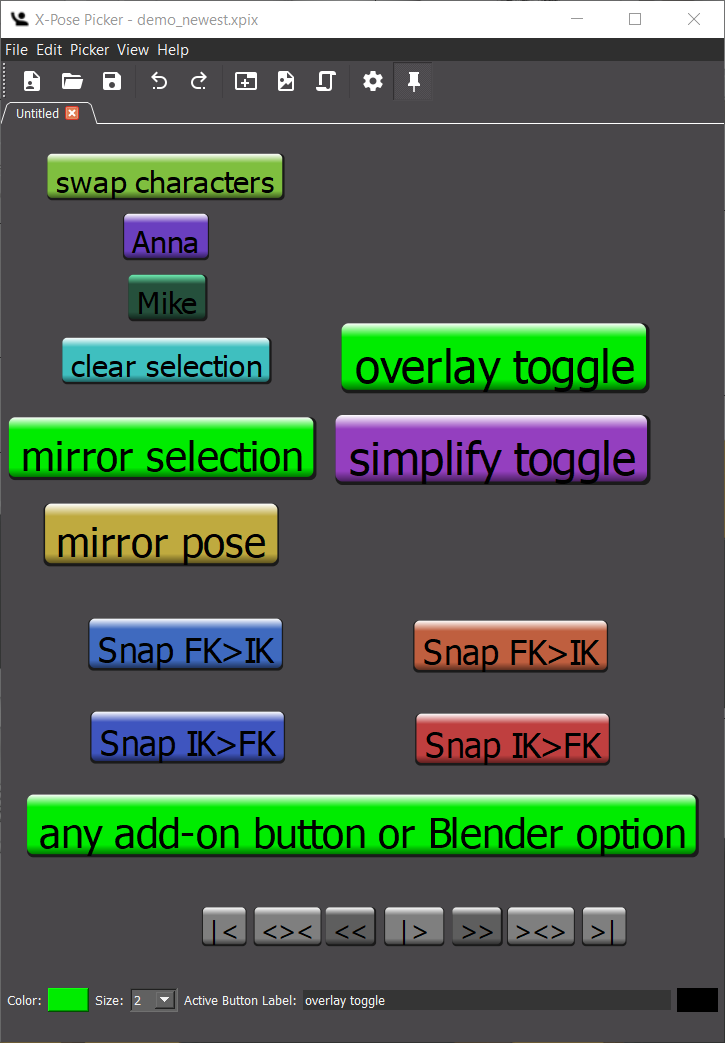
also as a little bonus new demo_newest.xpix script snippets are available for download!
Hello!
New X-Pose Picker 1.7.6 version is out!
With this version you are now able to remap all key shortcuts, including the Blender passthrough shortcuts keys.
From today also on user request you can use new passthrough keys for Keyframe insertion (LocRotScale and Available) with keys F/Alt+F and zoom to active object with key A.
Customizing all keys is important especially for these who are working with custom Blender keymap or are using Industry-Standard keymaps. New add-on is available for download on BlenderMarket as you’re reading this post.
By the way, Blender Playback buttons interface added to examples. With this cool feature you can now control Blender keyframes from Picker interface just to encurage you to experiment with picker’s functionality.
With new 3D Views support you’re now able to choose the active View for Picker with a button located in the View you want activate. This will affect all auto-cursor features.
gizmos on transforms disables modal Location, Rotation and Scale transformation operators on shortcut passthrough (R,G,S by default) and displays gizmos instead for manual adjustment (Maya style).
Please download once again the latest picker version thou the old version has issues with new features. Introduced bug has been eliminated with the latest build. The version of build remains the same so if you find version 1.7.9 after reinstallment it is totally normal.
Bug Symptoms:
gizmo does not work on LocRotScale shortcut
standard transform method does not work on LocRotScale shortcut
It’s a rather big feature, still some things to implement. load/save svg to xpix file, some design ux aspects and some other details. Expect the deployment before February.
Hi,
this addon is so confused I don’t know if i need to buy it for my purpose
because I don’t know how it work, can you do a video tutorial like quickstart or something like that with auto rig character for example ?
hello and thank you for your question! Here is some content available at the time:
introducing the picker:
how to produce a layout:
some latest features introduction:
Animschool explaination what picker really is and how it works:
Take a look at the documentation for details:
New videos appear with new new features, in few days with svg custom button shapes there will be new video presentation with this and some other features.
Hi, first want to say a big thank you for this plugin. It’s worth every $ and makes posing so much easier and faster, especially making expressions.
I’m having an issue however. Whenever I hide my rigify rig, x-pose doesn’t work. Clicking on any button in X-pose doesn’t allow me to make any poses or transformations on the rig. In all the demo videos I see you posing with the main rig hidden, what am I missing? How can I hide rigify while continuing to pose?
In videos rig is not hidden, the viewport rendering is set to Eevee and in Overlay Display bones options are switched off. The same settings applies to Cycles and Workbench viewports.
if you want to toggle between overlay on and off there’s a special script button in the template available (Overlay toggle). Simply copy paste it into your picker.
Sorry, I didn’t notice your last response. I ended up digging around and scripted an overlay toggle myself as well as those snap IK/FK buttons but thank you for adding it to the template as well. Should be very useful for others moving forward.
I’ll take a look at the template as the mirror pose and swap characters looks useful as well!