B3.2: automatic bake sequence

Hi all :slight_smile:

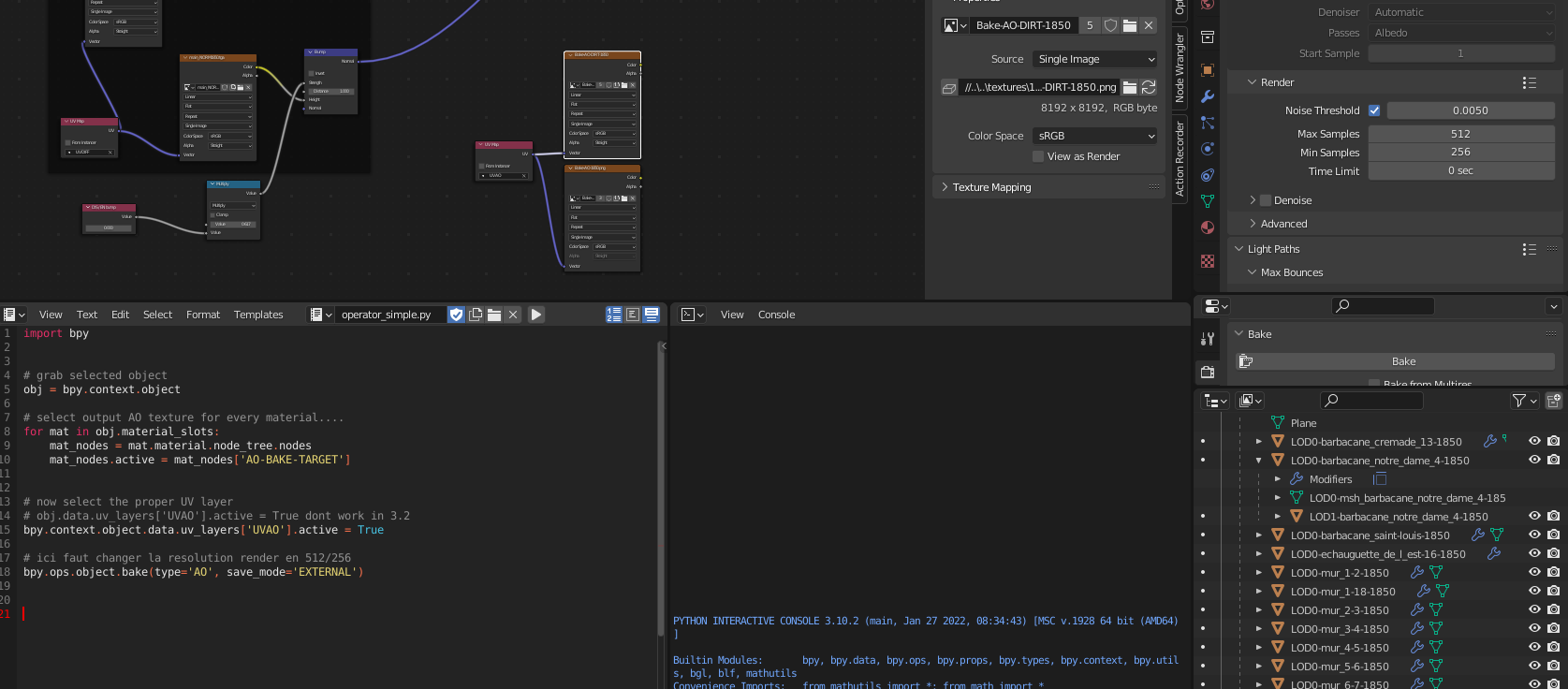
I made a small script for automating bake.

1st of all, i have to bake AO ( as cycles don’t allow AO intensity on base render ) and then bake another combination between previously baked AO and a dirt map.

here’s the pic:

The script selects the target texture, the UVmap needed and launches bake.

I have 2 questions:

  • how to change in python the render samples ? ( max & min samples )
  • if i continue my script to bake another texture, will this second bake wait for the AO bake to finish ?

Thankies :smiley:

And happy blending ! :slight_smile:

In theory it might be as simple as

bpy.context.scene.cycles.samples = 20

Yes- Python is not multi-threaded in Blender, so it executes each line fully before moving to the next

Wonderfull :smiley:

Thanks a lot @joseph !

I’ll come back with some more question on this topic :slight_smile:

Happy blending !

EDIT: oh it seems that denoise is inefficient for AO-bake on B3.2^^
EDIT2: wow ! i just discovered the R-CLICK on render parameters → copy path…
This is EXTREMELY handy :smiley:

ooookay :smiley:

Back there with some few trouble in python ( mostly due to my lack of knowledge of the language and my unbelief of the absurd sloth for common array copy ) Here

and a lil script that does the bake without eating all my 16 gigs of ram for nothing.
The script creates the target bake texture ( often a 1024x1024 one ) baked AO and copies the result to my big 8kx8k AO texture.
I need this as the 8K tex makes the bake last a lot by reaching my RAM limit and then swapping like crazy, making the bake far too long.
I’ll later also use the same method to bake dirt and lightmaps that are also stored in big 8K textures…

I post the script ( in its 1st version with only AO bake ) for memory and mebe for people who might be interrested in it ( the most interresting part is the ImageBlit that i havent understood completely till now :wink: )

import bpy
import numpy as np
from datetime import datetime


def ImageBlit(src:bpy.types.IMAGE_MT_image,dest:bpy.types.IMAGE_MT_image,destX:int,destY:int):
    sw, sh = src.size
    dw, dh = dest.size

    if (destX > dw or destX + sw < 0) or (destY > dh or destY + sh < 0):
        return
    
    src_data = np.empty((sw, sh, 4), dtype="f4")
    src.pixels.foreach_get(src_data.ravel())
    sx1 = max(0, -destX)
    sx2 = min(sw, dw - destX)
    sy1 = max(0, -destY)
    sy2 = min(sh, dh - destY)

    data = src_data[sy1:sy2, sx1:sx2, :4]

    dest_data = np.empty((dw, dh , 4), dtype="f4")
    dest.pixels.foreach_get(dest_data.ravel())
    dx1 = max(destX, 0)
    dx2 = dx1 + len(data[0])
    dy1 = max(destY, 0)
    dy2 = dy1 + len(data)

    dest_data[dy1: dy2, dx1: dx2, :4] = data

    dest.pixels.foreach_set(dest_data.ravel())
    dest.update()


#==========================================================================================    


# les objets doivent etre unvrappés avec le SMART UV PROJECT
# sur une texture de 512x1024 ou 1024x1024 ou 2048x1024 ou 4096x1024
# angle 75°
# margin 0.002
# area weight 1
# correct aspect: ON
# scale to bounds: OFF
#
# Les UVs sont corrigés ( rescaled a 0.995, virer les overlays etc... )
# ils sont utilisés pour le rendu AO et DIRT et ensuite intégrés à la texture
# globale AO ou AO-DIRT ( selon le type de bake.... )
#
# Le dico qui suit permet le trouver l'objet à bake, de le bake s'il existe dans la liste,
# de copier la texture baked vers la texture AO ou AO-DIRT globale et de resize et replace
# les UVAOBASE vert les UVAO pour unity
# le dico est au format suivant:
# idx, 'nom-de-lobjet-a-bake' , larg-bake-texture, posX-sur-tex-globale, posY-sur-tex-globale
objectsUVAOLocation = [
[ 0, 'LOD0-tour_de_moreti_5-1850'    ,1024, 3*1024, 7*1024],
[ 1, 'kjdhfqlkdjfhlqksdjfh'          ,512 , 1*1024, 7*1024]
]


def main():
    # first we get the selected obj name and find it in the dictionnary
    obj = bpy.context.object

    found:bool=False # is obj to bake found in dictionnary ?
    foundIdx:int=-1  # if yes, at wich index ?

    for o in objectsUVAOLocation: # browse the list
       if(o[1] == obj.name):
           found=True
           foundIdx = o[0]
           
    if(found==False):
        print("object not found in list !!!!! No bake possible")
        return

    print("baking ",obj.name)


    # temp image creation
    tempImageWidth  = objectsUVAOLocation[foundIdx][2]
    tempImageHeight = 1024

    tempImage = bpy.data.images.new('tempImage', tempImageWidth, tempImageHeight)
    tempImage.generated_color = (1,1,1,1) # make image white

    # catch the BIG terget texture....
    AOTargetImage ='Bake-AO-1850.png'
    targetXPos = objectsUVAOLocation[foundIdx][3]
    targetYPos = objectsUVAOLocation[foundIdx][4]

    # select output AO texture for every material....
    for mat in obj.material_slots:
        mat_nodes = mat.material.node_tree.nodes
        mat_nodes.active = mat_nodes['BAKE-TARGET']
        mat_nodes['BAKE-TARGET'].image = tempImage
        

    # now select the proper UV layer
    # obj.data.uv_layers['UVAOBASE'].active = True dont work in 3.2
    bpy.context.object.data.uv_layers['UVAOBASE'].active = True

    # ici faut changer la resolution render en 512/256
    bpy.context.scene.cycles.adaptive_threshold = 0.005
    bpy.context.scene.cycles.samples = 1024 #32
    bpy.context.scene.cycles.adaptive_min_samples = 512 #16
    bpy.ops.object.bake(type='AO', save_mode='EXTERNAL') # hopefully the temp tex is not saved...

    # copy the temp tex at the right place in the AO big texture...
    destBlit = bpy.data.images[AOTargetImage]
    ImageBlit(tempImage,destBlit,targetXPos,targetYPos)


    # clear nodes mess
    for mat in obj.material_slots:
        mat_nodes = mat.material.node_tree.nodes
        mat_nodes.active = mat_nodes['BAKE-TARGET']
        mat_nodes['BAKE-TARGET'].image = None
        
    # delete the now useless temp texture
    bpy.data.images.remove(tempImage)
    
    return
    
#==========================================================================================    
    
    
main()

Next step will be to resize the UVs so that they match the big AO texture target position. Thos UV will be used directly in Unity3D.

Hope you like it :smiley:
and happy blending !

Hi all :slight_smile:

Okay !!! i’m back with the final script for what i want to do:

import bpy
import numpy as np
from datetime import datetime


def ImageBlit(src:bpy.types.IMAGE_MT_image,dest:bpy.types.IMAGE_MT_image,destX:int,destY:int):
    sw, sh = src.size
    dw, dh = dest.size

    if (destX > dw or destX + sw < 0) or (destY > dh or destY + sh < 0):
        return
    
    src_data = np.empty((sw, sh, 4), dtype="f4")
    src.pixels.foreach_get(src_data.ravel())
    sx1 = max(0, -destX)
    sx2 = min(sw, dw - destX)
    sy1 = max(0, -destY)
    sy2 = min(sh, dh - destY)

    data = src_data[sy1:sy2, sx1:sx2, :4]

    dest_data = np.empty((dw, dh , 4), dtype="f4")
    dest.pixels.foreach_get(dest_data.ravel())
    dx1 = max(destX, 0)
    dx2 = dx1 + len(data[0])
    dy1 = max(destY, 0)
    dy2 = dy1 + len(data)

    dest_data[dy1: dy2, dx1: dx2, :4] = data

    dest.pixels.foreach_set(dest_data.ravel())
    dest.update()


#==========================================================================================    


# les objets doivent etre unvrappés avec le SMART UV PROJECT
# sur une texture de 512x1024 ou 1024x1024 ou 2048x1024 ou 4096x1024
# angle 75°
# margin 0.002
# area weight 1
# correct aspect: ON
# scale to bounds: OFF
#
# Les UVs sont corrigés ( rescaled a 0.995, virer les overlays etc... )
# ils sont utilisés pour le rendu AO et DIRT et ensuite intégrés à la texture
# globale AO ou AO-DIRT ( selon le type de bake.... )
class ObjToBakeInfos:

# Le dico qui suit permet le trouver l'objet à bake, de le bake s'il existe dans la liste,
# de copier la texture baked vers la texture AO ou AO-DIRT globale et de resize et replace
# les UVAOBASE vert les UVAO pour unity
# le dico est au format suivant:
# idx, 'nom-de-lobjet-a-bake' , larg-bake-texture, posX-sur-tex-globale, posY-sur-tex-globale
    objectsUVAOLocation = [
    [ 0, 'LOD0-tour_de_moreti_5-1850'    ,1024, 3*1024.0, 7*1024.0],
    [ 1, 'kjdhfqlkdjfhlqksdjfh'          ,512 , 1*1024.0, 7*1024.0]
    ]
#---------------------------------------------------------------------------------------------------


    def __init__(self): # ????? self ? what is the utility of a class if it can access someone-else other than 'self' XD ?
        return


    # find object from its name in list.
    # return: index or -1 if not found
    def Find(self,objName:str)->int:
        retour:int=-1
        
        for o in self.objectsUVAOLocation: # browse the list
           if(o[1] == objName):
               return(o[0]); # break the loop and return the found object index
        return(retour);
#---------------------------------------------------------------------------------------------------
    
    def GetTextureWidth(self,idx:int)->int:
        return(self.objectsUVAOLocation[idx][2]);
#---------------------------------------------------------------------------------------------------
    
    def GetTextureXPos(self,idx:int)->float:
        return(self.objectsUVAOLocation[idx][3]);
#---------------------------------------------------------------------------------------------------
    
    def GetTextureYPos(self,idx:int)->float:
        return(self.objectsUVAOLocation[idx][4]);
#==========================================================================================    
#==========================================================================================    
#==========================================================================================    


def main():
    # first we get the selected obj name and find it in the dictionnary
    obj = bpy.context.object

    
    for a in bpy.context.screen.areas:
        if a.type == 'IMAGE_EDITOR':
            space = a.spaces[0]
            previousImageInUVEditor = space.image
            
                
    OTBInfos = ObjToBakeInfos()

    foundIdx:int=OTBInfos.Find(obj.name)  # index of object found or -1 if not found
    if(foundIdx==-1):
        print("object not found in list !!!!! No bake possible")
        return

    print("baking ",obj.name,"....")


    # temp image creation
    tempImageWidth  = OTBInfos.GetTextureWidth(foundIdx)
    tempImageHeight = 1024
    tempImage = bpy.data.images.new('tempImage', tempImageWidth, tempImageHeight)
    tempImage.generated_color = (1,1,1,1) # make image white

    # catch the BIG target texture....
    AOTargetImage ='Bake-AO-1850.png'
    targetXPos = OTBInfos.GetTextureXPos(foundIdx)
    targetYPos = OTBInfos.GetTextureYPos(foundIdx)
    targetWidth,targetHeight = bpy.data.images[AOTargetImage].size

    # select output AO texture for every material....
    for mat in obj.material_slots:
        mat_nodes = mat.material.node_tree.nodes
        mat_nodes.active = mat_nodes['BAKE-TARGET']
        mat_nodes['BAKE-TARGET'].image = tempImage
        

    # now select the proper UV layer
    # obj.data.uv_layers['UVAOBASE'].active = True dont work in 3.2
    previousActiveUV = obj.data.uv_layers.active.name
    print("prev uv = ",previousActiveUV)
    bpy.context.object.data.uv_layers['UVAOBASE'].active = True

    # ici faut changer la resolution render en 512/256
    bpy.context.scene.cycles.adaptive_threshold = 0.005
    bpy.context.scene.cycles.samples = 32 #1024 #32
    bpy.context.scene.cycles.adaptive_min_samples = 16 #512 #16
    bpy.ops.object.bake(type='AO', save_mode='EXTERNAL') # hopefully the temp tex is not saved...

    # copy the temp tex at the right place in the AO big texture...
    destBlit = bpy.data.images[AOTargetImage]
    ImageBlit(tempImage,destBlit,int(targetXPos),int(targetYPos))


    # clear nodes mess
    for mat in obj.material_slots:
        mat_nodes = mat.material.node_tree.nodes
        mat_nodes.active = mat_nodes['BAKE-TARGET']
        mat_nodes['BAKE-TARGET'].image = None
        
    # delete the now useless temp texture
    bpy.data.images.remove(tempImage)
    
    
    # grab the current mode
    previousMode = bpy.context.active_object.mode
    
    # switch to object mode
    bpy.ops.object.mode_set ( mode = 'OBJECT' )
    
    UVSrc = obj.data.uv_layers['UVAOBASE'].data
    UVDst = obj.data.uv_layers['UVAO'].data
    for loop in obj.data.loops :
        uv_coords = UVSrc[loop.index].uv # uvcoords seems to be a pointer...
        UVDst[loop.index].uv = uv_coords # set from pointed data
        uv_coords = UVDst[loop.index].uv # point to newly created data
        # modify the pointed data
        uv_coords[0] = uv_coords[0] / 8.0+(float(targetXPos)/float(targetWidth))
        uv_coords[1] = uv_coords[1] / 8.0+(float(targetYPos)/float(targetHeight))

    # back to previous mode
    bpy.ops.object.mode_set ( mode = previousMode) # active mode ( object or edit )
    obj.data.uv_layers[previousActiveUV].active = True # active UV layer
    
    # previous image of UV editor
    for a in bpy.context.screen.areas:
        if a.type == 'IMAGE_EDITOR':
            space = a.spaces[0]
            space.image = previousImageInUVEditor
        
    
    return
    
#==========================================================================================    
    
    
main()

This works like a charm and UVs are resized and place at the exact place in the final big texture ! :smiley:

Next step will be the baking of dirt map using exactly the same method.

I however still got a question:

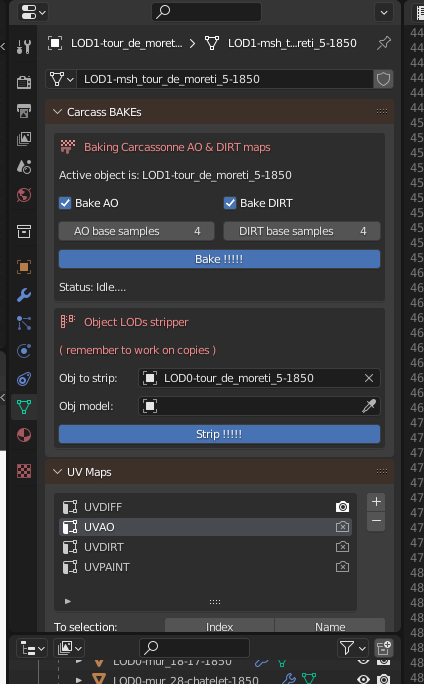
Is there a simple method ( or tutorial ) for adding a new tab in, say… object tab of properties with toggles, values and buttons for parameterizing this script and triggering the ‘main’ function ?

Other question: Is there a way to display a progress bar during the bake process ?

Thanks a lot for you help !

I don’t understand all the subtleties of python ( and its requirements ) but it starts becoming interresting to me as automation of specific things is mandatory to me :wink:
So thanks a big bunch to all your help and advices and infos on this language :smiley:

Happy blending !

After that just put your main function in an operator and then do row.operator() in the draw function. The simple operator template might help

weeeeee :heart_eyes_cat:
this works great !!!

It is awesome ! Thanks again @joseph :smiley:

Now i have to figure out how to install toggles in menu and interface them with my python script…

Things still seem strange to me as i still don’t understand the INs and OUTs of blender API.

2 questions coming:

  • again my previous question about having a progress bar during bake ( blender hangs with no response and the only ‘non-death’ flag is the windows task manager :sweat_smile:
  • is there a way ( or a tuto ) on customizing ( BK colors, fonts colors, fonts sizes, etc… ) those hand-made windows ?

Thanks and happy blending ! :smiley:

There’s some customization you can do. Not much, to be honest, but you can change sizing/spacing/layouts. It’s very difficult to find information, here’s a couple sources:

https://wiki.blender.jp/Dev:Py/Scripts/Cookbook/Code_snippets/Interface

There’s some hacky ways, and one that seems to work decently well-

Scroll down a ways, there’s an example with 5 upvotes

well…
I spent the day on searching, digging and trying for both those questions.

the progress bar solution in console is not convenient and as the bake has no delegate and hangs the whole app, i guess there’s no escape…
The ‘step’ solution is obvious and straightforward but useless during the hang.

The colors customization capabilities is as rich as the app multithreading: null. When i see the undecent possibilities of editor customization of unity and the poorness of blender features in this domain ( the python API doc also perfectly matches this ) i feel it’s 2 real different worlds.
As a visual customization i only have the row.alert in red and the row.defaultactive in blue.
Better than nothing :roll_eyes:

Anyway I thank you very much @joseph for the infos :slight_smile:

Have a nice evening and happy blending ! :smiley:

The bake operator must be called with 'INVOKE_DEFAULT':

bpy.ops.object.bake('INVOKE_DFEFAULT', type='COMBINED', ...)

so that it enters a modal loop. This uses the native progress bar while also keeping the UI responsive.

Edit:
That said, if you’re doing lots of other things after calling the operator, it may still hang, or if you’re entering bake modal but your script depends on the bake results, you essentially have to artifically wait for the modal to complete before continuing.

The issues people face is that they either want to run several bakes, or they want to do some more things in their operator after the bake has finished. The former is tricky to get right and involves bpy.types.Macro, the latter can be accomplished by entering a modal and use render handlers to determine when the script should continue.

oooh !
I thought that the INVOKE_DEFAULTS option would reset all the parameters ( like samples )…

Thanks @iceythe for the clue :smiley:

I will try this tomorrow !

Happy blending !

Hi @iceythe :slight_smile:

I come back here with some questions.

The ‘INVOKE_DEFAULT’ works fine, showing the progress bar but the bake func returns immediately.

I’d need to wait for baking end with a timer, wich is pretty simple but i cannot find any way to check for the bake end/status…
Could you tell me please wether there is one ?
Something like a blender global flag saying “On duty, please don’t disturb”
As you said, the macro seems to be the only way…
As it is tricky and adds mess in code i think i will just keep the blocking bake without ‘INVOKE_DEFAULT’ and i’d like to leave a message on my panel, saying the bake is in progress, please wait…

I set the message and launches the bake and… nothing shows up. The message only appears after the bake.
So my question is: Is there a way to force a panel refresh in python ?
( I found one weird and disgusting method consisting in unregistering and re-registering classes :rofl: LMAO python… )

Thanks and happy blending !

If you’re targetting Blender 3.3+, you can use

bpy.app.handlers.object_bake_cancel
and
bpy.app.handlers.object_bake_complete
to call a function that sets a flag somewhere.

You could then enter a modal with your operator that checks this.

Or (also 3.3+), you can enter modal and check bpy.app.is_job_running('OBJECT_BAKE') which returns whether a bake is currently in progress.

If you plan on supporting older versions, you need to use macro operators. I’m providing an outline and an example just for completeness. The actual code needed is usually longer and it’s generally a messy affair that exploits operator macros.

  1. Create a bpy.types.Macro and call it “BakeMacro”
  2. Create a bpy.types.Operator called “BakeFinished”
  3. After registering them, with your macro, define OBJECT_OT_bake and the bake finished operators.
  4. Create a bpy.types.Operator that will call “BakeMacro” and then enter a modal and wait.
  5. When the macro ends, it sets a global flag, continue your script.

Example:

import bpy

is_finished = False

class BakeFinished(bpy.types.Operator):
    bl_options = {'INTERNAL'}  # Do not show in search
    bl_idname = "wm.bake_finished"
    bl_label = "Bake Finished"
    def execute(self, context):
        global is_finished
        is_finished = True
        return {'FINISHED'}


class BakeMacro(bpy.types.Macro):
    bl_idname = "wm.bake_macro"
    bl_label = "Simple Object Operator"

    @classmethod
    def register(cls):
        # Create macro entry. bpy.ops.object.bake()
        op = BakeMacro.define("OBJECT_OT_bake")
        op.properties.type = 'COMBINED'

        # Create macro to signal bake finished.
        BakeMacro.define("WM_OT_bake_finished")


class MyBakeOperator(bpy.types.Operator):
    bl_idname = "wm.my_bake_operator"
    bl_label = "My Bake Operator"
    
    def modal(self, context, event):
        global is_finished

        if is_finished:
            context.window_manager.event_timer_remove(self.timer)
            print("Done")
            # Bake is finished. Continue your script here.
            return {'FINISHED'}

        print("waiting..")
        return {'PASS_THROUGH'}

    def invoke(self, context, event):
        bpy.ops.wm.bake_macro('INVOKE_DEFAULT')
        context.window_manager.modal_handler_add(self)
        self.timer = context.window_manager.event_timer_add(0.001, window=context.window)
        return {'RUNNING_MODAL'}


if __name__ == "__main__":
    bpy.utils.register_class(BakeFinished)
    bpy.utils.register_class(BakeMacro)

    bpy.utils.register_class(MyBakeOperator)  # The main operator

    bpy.ops.wm.my_bake_operator('INVOKE_DEFAULT')

Hi again @iceythe

Thanks for your example with macros. I won’t use it as python code is messy enough and i don’t want to add more obfuscation.

I finally get back to the blockin bake and found a way to force my properties panel refresh.

a simple

bpy.ops.wm.redraw_timer(type='DRAW_WIN_SWAP', iterations=1) 

does the thing pretty well :slight_smile:

Finally my message method is just like:

    ShowMessage("baking AO....")

Wich is pretty simple, straightforward and clear
Therefore, i will just write the ‘please wait’ info in my panel and wait for the bake to finish…

Thanks again and happy blending !

Back there with some updates :slight_smile:

Baking requence works like a charm !!!

Now i’m extending the script a bit for LODs generation…

  • copy the LOD0 to L0
  • get the LODx
  • keep in L0 all faces that are in LODx and delete any other faces
  • make the LO object the new LODx

I’ll post the whole script here when it is done, for ‘my deficient memory’ purpose and also for all people interrested in python coding :slight_smile:

Happy blending !

A bit out of topic but:

Amazing the direct panel render available by adding a handler :smiley:
I didn’t know this was possible but it opens many possibilities to custom display of things !

Now i’m curious about retrieving the rect regions of my properties in the properties panel.

Does anyone know how to retrieve those rects ?

Happy blending !

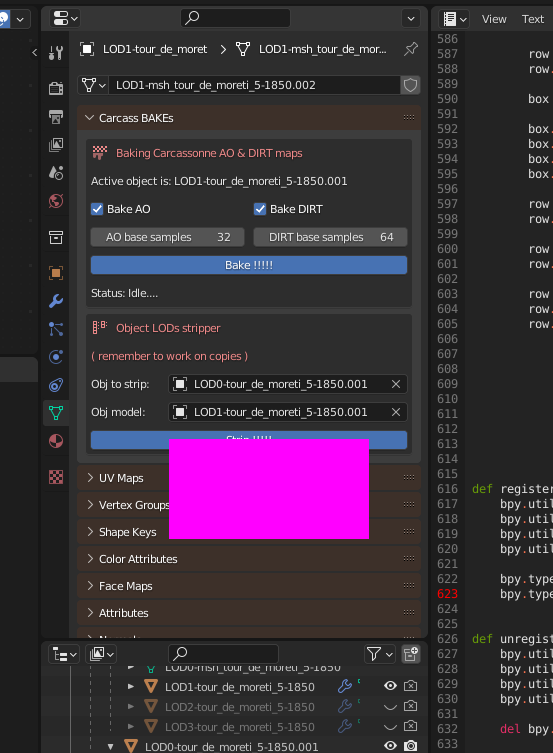
Back there with the final version of the script.

It works like a charm for baking my AO and DIRT+AO and also for my LODs stripping when i have to rework them :slight_smile:

import bpy
import time
import numpy as np
from mathutils import Vector
import math
#import gpu
#from gpu_extras.batch import batch_for_shader

from bpy.props import (StringProperty,
                       BoolProperty,
                       IntProperty,
                       FloatProperty,
                       EnumProperty,
                       PointerProperty,
                       )
from bpy.types import (Panel,
                       Operator,
                       PropertyGroup,
                       )


def ImageBlit(src:bpy.types.IMAGE_MT_image,dest:bpy.types.IMAGE_MT_image,destX:int,destY:int):
    sw, sh = src.size
    dw, dh = dest.size

    if (destX > dw or destX + sw < 0) or (destY > dh or destY + sh < 0):
        return
    
    src_data = np.empty((sw, sh, 4), dtype="f4")
    src.pixels.foreach_get(src_data.ravel())
    sx1 = max(0, -destX)
    sx2 = min(sw, dw - destX)
    sy1 = max(0, -destY)
    sy2 = min(sh, dh - destY)

    data = src_data[sy1:sy2, sx1:sx2, :4]

    dest_data = np.empty((dw, dh , 4), dtype="f4")
    dest.pixels.foreach_get(dest_data.ravel())
    dx1 = max(destX, 0)
    dx2 = dx1 + len(data[0])
    dy1 = max(destY, 0)
    dy2 = dy1 + len(data)

    dest_data[dy1: dy2, dx1: dx2, :4] = data

    dest.pixels.foreach_set(dest_data.ravel())
    dest.update()
#==========================================================================================    

# 0-255 to 0.0-1.0 conversion
def ColorByteToFloat(c:int)->float:
    return(float(c)/255.0)
#==========================================================================================    

# displays small message in the panel window....
def ShowMessage(msg:str):
    bpy.context.window_manager.stupidPythonNeed.statusStr = msg
    bpy.ops.wm.redraw_timer(type='DRAW_WIN_SWAP', iterations=1)     
#==========================================================================================    


def SelectUV(obj,uv:str)->str:
    previousActiveUV = obj.data.uv_layers.active.name
    bpy.context.object.data.uv_layers[uv].active = True
    return(previousActiveUV)
#==========================================================================================

def SetMatsForBake(obj,targetImg,mode:bool):
    if(mode==True): # settings for bake
        for mat in obj.material_slots:
            mat_nodes = mat.material.node_tree.nodes # grab the nodes entry
            
            bumpNode = mat_nodes['DIS / EN bump']
            bumpNode.outputs[0].default_value = 0.0 # disable bump
            
            RenderTypeNode = mat_nodes['BAKE / RENDER']
            RenderTypeNode.outputs[0].default_value = 0.0 # let's switch to bake mode
            
            mat_nodes.active = mat_nodes['BAKE-TARGET'] # select the bake target image
            mat_nodes['BAKE-TARGET'].image = targetImg  # and assign the newly created pic    
    else: # setting for back to default
        for mat in obj.material_slots:
            mat_nodes = mat.material.node_tree.nodes # grab the nodes entry
            
            bumpNode = mat_nodes['DIS / EN bump']
            bumpNode.outputs[0].default_value = 1.0 # re-enable bump
            
            RenderTypeNode = mat_nodes['BAKE / RENDER']
            RenderTypeNode.outputs[0].default_value = 1.0 # let's switch to render mode
            
            mat_nodes.active = mat_nodes['BAKE-TARGET'] # select the bake target image
            mat_nodes['BAKE-TARGET'].image = None  # no pic as default target
    
#==========================================================================================


def LaunchBake(whatToBake:str,samples:int):
    bpy.context.scene.cycles.adaptive_threshold = 0.005
    bpy.context.scene.cycles.samples = samples
    bpy.context.scene.cycles.adaptive_min_samples = int(samples / 2)
    
    ShowMessage("baking AO....")
    
    bpy.ops.object.bake(type=whatToBake, save_mode='EXTERNAL') # hopefully the temp tex is not saved...
#==========================================================================================    


# les objets doivent etre unvrappés avec le SMART UV PROJECT
# sur une texture de 512x1024 ou 1024x1024 ou 2048x1024 ou 4096x1024
# angle 75°
# margin 0.002
# area weight 1
# correct aspect: ON
# scale to bounds: OFF
#
# Les UVs sont corrigés ( rescaled a 0.995, virer les overlays etc... )
# ils sont utilisés pour le rendu AO et DIRT et ensuite intégrés à la texture
# globale AO ou AO-DIRT ( selon le type de bake.... )
class ObjToBakeInfos:

# Le dico qui suit permet le trouver l'objet à bake, de le bake s'il existe dans la liste,
# de copier la texture baked vers la texture AO ou AO-DIRT globale et de resize et replace
# les UVAOBASE vert les UVAO pour unity
# le dico est au format suivant:
# idx, 'nom-de-lobjet-a-bake' , larg-bake-texture, posX-sur-tex-globale, posY-sur-tex-globale
    objectsUVAOLocation = [
    [ 0, 'LOD0-tour_de_moreti_5-1850'    ,1024, 3*1024.0, 7*1024.0],
    [ 1, 'kjdhfqlkdjfhlqksdjfh'          ,512 , 1*1024.0, 7*1024.0]
    ]
#---------------------------------------------------------------------------------------------------


    def __init__(self): # ????? self ? what is the utility of a class if it can access someone-else other than 'self' XD ?
        return


    # find object from its name in list.
    # return: index or -1 if not found
    def Find(self,objName:str)->int:
        retour:int=-1
        
        for o in self.objectsUVAOLocation: # browse the list
           if(o[1] == objName):
               return(o[0]); # break the loop and return the found object index
        return(retour);
#---------------------------------------------------------------------------------------------------
    
    def GetTextureWidth(self,idx:int)->int:
        return(self.objectsUVAOLocation[idx][2]);
#---------------------------------------------------------------------------------------------------
    
    def GetTextureXPos(self,idx:int)->float:
        return(self.objectsUVAOLocation[idx][3]);
#---------------------------------------------------------------------------------------------------
    
    def GetTextureYPos(self,idx:int)->float:
        return(self.objectsUVAOLocation[idx][4]);
#==========================================================================================    
#==========================================================================================    
#==========================================================================================    


def Bakes(AOBake:bool,AOSamples:int,DIRTBake:bool,DIRTSamples:int):


    #do we have anything to bake ?
    if(AOBake==False and DIRTBake==False):
        return

    # first we get the selected obj name and find it in the dictionnary
    obj = bpy.context.object

    
    for a in bpy.context.screen.areas:
        if a.type == 'IMAGE_EDITOR':
            space = a.spaces[0]
            previousImageInUVEditor = space.image
            
                
    OTBInfos = ObjToBakeInfos()

    foundIdx:int=OTBInfos.Find(obj.name)  # index of object found or -1 if not found
    if(foundIdx==-1):
        print("object not found in list !!!!! No bake possible")
        return


    # temp image creation
    tempImageWidth  = OTBInfos.GetTextureWidth(foundIdx)
    tempImageHeight = 1024
    tempImage = bpy.data.images.new('tempImage', tempImageWidth, tempImageHeight)


    # should we bake AO ?
    if(AOBake==True):

        tempImage.generated_color = (1,1,1,1) # make image white

        # catch the BIG target texture....
        AOTargetImage ='Bake-AO-1850.tga'
        targetXPos = OTBInfos.GetTextureXPos(foundIdx)
        targetYPos = OTBInfos.GetTextureYPos(foundIdx)

        # prepare materials
        SetMatsForBake(obj,tempImage,True)

        # now select the proper UV layer
        previousActiveUV = SelectUV(obj,'UVAOBASE')

        # Do the bake
        ShowMessage("baking AO....")
        LaunchBake('AO',AOSamples)
        
        # retrieve previous active UV
        SelectUV(obj,previousActiveUV) 
        

        # copy the temp tex at the right place in the AO big texture...
        ShowMessage("Sending bake result to global AO Image....")
        
        destBlit = bpy.data.images[AOTargetImage]
        ImageBlit(tempImage,destBlit,int(targetXPos),int(targetYPos))
        
        # save the big AO image
        ShowMessage("Saving AO image to file....")
        destBlit.save()


        ShowMessage("Cleaning....")

        # retrieve materials base settings
        SetMatsForBake(obj,None,False)
            
        # previous image of UV editor
        for a in bpy.context.screen.areas:
            if a.type == 'IMAGE_EDITOR':
                space = a.spaces[0]
                space.image = previousImageInUVEditor


    # Now let's care about the DIRT.
    if(DIRTBake==True): # Should we bake the DIRT ?
    
        tempImage.generated_color = (ColorByteToFloat(63),
                                     ColorByteToFloat(63),
                                     ColorByteToFloat(63),
                                     ColorByteToFloat(255)) # texture background a (63,63,63,255)

        # catch the BIG target texture....
        AODIRTTargetImage ='Bake-AO-DIRT-1850.tga'
        targetXPos = OTBInfos.GetTextureXPos(foundIdx)
        targetYPos = OTBInfos.GetTextureYPos(foundIdx)

        # prepare materials
        SetMatsForBake(obj,tempImage,True)
            

        # now select the proper UV layer
        previousActiveUV = SelectUV(obj,'UVAOBASE')

        # Do the bake
        ShowMessage("baking DIRT+AO....")
        LaunchBake('EMIT',DIRTSamples)
        
        # retrieve previous active UV
        SelectUV(obj,previousActiveUV) 
        

        # copy the temp tex at the right place in the AO big texture...
        ShowMessage("Sending bake result to global DIRT+AO Image....")
        destBlit = bpy.data.images[AODIRTTargetImage]
        ImageBlit(tempImage,destBlit,int(targetXPos),int(targetYPos))
        
        # save the big AO image
        ShowMessage("Saving AO-DIRT image to file....")
        destBlit.save()


        ShowMessage("Cleaning....")

        # retrieve materials base settings
        SetMatsForBake(obj,None,False)


        # previous image of UV editor
        for a in bpy.context.screen.areas:
            if a.type == 'IMAGE_EDITOR':
                space = a.spaces[0]
                space.image = previousImageInUVEditor


    # delete the now useless temp texture
    bpy.data.images.remove(tempImage)
    

    # UV scaling to match big image placement...
    if(AOBake==True or DIRTBake==True):
        ShowMessage("UV placing....")

        # both AO and DIRT+AO images have to be the same size: 8Kx8K
        targetWidth,targetHeight = bpy.data.images[AODIRTTargetImage].size

        # grab the current mode
        previousMode = bpy.context.active_object.mode
        
        # switch to object mode
        bpy.ops.object.mode_set ( mode = 'OBJECT' )
        
        UVSrc = obj.data.uv_layers['UVAOBASE'].data
        UVDst = obj.data.uv_layers['UVAO'].data
        for loop in obj.data.loops :
            uv_coords = UVSrc[loop.index].uv # uvcoords seems to be a pointer...
            UVDst[loop.index].uv = uv_coords # set from pointed data
            uv_coords = UVDst[loop.index].uv # point to newly created data
            # modify the pointed data
            uv_coords[0] = uv_coords[0] / 8.0+(float(targetXPos)/float(targetWidth))
            uv_coords[1] = uv_coords[1] / 8.0+(float(targetYPos)/float(targetHeight))


        # back to previous mode
        bpy.ops.object.mode_set ( mode = previousMode) # active mode ( object or edit )

    
    return
    
#==========================================================================================    
"""
vertices = (
    (100, 100), (300, 100),
    (100, 200), (300, 200))

indices = (
    (0, 1, 2), (2, 1, 3))

shader = gpu.shader.from_builtin('2D_UNIFORM_COLOR')
batch = batch_for_shader(shader, 'TRIS', {"pos": vertices}, indices=indices)


def drawtruc():
    shader.bind()
    shader.uniform_float("color", (1.0, 0.0, 1.0, 1.0))
    batch.draw(shader)
"""

def Dist(A,B)-> float: 
    return math.sqrt((B[0] - A[0]) ** 2.0 +
                     (B[1] - A[1]) ** 2.0 + 
                     (B[2] - A[2]) ** 2.0)


def Vector3AlmostEQ(A:Vector,B:Vector,deltaMax:float=0.000001)->bool:
    
    if(Dist(A,B) <= deltaMax):
        return(True)
    else:
        return(False)


def CompareFaces(objVectorsA,faceA,objVectorsB,faceB)->bool:
    
    if(len(faceA.vertices) != len(faceB.vertices)):
        return(False)


    for idxA in faceA.vertices: # vertices are index in data array
#        print(objVectorsA[vA].co)
        vertexFound=False
        
        for idxB in faceB.vertices:
            if(Vector3AlmostEQ(objVectorsB[idxB].co,objVectorsA[idxA].co) == True):
                vertexFound = True
                break

        if(vertexFound==False):
            return(False)
        
    # here we sweeped all verts of A and found them in B
    # the face is identical
    return(True)    
#==========================================================================================    


def FindFaceInObj(objA,objB,faceB)->bool:

    for f in objA.data.polygons:
        if(CompareFaces(objA.data.vertices,f,objB.data.vertices,faceB)==True):
            return(True)
    
    return(False)
#==========================================================================================    


def Strip(objToStrip,modele):

    found:int=0
    notfound:int=0    
    
    # if we're in edit mode, lets go to object mode....
    bpy.ops.object.mode_set(mode = 'OBJECT')
    bpy.ops.object.select_all(action='DESELECT')

    print(len(objToStrip.data.polygons))
    
    # deselect all faces in objects
    bpy.context.view_layer.objects.active = objToStrip
    bpy.ops.object.mode_set(mode = 'EDIT') 
    bpy.ops.mesh.select_mode(type = 'FACE')
    bpy.ops.mesh.select_all(action='DESELECT')
    bpy.ops.object.mode_set(mode = 'OBJECT')
    
    # get the object-to-strip mesh entry
    for f in objToStrip.data.polygons:
        
        if(FindFaceInObj(modele,objToStrip,f) == True):
            found+=1
        else:
            f.select = True
            notfound+=1
            
    # show the 2 objects comparison
    print("found = ",found," / not found = ",notfound)
    
    # now all selected faces have to be deleted
          
    bpy.context.view_layer.objects.active = objToStrip
    bpy.ops.object.mode_set(mode = 'EDIT') 
    bpy.ops.mesh.delete(type='FACE')
    bpy.ops.object.mode_set(mode = 'OBJECT')
        
    return
#==========================================================================================    


#**************************************************
#
# The class method called at bake button press
#
# python: the art of obfuscating simple things....
#
#**************************************************
class MyBakesEntryPoint (bpy.types.Operator):
    bl_idname = "carcass.baker"
    bl_label = "Bake !!!!!"
    
    def execute(self, context):
        SPN = context.window_manager.stupidPythonNeed

        Bakes(SPN.enableAOBake,SPN.baseAORenderSamples,SPN.enableDIRTBake,SPN.baseDIRTRenderSamples)

        ShowMessage("Idle....")
        
        return {'FINISHED'}
#==========================================================================================  

#**************************************************
#
# The class method called at STRIP button press
#
# python: the art of obfuscating simple things....
#
#**************************************************
class MyStripEntryPoint (bpy.types.Operator):
    bl_idname = "carcass.striper"
    bl_label = "Strip !!!!!"


    def execute(self, context):
        SPN = context.window_manager.stupidPythonNeed
        
        if(SPN.objectToStrip != None and SPN.objectModelForStrip != None):        
            Strip(SPN.objectToStrip,SPN.objectModelForStrip)
        
        return {'FINISHED'}
#==========================================================================================    
    
    
#**************************************************
#
# The class for parameters ( LAUGH MY ASS OFF !! )
#
# python: the art of obfuscating simple things....
#
#**************************************************
class MyBakesParameters(PropertyGroup):
    
    enableAOBake : BoolProperty(
                    name="useless stupid thing",
                    description="Enable AO baking",
                    default = True)

    enableDIRTBake : BoolProperty(
                        name="useless stupid thing",
                        description="Enable DIRT baking",
                        default = True)
                        
    baseAORenderSamples : IntProperty(
                          name="useless stupid thing",
                          description="Base AO render samples",
                          default = 32)
                        
    baseDIRTRenderSamples : IntProperty(
                            name="useless stupid thing",
                            description="Base DIRT render samples",
                            default = 64)
                            
    statusStr : StringProperty(
                name="useless stupid thing",
                description="Status.....",
                default = "Idle....")

    objectToStrip : PointerProperty(
                    name = "Obj to strip",
                    type = bpy.types.Object,
                    description="Object to be stripped. Usually lower LOD.\n( Will be modified )")

    objectModelForStrip : PointerProperty(
                            name = "Obj model",
                            type = bpy.types.Object,
                            description="Object model stripped. Usually higher LOD.\n( Won't be modified )")
                        
#==========================================================================================    


#**************************************************
#
# The class for drawing previous both classes
# ( LOOOOOOOOOOL )
#
# python: the art of obfuscating simple things....
#
#**************************************************
class CarcassBakesPanel(bpy.types.Panel):
    """Creates a Panel in the Object properties window"""
    bl_label = "Carcass BAKEs"
    bl_idname = "OBJECT_PT_hello"
    bl_space_type = 'PROPERTIES'
    bl_region_type = 'WINDOW'
    bl_context = "data"


    def draw(self, context):
            
        obj = context.active_object
 
        SPN = context.window_manager.stupidPythonNeed

        
        layout = self.layout
        
        box = layout.box()
        
        box.alert=True
        box.label(text="Baking Carcassonne AO & DIRT maps", icon='TPAINT_HLT')
        box.alert=False

        row = box.row()
        row.label(text="Active object is: " + obj.name)
        
        row = box.row()
        row.prop(SPN,"enableAOBake", text="Bake AO")
        row.prop(SPN,"enableDIRTBake", text="Bake DIRT")
        
        row = box.row()
        row.prop(SPN,"baseAORenderSamples", text="AO base samples")
        row.prop(SPN,"baseDIRTRenderSamples", text="DIRT base samples")

        row = box.row()
        row.active_default = True
        row.operator("carcass.baker")
        row.active_default = False
        
        row = box.row()
        row.label(text="Status: " + SPN.statusStr)
        
        box = layout.box()

        box.alert=True
        box.label(text="Object LODs stripper", icon='SHORTDISPLAY')
        box.label(text="( remember to work on copies )")
        box.alert=False

        row = box.row()
        row.prop(SPN, "objectToStrip")
                
        row = box.row()
        row.prop(SPN, "objectModelForStrip")
                
        row = box.row()
        row.active_default = True
        row.operator("carcass.striper")


def register():
    bpy.utils.register_class(CarcassBakesPanel)
    bpy.utils.register_class(MyBakesEntryPoint)
    bpy.utils.register_class(MyStripEntryPoint)
    bpy.utils.register_class(MyBakesParameters)

    bpy.types.WindowManager.stupidPythonNeed = PointerProperty(type=MyBakesParameters)
#    bpy.types.SpaceProperties.draw_handler_add(drawtruc, (), 'WINDOW', 'POST_PIXEL')


def unregister():
    bpy.utils.unregister_class(MyBakesParameters)
    bpy.utils.unregister_class(MyStripEntryPoint)
    bpy.utils.unregister_class(MyBakesEntryPoint)
    bpy.utils.unregister_class(CarcassBakesPanel)
    
    del bpy.types.WindowManager.stupidPythonNeed


if __name__ == "__main__":
    register()

Now i have to figure out how to run this script at launch and also will have a later step for baking impostor parts of LODs…

Hope you like it :smiley:

Happy blending !

Back there with the new feature of this script:

bake only selected faces ( for example if i have impostors instead of meshes ).

My problem was to bake those faces to an AO transparent base texture and then to blend the result to the right place in the final global 8K AO image.

This needed a blitImage handling alpha… And it works like a charm !
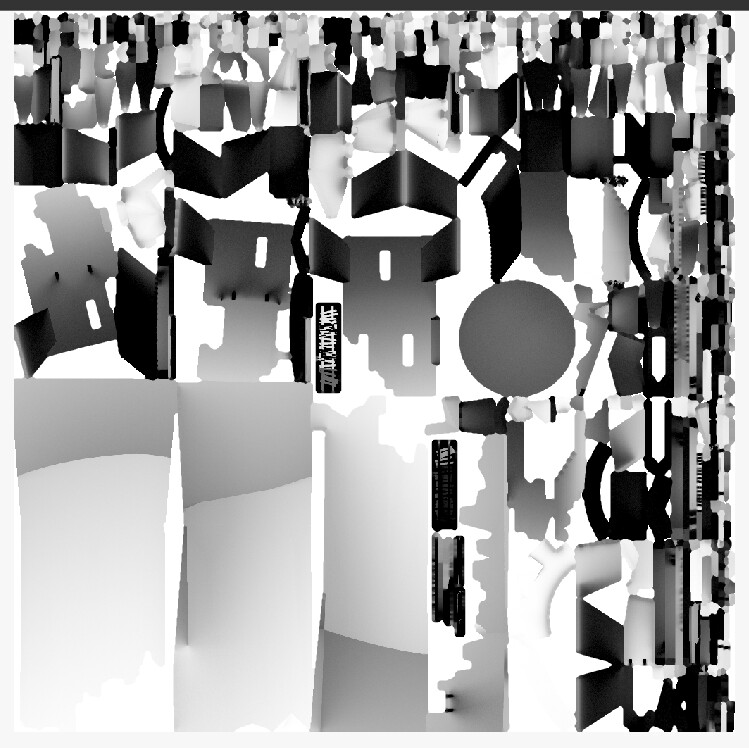
Here’s the main object AO bake:

And the same image with added AO for my impostors:

Of course, all works the same way for DIRT bake :wink:

Hope you like it !!!

Happy blending !

while beeing swimming in python, i tried to make one lil handy thing:
A small helper for texture UV work, that selects the proper UV layer, the proper image in UV editor and the proper texture node in shader for 3D view…

It’s amazing to think i’ve been using blender for more than 10 years and i never did this extremely handy thing that saves lots of clicks !
revolution

I’m really glad it works great :smiley:

Hope you like it ! :smiley:

Happy blending !