Hi,
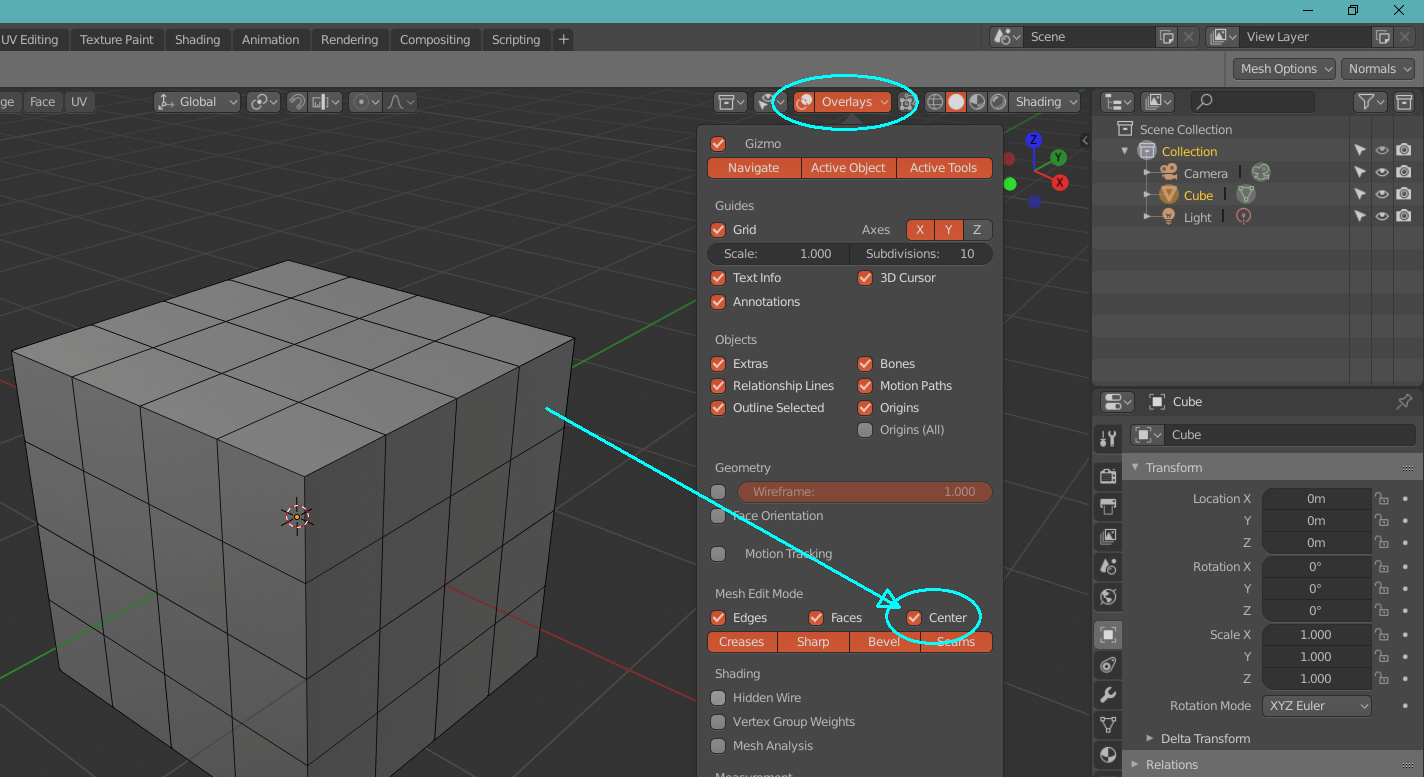
Is there a way to have edit mode edges thinner? I already have the thin option enabled, but still they are too thick. Why they aren’t as in 2.79? Any plans for this?
Regards
Hi,
Is there a way to have edit mode edges thinner? I already have the thin option enabled, but still they are too thick. Why they aren’t as in 2.79? Any plans for this?
Regards
Don’t waste your time, this is beyond user wishes. Literally no one likes those thick edges and yet it’s still there. Go figure.
Thank You for explanation, that this is known users complain in 2.8. Hope they will fix it asap, because thick lines are horrible.
Regards,
Kamil.
I forgot to tell you, but there’s a nasty tradeoff. If you enable center in the overlays, the thick edges goes away, and in return it gives you the infamous “face dots” when you are in faces mode. There’s no way out, it’s either one or the other.
Still not as in 2.79, but much, much better! Thank YOU!
Best Regards,
Kamil.
Except some people wanted to see the dots come back just like how it was in 2.79. You have an option now, so it theoretically should make face mode work for everyone.
The problem is that there are users who don’t want to see neither thick edges nor facedots. So this hardcoded method is not the best solution.
Ah, I get the reasoning behind this : in order to distinguish between edge and face mode, they thickened the edges in edge mode. BUT face dots are also a good way to distinguish between the two modes so when it’s enabled, it automatically disables the thick edges. I agree it would be nice to have total control over this. I don’t mind the thick edges personally.
And if edge-mode also gets the thin edges by default, people might complain that they can’t tell which mode they are in 
The devs. just can’t win.
Of course they can win ! By giving us a nice checkbox. Why wasn’t it a problem in 2.79 ? Face dots were always there. I don’t see why we could not have a slider for ‘edge thickness’ or a ‘thick edges’ checkbox ?
You mean they won’t, right?
What is difficult to understand that giving the options to the users is the right way of doing this?´
We just need 2 separate checkboxes in the overlays panel, one for thick edges and other for facedots, and that’s it, everyone is free to use what they want.
Exactly and than they can just activate one on default and if someone want both option to turn off they can just do it and save the startup file or preference.
I’m not an expert, but I think this patch will give a bit of lightness in selecting vertex edges and objects in heavy scenes with eevee enabled
GPU: Simplify select shaders.
The shaders are: GPU_SHADER_3D_FLAT_SELECT_ID and GPU_SHADER_3D_UNIFORM_SELECT_ID.
This commit allows the drawing of the mesh select ids to be done on a 32UI format texture.
This simplifies the shader that previously acted on the backbuffer and had to do an uint to rgba conversion.
No, the speedup from this patch will not benefit complex scenes and is rather small. It is more of a code cleanup than anything else.
I appreciate your enthusiasm but try to not overhype thing.
Hehe you’re probably right 
Since I saw that there are fewer conversion steps from one format to another, I thought that probably there would be some small benefit. … but I understand, actually by selecting one object at a time, there won’t be much calculation to do … perhaps selecting many objects at once with circle select or lasso, could there be any advantages ??
would be awesome if we could have more effects for eevee lensflare, Vignette…
This kind of way of solving things could lead to a crowded UI filled with unnecessary checkboxes.
I’d rather have a clean UI…
…good design takes time…
any relevant news that I missed?
Clement has been doing some cleanup and fixes for EEVEE and drawing in general I think, I don’t really know what are the impacts of all these changes, but I guess it is only good things ! haha 
For the viewport speed up we need to wait patches from Sergey