Thanks. I messed around with this feature, and if I’m right, it only allows me to weight paint the breaking threshold? For my 2 object building, I used very different settings on floors and beams, such as bending limits (so metal beams can stay deformed while floors just crumble) and also a point pivot connector between beams and floors with a generous angle limit so they hang down without falling immediately as seen here: https://i.komachi.sh/r9p26y2ee2.png
Indeed you can’t control every setting with vertex groups. However, it is recommended to stick with breaking thresholds wherever possible, because this is physically the most accurate way to define a material strength. Meant only as workaround Special Breaking Settings should only be used if breaking thresholds don’t work for some reason, they also will change behavior if solver settings are changed.
Having said that, I see that the deformation feature has not much of an alternative, so if it is really necessary to have different bending limits you might want to stick to your old rig.
As a side note, for more plausible simulations (on a scientific level) we have developed the Bullet Constraints Builder (BCB) add-on, perhaps this is something you want to look into, too.
BCB Is the first thing that I wanted to study but I couldn’t wrap my head around it at the time (to study both blender and this complex addon at the same time is even more overwhelming!). Now that I’m a bit more comfortable with it I’d like to try it again. What’s the deal with “Guide to Simulate a Multi-Family House with Standard Blender”? Is it still useful with the FM blender? Because it looks to have a ton more info. And in general with BCB, can I just “wing it” with building structures in there, or do I need to plan out everything carefully? While I can allow myself to spend some time on this small hobby, reading real life blueprints and copying them into blender would be too much.
Also, thanks for the tip on using thresholds. I always kept them super high so I wouldn’t have to deal with them. What’s your opinion on using Blender’s automatic mass calculation by volume and material? Is it something I want to use with FM?
The BCB is not so hard to use, it has material presets and you can apply those pretty easily to a group of objects. Preprocessing tools are also included which will automatically perform fracturing (in the BCB called „discretization“), applying rigid body settings, creating foundations etc. Check the installation tutorial to simulate a simple test file with only a few clicks.
The BCB can make use of the FM to increase simulation performance which would otherwise not be possible with standard Blender, that’s why the tutorial refers to the FM. It is actually recommended to use the FM version of Blender for the BCB, even though it’s not required. The tutorial explains the difference in the workflow.
Regarding the thresholds, I see that it’s tempting but no good practice to keep the thresholds high and to tweak the special settings instead. The correct way, however, is the other way around: Try to tweak the thresholds first, and only if this doesn’t work for your scene then you can try the fallback settings. Breaking thresholds are evaluating actual forces, so it makes sense to use them.
You can and should use the automatic mass calculation for the FM if you want realism. The predefined mass in the FM settings will be used as total mass for the entire structure. The masses of the individual shards are then derived from their relative volumes compared to the total volume, so that everything will have the correct mass after fracturing.
Thanks! I made a very quick single object building using only painted weights and threshold. Worked much better than I expected (not that I had any doubt that you know infinitely more than I do about this)
https://i.komachi.sh/dw3348cwzf.mkv
Now to take on the BCB! 
1 Like
When saving config in BCB, I get “Error: Could not write file: /tmp\bcb.cfg” I tried launching Blender as Administrator and also changing the temp folder in Blender settings, but to no avail.
In any case, Kai, I want to kiss you, haha. You were again completely right, BCB is not complicated to use at all after all. I got scared by the part of the manual where you had to manually input every property and model your buildings in external programs. Missed the small blue text that says “btw you can just create whatever in blender and add pre-defined materials to it”. IMHO, you should put more emphasis on that text, to attract more casual users like me and not scare them off! This tool is AMAZING.
I have a question, though. When using the same exact materials and scenario, if I discretize them into smaller parts, they behave very differently (bend more instead of breaking) I understand how the geometry of that works relative to constraints, but there’s more: If I change the steps per second and/or simulation speed, everything changes, too. In one instance, my scaffolding breaks like I expect it to under a heavy falling object. When the shards are smaller it acts more like rubber, and most importantly - if I increase the steps per second it suddenly becomes much stronger. How do I achieve the most realistic scientific results? Comparing to similar real life situations visually or is there a more precise method/formula for these settings? Or do (in theory) infinitely small shards + infinite steps/second are the most realistic? And again, huge thanks for all the work you guys did!
1 Like
Thank you very much. Good to see that you like it.
You don’t need to save an external config file to do simulations, this is only needed to exchange BCB settings with other .blend files. I will look into the issue anyway, so thanks for testing it. I think the path is hardcoded, so I guess it would be better to use the temp path from Blender instead.
The rubber appearance problem is indeed a solver limitation. The smaller the discretization size the greater the solver steps and constraint solver iterations (see Rigid Body World panel) need to be in order to keep the structure solid. However, as long as the bending is not too strong, i.e. not that much that it changes the overall shape of the structure, then the forces should be evaluated correctly. As a rule of thumb I would recommend to use 200-300 steps and 100-1000 solver iterations for very large structures with lots of elements. But this also takes longer to simulate, of course.
Keep in mind that you always have to update/rebuild constraints if you change the solver settings, because the breaking thresholds need to be recalculated to include these changes. (Force to impulse conversation is depending on the number of steps per second.)
I have an update on the export config bug - it only happens when Blender is installed on the D drive. When it’s on C, everything works fine.
And another two small questions, if I may.
First, how to correctly use “Dynamic FM” building option? Objects are very hard to shatter (same settings and values that work wonderfully with normal mode), and it’s sometimes prone to crashing when stopping the simulation. Don’t know if that normal, but everything looks grey for the first few frames and also there’s a ball on the first frame instead of my objects.
Second, After the simulation is done, how do I revert to the previous state where I can adjust or move things? I have already set up cameras and lights so ctrl+z isn’t a good option. Automatic mode or not, in the end I only have one object, the BCB export.
Thanks.
Edit: Don’t know if this is a bug or an inherent limitation of the system, but I have split the atoms on this concrete column by dropping it on the side (tried different discretizations, steps and solvers, same result). Here’s an example with 1000 steps and solvers, 1/3 sim speed (the scaffolding becomess wobbly at this point. Maybe too much) https://i.komachi.sh/o23jycpjyd.mkv
Unfortunately dynamic fracture has never been working stable in the FM, and so is this feature in the BCB. Consider it being experimental.
The FM mode doesn’t support scene clearing (removal of constraints) for now because the source objects will be moved into the FM object without keeping a backup in the scene. I recommend to save your simulation result in a new .blend file and to always keep a backup of the original scene. If enabled the Backup checkbox will do that automatically for you.
Be careful with too high simulation step numbers because collision detection can become very aggressive then. I don’t want to go too deep into the details but I can see another problem in your video, let me elaborate a bit on that.
Like the special setting in the FM the BCB also has a feature for limiting the distance and angle a connection can reach until it will completely be detached. In the BCB these settings are called tolerances, and those are meant to ensure a connection will ultimately break even if some constraints remain intact. You need to know that the BCB uses multiple constraints per connection, one for every degree of freedom. These tolerances are by default being set much higher than the deformation to be expected, so that they can only come into action when the connection is failing anyway due to exceeded breaking thresholds. It’s basically a safety mechanism to ensure simulation stability.
Why I’m explaining that? Collisions between connected elements are suppressed until separation happens. In your video I can see that the elements start to intersect each other before they detach. This in combination with the high steps number leads to an explosive collision force building up as soon as the connection is detached by the tolerances. This means that the first bending tolerance “1st Rot. Tol.” is a bit too large and should be reduced to the half or a third. Then the connections will be detached before intersections happen and everything should behave more stable.
Sorry for the lengthy explanation but you asked. I hope that helps.
It’s me who should be asking forgiveness for such an amount of questions, haha. Your explanation is greatly appreciated, I love to read about how stuff happens under the hood.
I’d like to ask about estimating I-beams for a “close enough” simulation. I understand that volume needs to be as close to real life as possible for a good simulation. Will a simple thin rectangle (Imagine an I-beam compressed into a simpler shape) of the correct volume work as well as properly modelled I-beam? The only difference would be the surface area at the connection, if that plays any major role.
I think I have most of BCB figured out, but there are some small things left. Like the Steps per second vs solver per step. I understand that two are dependent. if I have 300 steps and 100 solver, then each constraint will be calculated 300 x 100 per second. Is that correct? Now, the practical side of this question is when should I increase which setting? If I don’t know how my made up structure would react in real life, what are some green or red flags I could notice that tell me “yeah, looks weird but that’s how it would be in real life” versus “oh that’s a solver issue”.
So far with extensive experimentation I turn up the steps until it stops feeling “melty” at the start of the sim and then increase solver so it doesn’t bend too much before breaking and until it becomes like a dry cookie. Here’s the best results I found so far for different levels of discretization in order (steps-solver) 100-10, 300-10, 300-200. https://i.komachi.sh/urkkytha87.mp4 They all look somewhat different and the problem is that I have no idea which one is the most objectively correct.
By default contact areas are indeed evaluated depending on the actual mesh surface area in the connection region. I-beams should therefore be modeled with the real dimensions and thicknesses. However, if that’s no option for you then you can disable Accurate Contact Area Detection in the BCB settings, then only boundary box intersections will be used as contact areas. But keep in mind that for I-beams this will increase the detected contact areas massively, so that you have to take the difference into account in your breaking thresholds settings, either by changing the values accordingly or by using the breaking threshold multiplier. But calculating this manually requires probably more work than just modeling the beams right.
Your general idea of the steps per second and solver iterations settings is correct. Steps per second is the actual number of simulation steps computed per second and is depending on the frame rate setting. Collisions are evaluated once per step while constraint dependencies can have additional iterations, that’s what the (constraint) solver iterations are for.
So if you are struggling with a shaky structure due to long constraint dependency paths (e.g. a highrise building) then you only need to increase the constraint solver iterations to improve the result. If you have problems with too soft or unstable collisions (e.g. a large pile of debris) then you might want to increase the solver steps per second instead to allow for more collision steps.
Your approach seems good to me, start low and increase the solver settings just as much as needed. We haven’t worked out a general rule for this. Simulations are always of chaotic nature, so results can deviate even with the smallest changes, and the use cases are often so different that it’s really hard to come of with ideal numbers.
1 Like
Thanks again for all the help, Kai. I think the road is clear ahead for me, no further questions for the foreseeable future  Now to study blender itself a bit deeper to better my workflow. Here’s my showreel for today, made two buildings. I’m happy with the shack, but the skyscraper - not very much. It started just as a simple exercise in modelling simulating a very simple monotonous metal frame that got a bit out of hand with floors and elevator shafts and vertical bracing… Ended up with something that to me feels a bit too thick for the size. There’s no central structure to speak of, etc. I could fix that but it’s better to start anew with the things I learned.


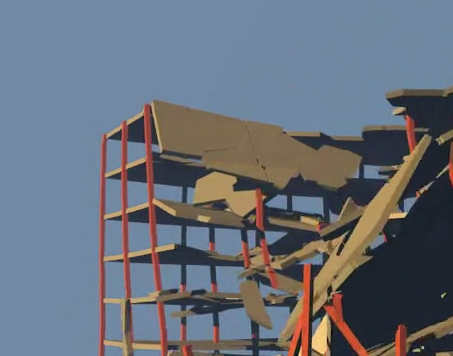
1 Like
You are learning fast. Keep it up!
1 Like
Don’t know if it’s a bug or a weird feature, but you have to hit “Fix Foundation” twice - once to create the foundation and second time without the checkbox to glue it to the ground. If you only click it once (having selected everything of course) the buildings just slide on the ground. Here’s an example - note that breaking is disabled everywhere: https://i.komachi.sh/o7z9s8ngio.mp4
Executing Fix Foundation twice shouldn’t be necessary and should be avoided because it generates additional geometry intersecting the earlier created foundation mesh. The foundation includes active buffer elements to simulate soil-like damping for earthquake simulations. These buffer elements are using hard-coded settings, so that it’s possible if a structure is too strong or too heavy that the buffers will yield before everything else. I guess this is something with room for improvement in the future.
Anyway, you can also define the connection type (CT) used for the foundation yourself by modifying the respective setting for the Foundation element group from Passive (0) to something else like Fixed (1) and giving it a very high strength like 1000 N/mm². If it still detaches to early then try to increase the group priority from 5 to 6 to prioritize the strength of this group over connected groups with lower priorities. If it still fails to close to the ground then you can also try to disable Enable Breaking Passive in the Global Settings panel. I hope this works for you.
Hi, like I showed in the video in the previous post, the foundation starts broken even if I disable all breaking what so ever. It’s not an issue, since in my case this is fixed by executing fix foundation once with the checkbox to create foundation geometry, and a second time without the checkbox so it doesn’t create geometry again but connects the recently created one properly. I don’t know what’s going on under the hood but by using this method everything seems to work perfectly, including the soil damping. So not really an issue but like you said, should not be happening. I will test it out later in different scenes.
Oh, you were right, there are no constraints between passive elements and buffers anymore. Looks like you found an actual bug. In older versions I can see constraints, in more recent ones not. That’s too bad, I will have to investigate and fix this. In the meantime, use the method I described to change the Foundation group settings from the Passive connection type to a regular one, then constraints will be generated.
Here is an update of the BCB that should fix the foundation issue among other things:
https://github.com/KaiKostack/bullet-constraints-builder/raw/master/kk_bullet_constraints_builder.zip
Outstanding work as usual @SlothropSez! I really like the perspective and camera work on this one. Ya, you need some adjustments but you are heading in the right direction. Very well done.
I wonder if you could parent the camera to an empty and/or a ghost object set to interact with constraints and had the shards jostle and interact with the camera? I’ve been meaning to test that.
Scene composition is one of my strong points. One method that works for more advanced composition is Quad View. You’ll have to adjust the windows a bit. Then you can scrub through the animation and make some choice movements according to the shard locations in the physics sim. With the camera being attached to an empty or ghost object you can use the the other curve control tools to ease in/out and fine tune the movement.
It will take a bit of practice and experimentation to make it look more realistic as though it is interacting with the other objects or navigating. Think flying through and asteroid field and that might help.
Either way, excellent work and progress. Thanks for using the FM!
Fracture ON!
@ARC9 and @YAFU RE: FM status with 2.8/9 official:
The prior posts on status of the FM still are accurate and up to date. We have been for a while working on other related technologies to advance the FM technology. This has been going on for a while so parts of the FM in related projects are bound to come out in 2021. But a full stable version in 2.8/9 with feature parity of the 2.79x version is a long way off due to blender core dev choices beyond our control.
You can see from the recent building destruction posts in this thread that the FM is quite a powerful and complex tool. There are over 170 settings not even counting combinations or adding the BCB features. Also it is not only a fracturing tool, it’s a constraints subsystem and a polygon edge management tool among other things.
While the core devs for blender have been working on 2.8/9 they have yet to fully address internal problems with blender in general that adversely affect other highly technical projects. Most if not almost all of the current work and progress in the official build has been on the surface with what some call eye candy features even with the large increase in funding they have been receiving for a while now. More money seems to have resulted in the same net effect as always.
Currently in the most recent 2.9x versions the core devs have added more code for future modularization and other features. So the code base is basically IMO in a constant state of disrepair. So there are many challenges to a full featured FM in 2.8/9 in 2021. There will be though parts of the FM technology old and new that the FM team will able to start sharing with artists and users in 2021 that can be used along side 2.8/9 official.
Our long term goal for many years has been to make FM external from blender core dependencies. Also in the works have been more artist friendly UI/UX tools on top of FM technology. So as time goes on we continue to get closer to those goals. Many other projects also have chose the external path so their work is not totally dependent on blender core dev choices and work either.
Keep watching here and when we do have something you will find out about it in this thread before anywhere else. So TL;DR is don’t expect the full FM tech in official 2.8/9 but expect some of our hard work on FM technology components to be shared as we are able in the coming months. The voxel remesher via OpenVDB is one of those technologies and we have others on the way.
Fracture ON!
8 Likes