One feature I miss a lot - is motion blur. I know I can do it in Davinci Resolve/Fusion using Optical Flow, but native motion blur would be better. Is there a chance it will be implemented in future?
BTW, can simulation born large bubbles somehow?
One feature I miss a lot - is motion blur. I know I can do it in Davinci Resolve/Fusion using Optical Flow, but native motion blur would be better. Is there a chance it will be implemented in future?
BTW, can simulation born large bubbles somehow?
At the moment, addons do not have a way to send or attach motion blur data to meshes, so native motion blur is not support. We have some more info in this topic: Motion Blur Support
Realistic and physically accurate large bubbles are not supported in this simulator. This would require a multiple liquid simulation feature (ex: simulating both a water fluid and a low density air fluid). Due to the complexity of this type of simulation, this feature may be outside of the scope of the FLIP Fluids addon project.
I’m currently testing flip fluids for a bridge destruction scene. I’m using an alembic cache for the obstacle but as Flip Fluids doesn’t really see the weight of the bridge, there is hardly any splashing happening when the parts go into the the water. Is there a way to fake this a bit, so you get a much bigger reaction?
Thanks
I’ll add some tips that can help with this type of simulation.
I think these first two points are already set up correctly based on the video, but I’ll add them just in case:
Hope this info helps!
Thanks for the suggestions Ryan…I think most of these things are covered, but I’ve not tried changing the scene scale yet. My test sim is at 380 which is around 5 million voxels, and everything is at a real world scale, so should be enough for decent interaction. Wondering, if the lo res land proxy needs some extra detail and surface displacement to help offer more resistance to the fluid?
I took a closer look at the animation and it does look like the scales for the liquid and fracture simulations are matching and should be large enough for good interactions.
I don’t think changing the terrain would help. I would expect more splashing and interaction even if the liquid was just contained in a box.
This fracture simulation is from one of our early development tests at 550 resolution, which isn’t that much higher than 380:
https://gfycat.com/apprehensivegenuinecopperhead
I would think that if everything was running correctly that you would expect comparable splashes and interaction in your scene. I am not exactly sure what the problem could be, but if you are able to attach or link to a .blend file (or send to support@flipfluids.com), I’d be glad to check it out.
Yeah…thats definitely more what I’m after!..I’ll email you a link to my scene files shortly…thanks for the support!
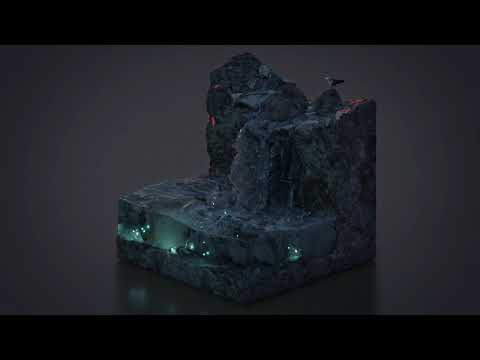
At last I’ve finished this animation) Thanks for your advices, RLGUY
Hello, @RLGUY
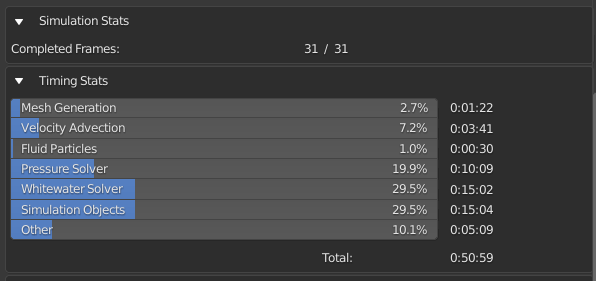
I have a question about the speed of the addon.
What part of the miscalculation is the bottleneck for performance and parallelization?
If we hypothetically run the simulator on a computer with 100 TB of RAM, and set the resolution to 5000, then at which stages of the simulation will the addon start spending the most time?
What’s the bottleneck if I don’t use white water, viscosity, surface tension, mesh generation? Calculation of FLIP particles only.
I have 16 GB of RAM, but I cannot use it 100%. I have to wait too long. I usually use a resolution around 200x200x200. Although the RAM allows you to run 400x400x400.
I’m wondering what takes the most time and can the engine be optimized in the future?
Hello! As resolution increases, the bottleneck is almost always the pressure solver and viscosity solver if viscosity is enabled. The technical details are that the pressure/viscosity solver are solving a linear system of equations using a Conjugate gradient method.
The reason why these are the bottle neck is because much of the solver needs to be run single threaded. These solving sections also require processing a large amount of memory and memory transfer speed between RAM->Cache->CPU can be a hardware bottleneck.
The entire engine can be optimized, including these solvers. And it will be, it just takes development time and resources. There is a lot of room for improvement for optimizations in speed and memory usage.
This maintenance update adds support for the Apple Silicon chip, preliminary compatibility for Blender 3.0 Alpha, many bug fixes, and other improvements.
Hey there! I noticed in the weekly changes thread over on DevTalk that Brecht submitted a patch for exporting motion blur velocities via attributes: https://developer.blender.org/D12305
Will this have any future implications in terms of more robustly supporting motion blur within the addon? 
Hey! I was quite excited when I saw this. I haven’t had a chance to test this yet, but will be able tomorrow.
The one worry I have is that the patch only mentions ‘Export’ of the velocity attribute. And that makes me think it only affects how velocity data is accessed/exported to Cycles and other renderers. What we need is a way to import velocity data from Python into the velocity attribute.
A few months ago I was trying to access the velocity attribute to add our velocity data but found out it seemed to be read-only and would not work. To work around this, we just renamed our velocity attribute to flip_velocity. Really hope that we’re now able to now store that data into the standard velocity attribute. If so, motion blur support could be as simple as just renaming the attribute in code.
Just tested this, and it looks like we’re not able to modify the velocity attribute with our own data, so I guess it may still be read-only. Maybe things will change in the future or there will be a workaround.
I did some more experimenting, and it looks like motion blur on the fluid surface will work - and without any modifications to the FLIP Fluids addon!
Although we cannot modify the velocity attribute directly, we can transfer and scale the existing flip_velocity attribute and transfer this to the velocity attribute using a node setup:
Enabling motion blur in Cycles as well as on the fluid_surface object properties, it appears this does render with correct motion blur vectors.
This will not work for whitewater particles at the moment. I am not sure if there is a feature in geometry nodes to transfer attributes to instances yet, but there could be. I’ll look into it. If anyone knows, let me know as it has been some time since I have kept up with the geometry nodes development.
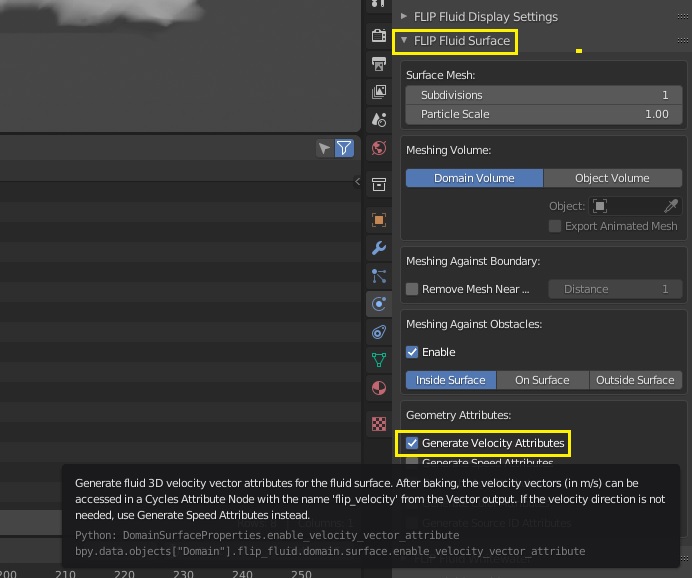
Note: the velocity attribute feature is hidden in the latest FLIP Fluids 1.1.0 due to a bug (T88811) preventing this from being considered as a stable feature. This feature can be unhidden from the FLIP Fluid Surface panel by enabling the Developer Tools option in the addon preferences menu.
Here is a basic .blend file setup:
geometry_node_motion_blur_setup.blend (1.3 MB)
Great news that it was easy enough to implement without requiring any modifications to the addon! And impressed with how effortlessly geo-nodes could edit and rewrite the attribute to achieve the correct result. Curious if there’s a reason that you scaled the flip_velocity attribute by 3 when transferring, or if that just dialed in how much blur is applied to the motion? It’s a shame about the API bug reducing stability, hopefully that can be fixed by the devs soon!
And with regards to transferring attributes to instances, if Jacques’ DevTalk post from 16th is something to go by, it’s unfortunately still not possible yet; but something the devs are aware of and intending to support in the future:
Another thing we don’t support yet but should eventually are attributes on instances. Again it would probably be easier for artists to instance first, and then add attributes to the instances. Those attributes could then be used either by later processing steps or the renderers. Often it is conceptually important whether an attribute is on the instance or on e.g. every vertex. Shaders are build with that in mind.
Thanks for the info on instancing, that is very helpful to know!
The scale value was just used to make the velocities larger to exaggerate the motion blur effect. A value of 1.0 would be the accurate amount to use for rendering.
Hi,
Is it possible to bake Whitewater after baking the whole simulation ?
My goal is to save Whitewater’s computing time and bake it if I am satisfied with the simulation.
Also, is there a big impact on the computation time and on the shape of the simulation if we change the scale of the world? In my scene I want something very “Splashy”, precision is not very important.
Actual domain : 40x20x20m
I do not think you can bake WhiteWater after the initial simulation.
if I recal correctly world size certainly has an impact on how the water will behave, just like I think resolution itself does.
Just adding an update on the fluid surface motion blur. The previous motion blur rendering setup is no longer recommended and contains a legacy geometry node. Legacy nodes will eventually be removed before Blender 4.0 and they also cannot be added as nodes in more recent versions of Blender 3.0.
I have updated the setup to use the newer Geometry Nodes ‘Attributes and Fields’ workflow. The example file can be found in the Experimental Builds package and requires an installation of the most recent FLIP Fluids experimental version (current: v9.1.3, 03-NOV-2021).
The example file can also be downloaded here: motion_blur_rendering_example.blend (1.2 MB)
Notes from the example file:
This example .blend file demonstrates a quick set up for how to render
the FLIP Fluids addon liquid surface with motion blur. This example file
is intended to be used with builds of Blender 3.0 on the date of or later
than October 31st 2021.

Blender 3.0 adds a feature that allows for the FLIP Fluids surface to be
rendered with realistic motion blur, something that was previously not
possible. Whitewater motion blur rendering is not yet possible, but will
hopefully be added by the Blender developers at a later date.

This set up uses a simple Geometry Node network to transfer the FLIP Fluids
addon velocity data attribute into Blender's own velocity attribute, which
can then be used by the Cycles renderer for motion blur rendering.

How to use this example file:
    - Bake the fluid simulation
    - Render an image or an animation
        - Note: motion blur rendering is not displayed in viewport render
    - The node network and data values can be viewed by selecting the
      fluid_surface object. The GeometryNode modifier can be view in the
      fluid_surface modifiers tab.

How the node set up works:
    - The FLIP Fluids addon stores its own custom surface velocity vectory data
      into the attribute named 'flip_velocity'.
    - A vector math node scales this vector and stores the result into Blender's
      internal velocity attribute which is named 'velocity'.
    - The amount of motion blur can be optionally scaled by adjusting the 'Blur Scale'
      value in the fluid_surface modifiers tab.
    - The geometry node attribute data values can be viewed in the spreadsheet window
      when the fluid_surface object is selected.

Additional notes:
    - These notes may be helpful for if you want to set up motion blur rendering on a
      new scene.
    - By default, the option to generate the 'flip_velocity' attribute is hidden. This
      option can be unhidden by enabling the 'Developer Tools' option in the FLIP Fluids
      preferences menu. Afterwards, the option to generate velocity attributes can be
      enabled the FLIP Fluid Surface panel.
    - Generating velocity attributes is still considered an experimental feature due to
      a bug in Blender that can cause render crashes
      (https://developer.blender.org/T88811). Until this bug is fixed, a workaround is
      to render from the command line.
    - Motion blur rendering is only supported in Cycles. Motion blur rendering must be
      enabled in the Render Properties menu as well as on the fluid_surface Object
      properties menu.
    - The 'flip_velocity' attribute is added as a Group Input node in the node network.
      The input attribute name (flip_velocity) is specified in the GeometryNode modifier.
    - Blender's 'velocity' attribute is added as a Group Output in the node network.
      The output attribute name (velocity) is specified in the GeometryNode modifier.
Here’s an example animation using motion blur, created for Halloween!