Hello, @RLGUY
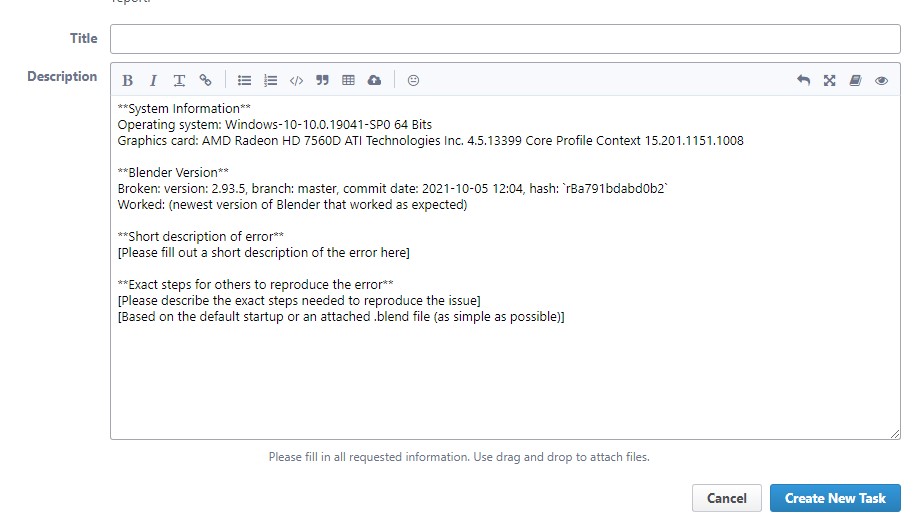
I want to propose to implement a new function for the addon. I would like to be able to quickly create bug reports. Blender has a button on the Help > Report a Bug menu. Is it possible to implement a similar button, but for an addon? For this button to open github issues and automatically fill in the information. OS, blender version, CPU, GPU, RAM, addon version. In the blender bug tracker, this information is automatically filled in:
1 Like
Hey, that’s a good idea. I did not know that the Report a Bug menu did that.
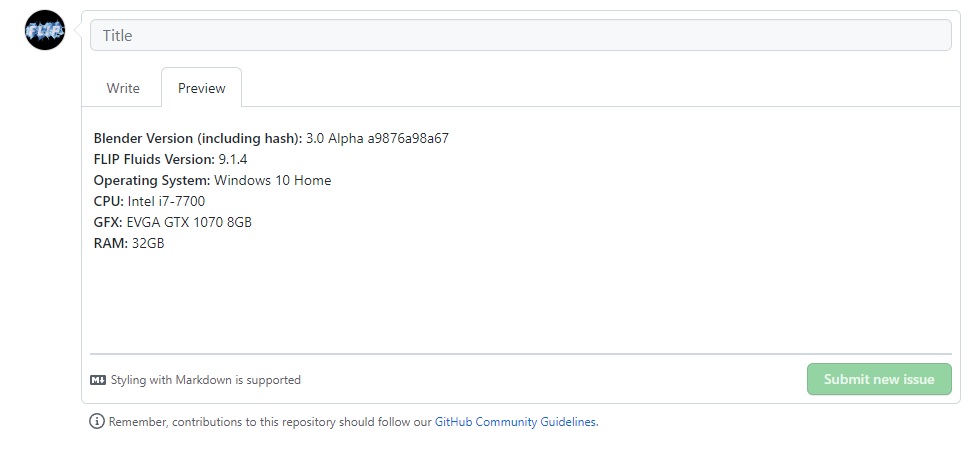
We can pre-fill the GitHub issue form within the URL and get the user’s system/version info using Python.
For example, this URL
https://github.com/rlguy/Blender-FLIP-Fluids/issues/new?body=**Blender%20Version%20(including%20hash):**%203.0%20Alpha%20a9876a98a67%20%0A**FLIP%20Fluids%20Version:**%209.1.4%20%0A**Operating%20System:**%20Windows%2010%20Home%20%0A**CPU:**%20Intel%20i7-7700%20%0A**GFX:**%20EVGA%20GTX%201070%208GB%20%0A**RAM:**%2032GB
will fill the issue text like this:
2 Likes
@RLGUY can you add such a feature?:
Automatically turn on the Motion Blur parameter for the generated fluid_surface objects.
For a long time I could not understand why blurring does not work until I remembered about this parameter:
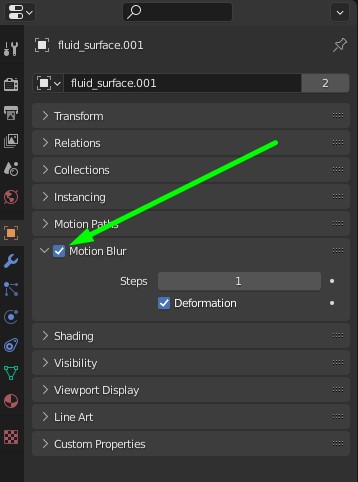
The FLIP Fluids addon disables the Motion Blur option on the fluid_surface (and other simulation mesh objects) due to a possible rendering issue.
If there is no motion blur velocity data on the fluid_surface object, Blender will try to calculate it’s own blur data by subtracting the mesh vertex positions between frames. Since the surface changes topology between frames, the generated data does not make sense. This issue happens when the surface contains the same number of vertices in two frames, which is more common in lower resolution simulations or simulations with static liquid or small amount of movement.
This issue results in an incorrect frame render, but the main issue is that rendering bad motion blur data causes very long render times. The frame could take hours to render.
There are other areas of Blender where topology changes can cause issues (Ex: Alembic cache) since only the number of vertices is checked internally in Blender. It has been mentioned that fixing this is a ‘To do’ for future development, but running a full topology check can cause a considerable slowdown in Blender.
In future development when Geometry Nodes become more stable and complete, we may be able to detect when motion blur data is available and provide a reminder to enable the motion blur option, or to automatically set the option. An operator to set up motion blur rendering could also be useful.
1 Like
There is a typo in the wiki:
In the Playback Offset Settings section. Parameter names are written like this:
_Playback Mode_
_Frame Offset_
Thanks! Just fixed this.
1 Like
@RLGUY hello.
I created multicolored chocolate:

And I saw a your post on twitter asking: How did Pavel Blend mix different colors?
To specify the color, I used an experimental add-on function, with which the liquid source can have its own color. I created 6 fluid sources (scaled cubes) and gave them different colors.
6 Likes
That’s neat, tends to flicker here and there where colors are mixing but seems to work! What is this experimental function? Is it part of the beta releases of Flip Fluids?
This feature is available in the latest version of the addon. I used the color attribute for the fluid sources:
https://flipfluids.com/weekly-development-notes-55-new-geometry-attribute-features/
1 Like
If I understand correctly this will be merged into main with blender 3.1 seeing the 3.1 release notes page:https://wiki.blender.org/wiki/Reference/Release_Notes/3.1/Cycles
1 Like
Thanks for the update! This looks like great news.
Just tested very quickly with 5,900,000 whitewater particles and the point cloud looks very promising for memory efficiency and render speed.
1m11s for instance rendering vs 14.5s for point cloud rendering.

What is really amazing is how responsive the viewport is in displaying the point clouds, even in rendered view. Loading this many instances into the viewport makes Blender almost impossible to work with.
This is the geometry node setup I used to convert the whitewater vertex mesh to points:

Next I’ll need to test whitewater attributes on point clouds as well as motion blur. Looking forward to it!
13 Likes
Testing other pointcloud functionality today, but ran into problems rendering motion blur using vectors set by geometry nodes (no motion blur rendered at all).
Not sure if it’s a bug or just has not been implemented into Blender yet, so I’ve opened a bug report here: https://developer.blender.org/T94622
Edit: and just a few minutes after submitting the report, the issue has been confirmed. And a fix has already been submitted just a half hour later: https://developer.blender.org/D13719
9 Likes
More pointcloud testing today!
Ran into another problem. When using pointcloud attributes in a shader, rendering on the GPU results in a CUDA error and rendering on CPU results in a crash. I have opened a bug report here: https://developer.blender.org/T94651
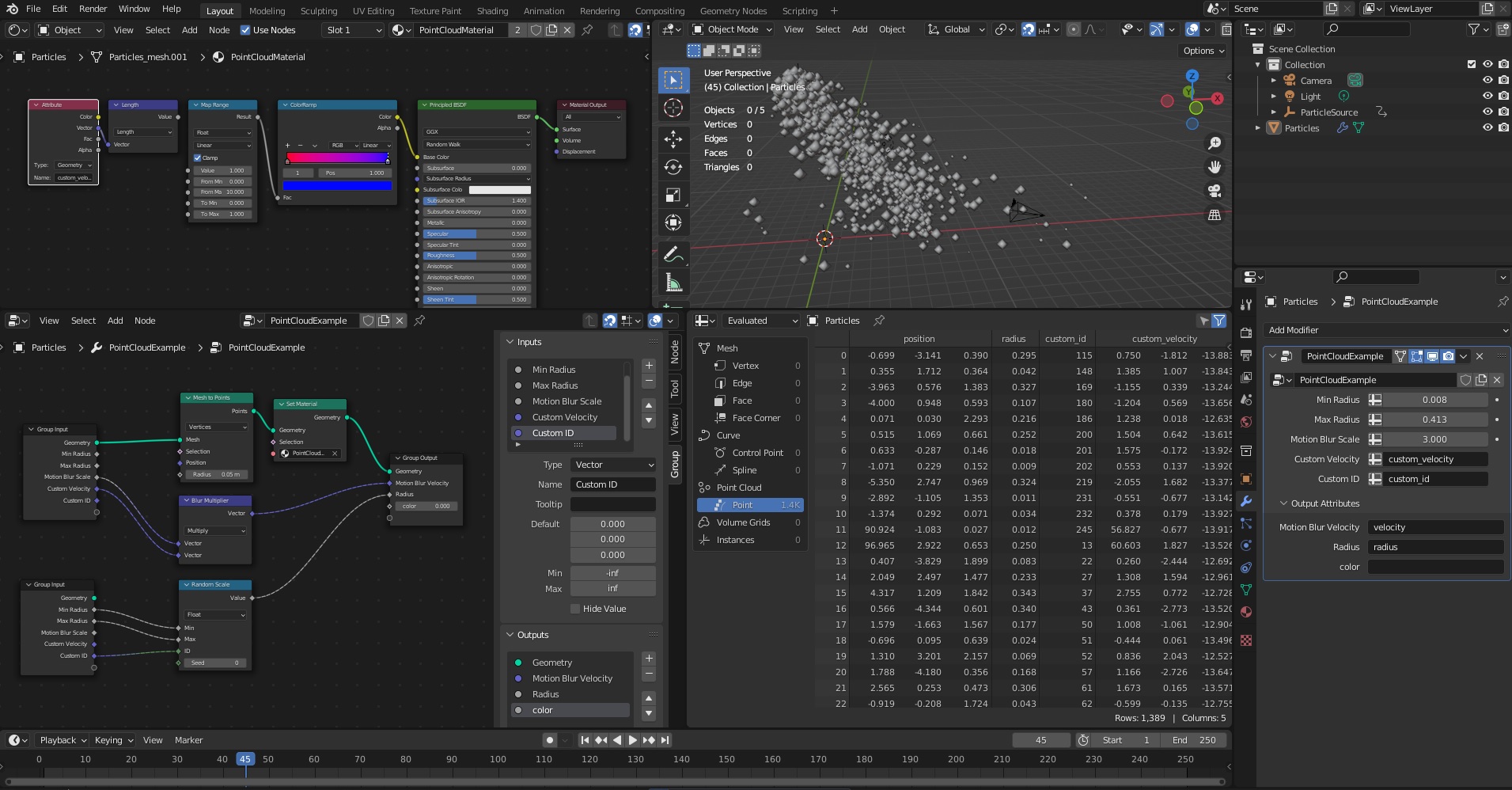
The good news is that it looks like we can export a whitewater ID value for each particle and use this in a geometry node set up to vary the scale of each particle. Using our own custom ID value makes it so that each particle scale is consistent between frames. Without this value, the scale would be randomized on each frame.
11 Likes
Hi. Will FF from August 2021 work in Blender 3.0 ?
Hi, the earliest version of the FLIP Fluids addon that is compatible with Blender 3.0 is version 1.2.0 (Nov 25 2021). The latest version is 1.2.1 (Dec 03 2021).
Thank you so much! I was using an old one in 3.0 and actually worked out  but now I am using the updated version.
I am creating a scene I would like to ask a few things. Is this the right channel to share it?

I have a few questions about how to optimize the realism of the water and all the particles associated with it in this scene. Thank you
No problem! Yes, this is a good place for questions. We have some tips for rendering whitewater here that may help: Whitewater Rendering Tips.
In short, it may help to generate more whitewater particles and render them smaller, and if possible for the effect, it’s best to view whitewater from a distance.
I’m not as knowledgeable of render/lighting/material set ups compared to others, so perhaps others may have some good tips.
The pointcloud motion blur bug (T94622) has been fixed and is now in the daily Blender 3.1 builds! I also ran into another bug related to Alembic export crashing on playback (T94674), and this has also been fixed.
After some testing, it looks like we will be able to implement point clouds within the addon that have functionality for motion blur, varying sized particles, and Cycles shading based on attributes exported by the simulator. Note: vector attributes will not work until T94651 is fixed. Only sphere shapes are supported for pointclouds, but maybe in future development we’ll be able to add varying shapes and possibly rotations.
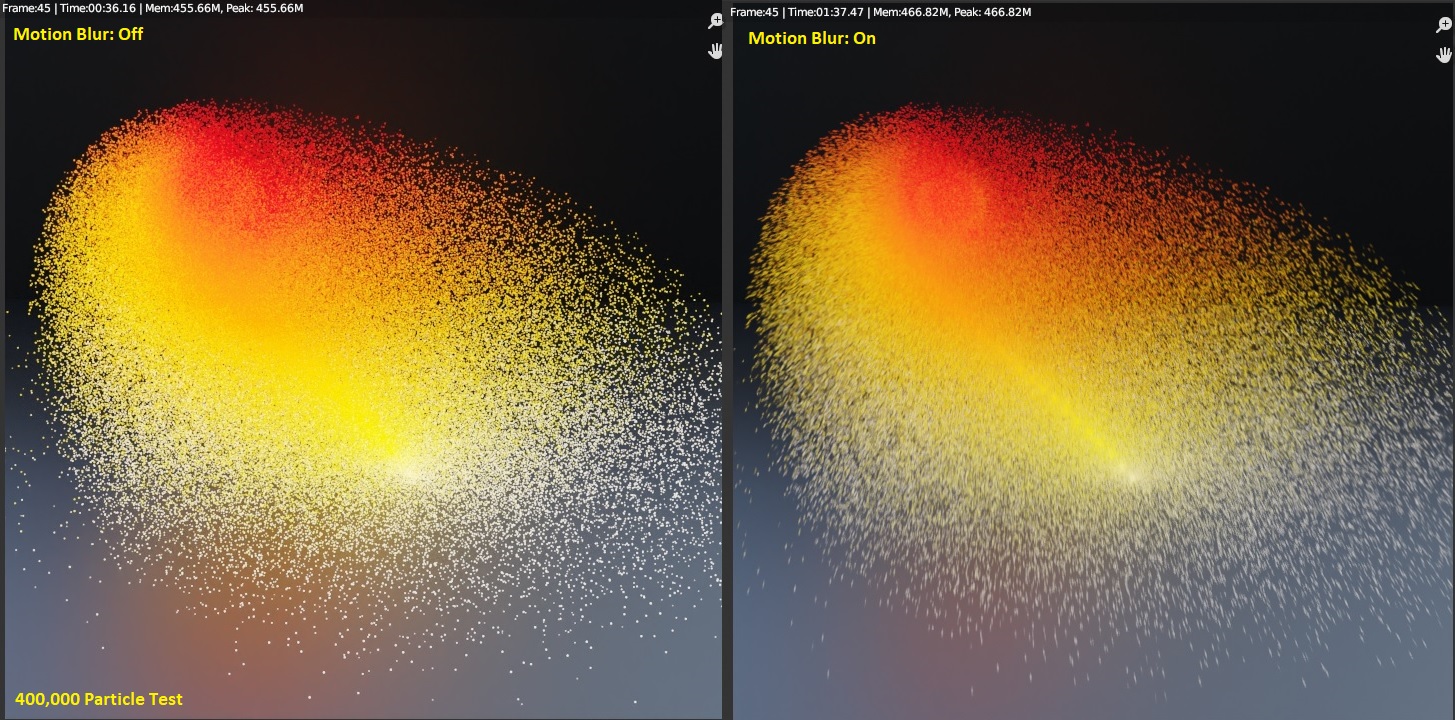
In this test of 400K particles, rendering without motion blur took 36s while rendering with motion blur took 1m37s. That’s a great improvement to render time over using instances! Using the older instance motion blur workaround for Blender 2.79 took upwards of an hour to render just 30k particles.
Unfortunately, using these features (as well as all other attribute features in the addon) will result in frequent render crashes due to this bug: T88811. Rendering from the command line will be necessary to prevent render crashes until this is fixed.
Sidenote on T88811 - Render crash when using Python API to modify object Attribute data in frame_change_pre handler:
The issue has not been confirmed yet and the status is ‘Needs Triage’.
For fun, I tried automating the crash test in the above issue using the example file.
The render was run 1618 times. 1615 attempts resulted in a crash while 3 attempts successfully rendered all 1000 frames. Here is a histogram of the crash frequency on my system:
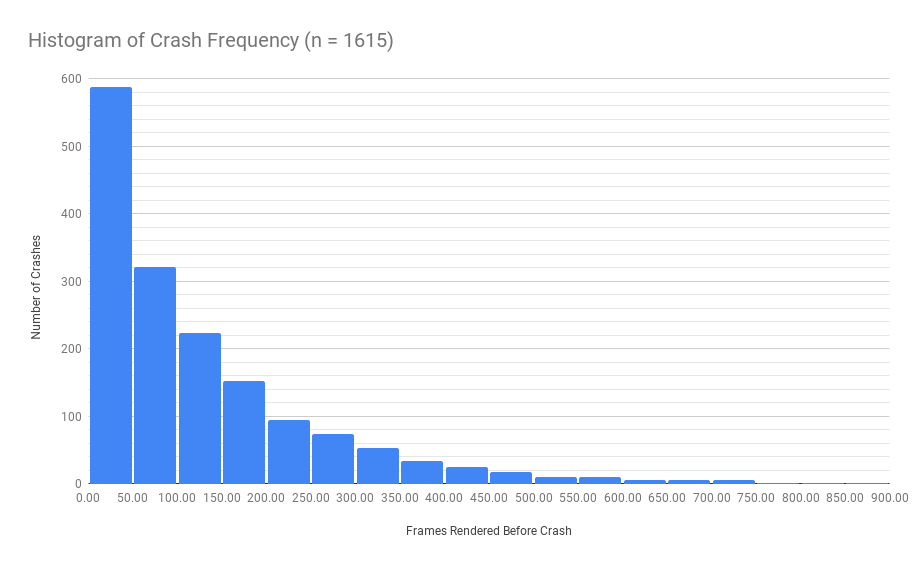
Over 50% of the attempts crashed before frame 100, or less than 50 seconds on my system.
Mean: 125
Standard deviation: 132
Min: 1
Max: 853
6 Likes
After some testing, it looks like we will be able to implement point clouds within the addon that have functionality for motion blur, varying sized particles, and Cycles shading based on attributes exported by the simulator
These are really great news! Thanks for the update
1 Like
Great to see these updates! Please keep us posted on your progress! Super interesting to see
1 Like