Tried using the new 2.2 alpha (luxblendcore with openCL) with OIDN but it just shows me a black image instead of denoised.
The noisy image shows correctly. Any ideas what might be the issue ?
Has anyone experienced this kind of luxcore behaviour ?
Switch to renderlayer and choose denoise😊
That is precisely what I did. That is the issue… it’s not working for me and I wonder why.
All the rest seems to work fine.
OK. I guess I have the issue - my oldtimey AMD CPU seems to not run SSE4.1 commands or sth…
So I guess these denoisers are CPU based - right ?
Yeah OIDN is CPU only
The latest OIDN release had a change “Lowered the CPU requirement to SSE4.1”: https://github.com/OpenImageDenoise/oidn/releases/tag/v0.8.1
We probably have the older version in Lux where SSE4.1 is not yet supported.
2 Likes
We are using v0.8.1. I think Djtartak CPU doesn’t support the SSE4.1 too (he wrote “my oldtimey AMD CPU seems to not run SSE4.1”).
On the topic of bias intruded by cache it is currently almost non-existent. Where cache mostly introduces more lightbounces to hard to reach areas but gives near exact same result as Pathtracing only:
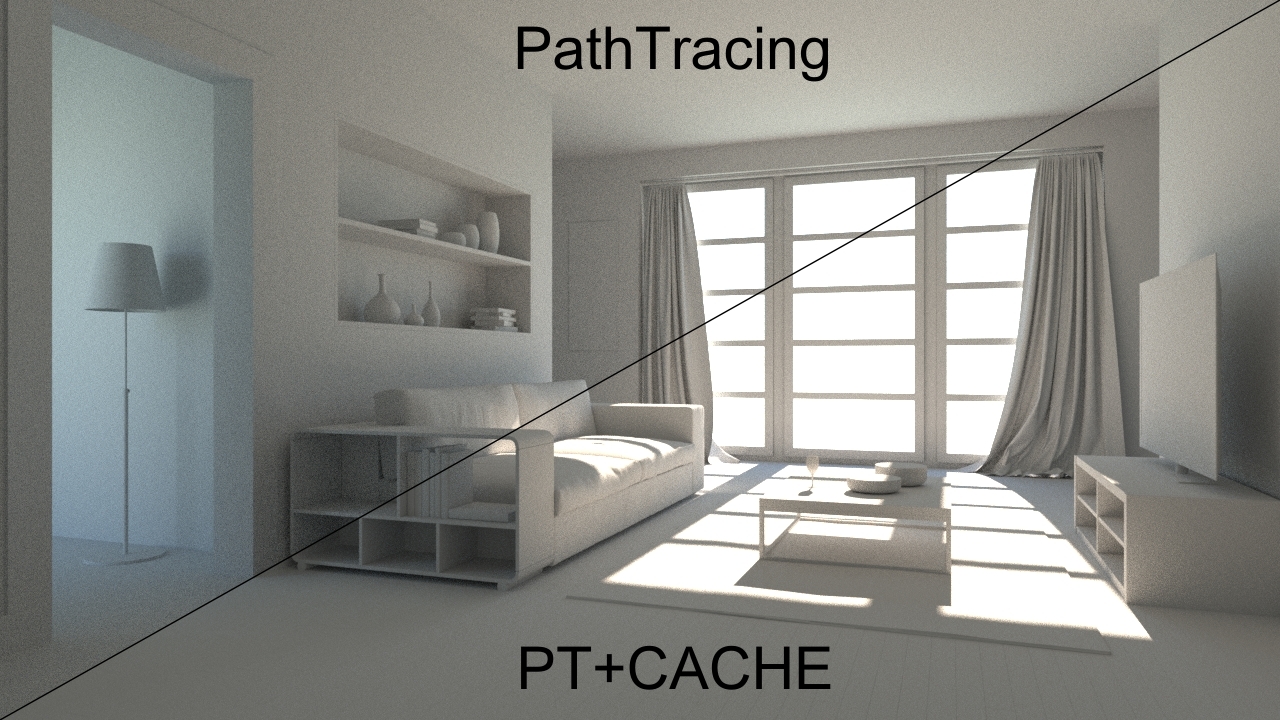
3 Likes
Does LuxCoreRender not using Custom Normal Data?
I’ve tested this simple scene with model made using Weighted Normal Modifier from Blender 2.80.
Cycles working fine in 2.80 and also in 2.79b but LuxCore is producing glitches in the bad topology areas.
Cycles 2.80:

LuxCoreRender Path+Metropolis:

It’s complicated to get this data from Blender. So far it was not implemented.
See https://github.com/LuxCoreRender/BlendLuxCore/issues/120#issuecomment-439108323
Bummer, it’s my new favourite workflow.
Still I’m impressed by LuxCoreRender even in current form and I will be waiting patiently for it 
How can I activate OIDN in the Windows Theory Studios build?
I did install the latest version (the 2.2) but I am not finding how to increase-decrease the intensity of lights. I am uploading a point or area light (or even an object with emission node) but whenever I try to change the values on the related tabs there happens nothing. What do I have to change for altering the light intensities of non-hdri lights?
Luxcore camera has by default autobrightness on. Go to camera settings and in tonemapping turn of autobrightness
1 Like
Regarding all the comparisons: It’s fine to compare to PT to PT+Caching. So if Luxcore has caching, that’s great! No one want’s to render pure PT just for the sake of feeling like they are “not cheating”. In fact, secondary cached GI often actually increases accuracy, as people can afford more bounces than they can afford with pure PT. The whole biased/unbiased debate is a nonsense under production conditions.
That being said:
It’s not ok to throw “simplify AO” thing into the mix. Just adding constant overlay of ambient lighting multiplied by AO into your scene will fail in many scenarios. Especially darker, more atmospheric lighting scenarios, like evening. Or scenarios where one camera view captures multiple areas of image with very varying amounts of indirect lighting intensity. Simplify AO is an ugly fake that comes with a severe compromise in resulting image lighting quality, while secondary GI caching does not. Those two should not be compared.
4 Likes
There is no simplify AO in luxcore, there is just pathtracing and caching… Or bidir…
But I’m not sure you meant luxcore when talking about that…
Anyways there are basicaly no tricks in luxcore similar to AO or simplify AO, there is only variance clamping and cache… And caustic cache that should allow for fast SDS with pathtracing hopefuly soon.
I didn’t mean LuxCore.  I mean LordOdin comparing his shaman build to LuxCore with proper light transport. Apples to potatoes comparison
I have nothing against LuxCore BTW. It’s a solid renderer for being open source. It’s just that in a typical opensource style, the user experience is garbage So I’ll rather render slower in Cycles knowing that my artist time, which is more expensive, won’t be wasted
2 Likes
Agreed. The increasing amount of exquisitely looking Eevee renderings is the best proof that it’s all relative. 
I recommend you this tutorial to feel better in luxcore when you come from cycles :
1 Like
Any key points you can make out that should be improved?
I am very open to suggestions. One of the main reasons why I rewrote the whole Blender addon from scratch was that I wanted to improve user friendliness.
At the moment I am collecting ideas for simplifying and improving the render settings, warnings etc., many users have already posted their ideas: https://github.com/LuxCoreRender/BlendLuxCore/issues/243
2 Likes