Objects: http://www.youtube.com/watch?v=RRb8YRyL4Xs
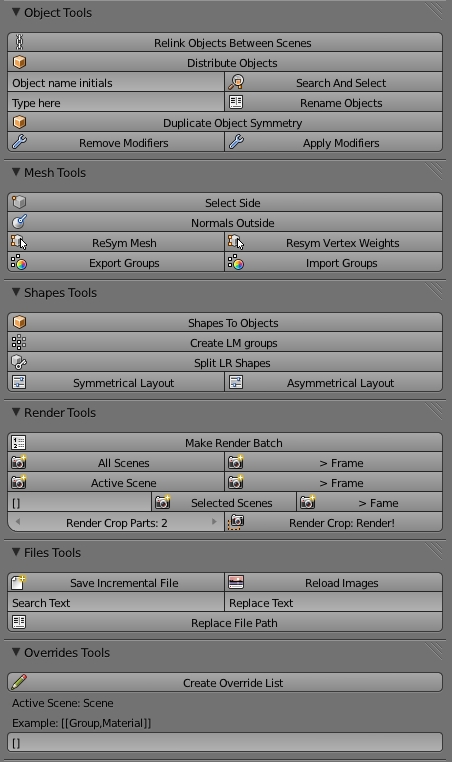
- Distribute objects in the space.
- Search and select objects by your initials.
- Rename objects.
- Duplicate objects simmetrically.
- Remove all modifiers in the selected Objects.
- Apply all modifiers in the selected Objects.
Meshes: http://www.youtube.com/watch?v=YXRgpZVqB2s
- Select the vertices minor to zero in x.
- Push all normals outside in selected objects. Good for quality checklist!.
- Recover the simmetry of the object and create two uvs.
- Recover the simmetry in the uvs.
- Export & Import vertex groups. Good for save armature settings.
Shapes: http://www.youtube.com/watch?v=OqhkFZjwZG0
- Create one object per each shape. Good for export to other platform.
- Create 2 vertex groups for mix shapes.
- Connect all shapes with the “L R” groups! Good for facial rigs.
- Create a 2D panel for mix this shapes.
Files: http://www.youtube.com/watch?v=ZWEgjP_9v1w
- Make an increment of scene version. Example: _v01 _v02
- Reload all images in the .blend.
- Search and Replace filepaths in the .blend.
Hi again,
I copied your awesome rename objects & search & select functions & put them in their own script.
# ##### BEGIN GPL LICENSE BLOCK #####
#
#  This program is free software; you can redistribute it and/or
#  modify it under the terms of the GNU General Public License
#  as published by the Free Software Foundation; either version 2
#  of the License, or (at your option) any later version.
#
#  This program is distributed in the hope that it will be useful,
#  but WITHOUT ANY WARRANTY; without even the implied warranty of
#  MERCHANTABILITY or FITNESS FOR A PARTICULAR PURPOSE.  See the
#  GNU General Public License for more details.
#
#  You should have received a copy of the GNU General Public License
#  along with this program; if not, write to the Free Software Foundation,
#  Inc., 51 Franklin Street, Fifth Floor, Boston, MA 02110-1301, USA.
#
# ##### END GPL LICENSE BLOCK #####

# <pep8-80 compliant>

bl_info = {
    'name': 'Object Rename',
    'author': 'Oscurart, meta-androcto',
    'version': (0,1),
    'blender': (2, 5, 7),
    'api': 36810,
    'location': 'ToolShelf',
    'warning': '',
    'description': 'Rename Selected objects',
    'wiki_url': '',
    'tracker_url': '',
    'category': 'Object'}

import bpy
import math
import sys

class ReNameTools(bpy.types.Panel):
    bl_space_type = 'VIEW_3D'
    bl_region_type = 'TOOLS'
    bl_label = "Object Rename"


    def draw(self, context):
        active_obj = context.active_object
        layout = self.layout
        col = layout.column(align=0)
        row = col.row()

        col.label("Rename tools:")
        row = col.row(align=1)
        row.prop(bpy.context.scene,"RenameObject")
        row = col.row(align=1)
        row.operator("object.rnm",icon="SHORTDISPLAY")

        col.label("Select tools:")
        row = col.row(align=1)
        row.prop(bpy.context.scene,"SearchSelect")
        row = col.row(align=1)
        row.operator("object.sas",icon="ZOOM_SELECTED")


##------------------------ SEARCH AND SELECT ------------------------

## SETEO VARIABLE DE ENTORNO
bpy.types.Scene.SearchSelect = bpy.props.StringProperty(default="Type Here")


class SearchAndSelect(bpy.types.Operator):
    bl_idname = "object.sas"
    bl_label = "Search & Select"
    def execute(self, context):
        for objeto in bpy.context.scene.objects:
            variableNombre = bpy.context.scene.SearchSelect
            if objeto.name.startswith(variableNombre) == True :
                objeto.select = 1
                print("Selecciona:" + str(objeto.name))
        return("FINISHED")

##-------------------------RENAME OBJECTS----------------------------------

## CREO VARIABLE
bpy.types.Scene.RenameObject = bpy.props.StringProperty(default="Type here")

class renameObjects (bpy.types.Operator):
    bl_idname = "object.rnm"
    bl_label = "Rename Objects"
    def execute(self,context):

        ## LISTA
        listaObj = bpy.context.selected_objects


        for objeto in listaObj:
            print (objeto.name)
            objeto.name = bpy.context.scene.RenameObject
        return("FINISHED")


def register():
    bpy.utils.register_module(__name__)
    pass


def unregister():
    bpy.utils.unregister_module(__name__)
    pass


if __name__ == "__main__":
    register()
I can use this to replace the old rename objects script that has been broken for sometime now.
Thanks.
If you can drop in to irc freenode #blenderpython it would be good to have a chat.
I’ll do a wiki & tracker page for the object rename& put it into Contrib scripts right away
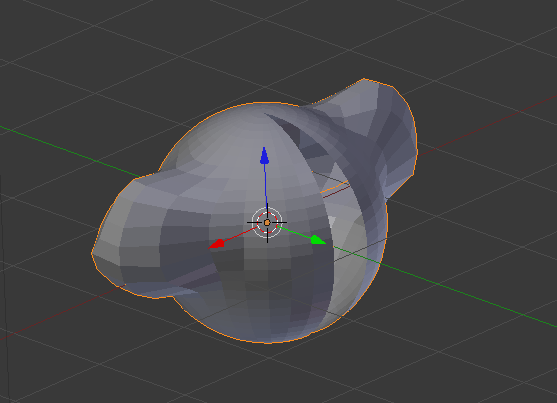
Hi res , yes, the sphere’s vertices aren’t X = 0. For this reason resym remove vertices.
Try with susanne model.
Select a vertex of sphere equal to 0 in x.
Run this script several times.
You can see how the vertex is moved in the axis and away to X
import bpy

bpy.ops.object.mode_set(mode='OBJECT', toggle=False)

for i in bpy.context.object.data.vertices:
    if i.select:
        print(i.index)
        i.co=i.co*1.5
        print(i.co)




 … thank you for the update. :yes:
