PresetterProfessional
PresetterProfessional, besides being questionable use of the English language, is an addon for Blender 2.80+ that lets you save and recall presets for Shading, Visibility, Snapping, and Transform Settings. Beyond saving individual categories of settings, PresetterProfessional (PP) has a few convenient combo Presetters that combine categories of settings to speed your workflow even more.
Presets for The 3d View
PresetterProfessional lets you store and recall settings in several categories.
- Object Types Visibility
- Viewport and Object Gizmos
- Viewport Overlays
- Shading Settings - Including shading mode and x-ray settings
- 3d Cursor Location and Rotation
- Snapping Settings
Powerful Combo Presetters
- Combination Shading and Overlays Presets - Get all of your settings for the way you work in one preset instead of having to change multiple settings every time you change tasks.
- Orientation and Pivot Combos - This powerful Presetter lets you store your favorite combinations of Pivot and Orientation. This is great when used with the 3d Cursor Presetters. Set your Orientation and Pivot Point to 3d Cursor for an ultra intuitive workflow. Set Local Orientation, Individual Origins, and Only Origins in one go. These could almost be seen as workflow presets.
Presetters Crowding Your Menus?
Let’s face it. You probably don’t need to recall settings for all of these categories. If you have no use in changing Gizmo settings en masse, just turn off the option in the Addon Preferences.

Feast Your Eyes Upon All of the Presetters Available!

Object Type Visibility and Selectibility
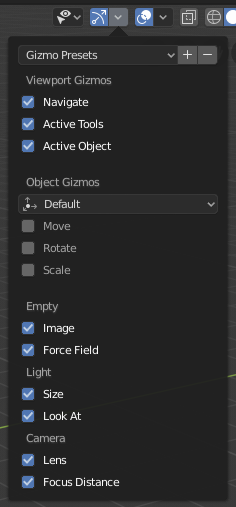
Store and recall gizmo availability.

Store the visibility of the overlays you use for your different workflows.

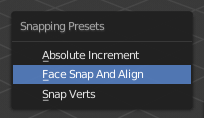
Save snapping settings like Projection, Alignment, and Target

Recall Cursor location and rotation from the 3D Cursor panel…

…or from the Pivot Point pop up since it is common to set the cursor as a pivot point.

Powerful combo Presetters are available, like Shading and Visibility…
…or all of your transform settings (pivot and orientation).
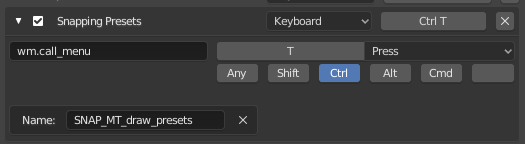
You can assign a keyboard shortcut to make your list presets popup:

Here’s how you would set up the keyboard shortcut:

Changing the menu name in the Name slot will change which preset list is displayed:
Orientation and Pivot Presets - ORPIV_MT_draw_presets
Snapping Presets - SNAP_MT_draw_presets
Overlays and Shading Combo Presets - VIEW3D_MT_view_presets
Overlay Presets - OVERLAY_MT_draw_presets
Gizmo Presets - GIZMO_MT_draw_presets
Oblect Type Visibility Presets - VIS_MT_draw_presets
Shading Presets - SHADE_MT_draw_presets
Cursor Location and Rotation Presets - CURSOR_MT_draw_presets
Download now from GitHub
Preliminary support for 2.81 and 2.82 can be found here: GitHub