Hi, I want to separate this embossed pattern from the rest, but after applying the embossing, I removed the mask. How can I do this with vertex paint? I will paint this relief with smart gold/metal material in substance painter. Is there an alternative way other than this? Thanks.

I would have done it with an image textures and displacement modifier, but, yes you can paint vertex colors and use them in the material to mix or mask together different colors/textures/shaders.
Depending on the topology of the object you might also be able to simply use the vector of one axis and a color ramp to separate the raised area from the flat area.
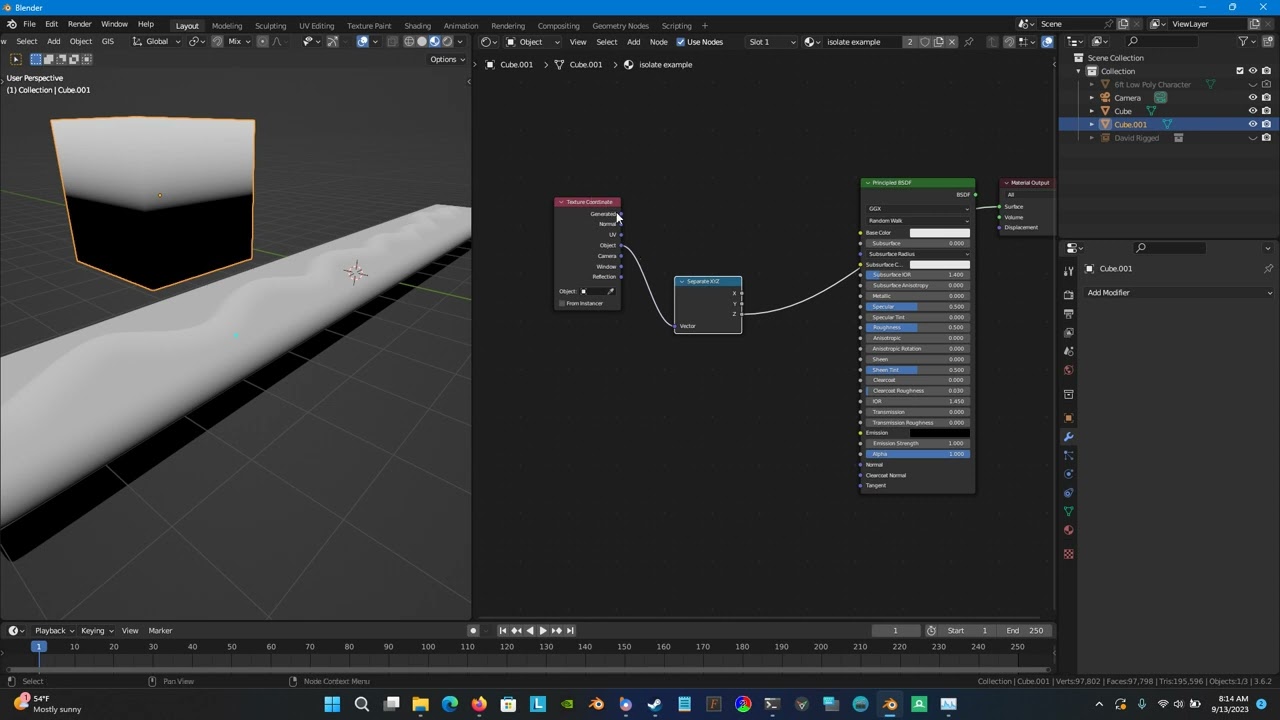
Can you share the file?
I selected the jpg image of the pattern using stencil masking and painted it on the plane. After selecting the mask and pattern and pressing shift+k, the plain area and the pattern became the same color.
Is there any way to do this in Substance Painter with any layer like paint layer?
Don’t know. I’ve never used substance.
1 Like
Thanks a lot for video. Do i need to click “Set Vertex Colors (shift+k)” after doing this in shader editor?
I don’t know. I’ve never really used vertex colors much.
You can use vertex colors to define different areas to mix shaders: