Any News on a Mac OS version…Id literally Pay for one at this point. It would be helpful to develop one pleeeeeaaaasssseeeee.
2 Likes
Thank you. Is there a version deviation 2.93 because it does not work on it
1 Like
Is there an update to the version of Blender 2.93 ?
3 Likes
Hi,
I’ve been using the plugin for a while and it’s simply awesome! Thanx allot.
Another minor bug I’d like to report:
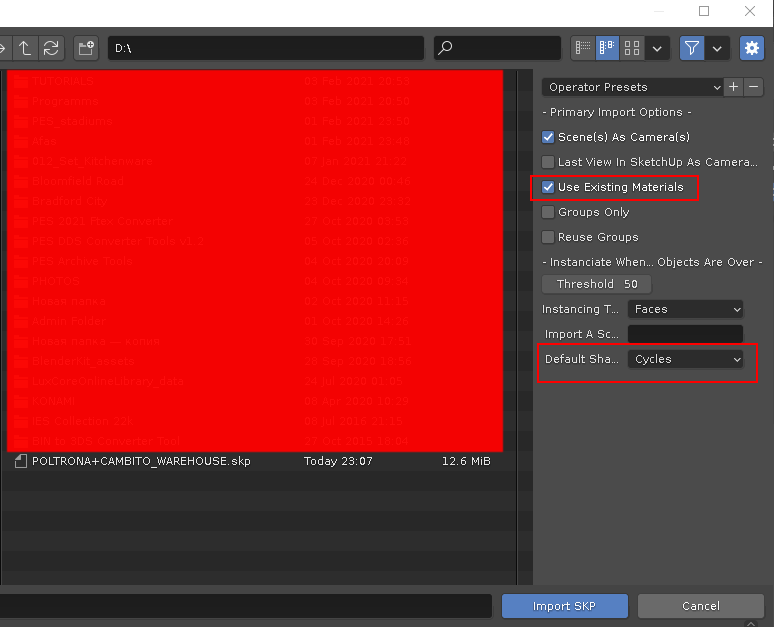
When importing Sketchup models Blender always switches to Cycles, any chance this can be modified so it doesn’t change the current selected render engine?
Support 3.00 alpha and Sketchup 2020
3 Likes
If I remember you must disable use existing materials for gives the result you wants.
Hi. Is it you updated the plugin?
Yes, I Forked this and updated it
2 Likes
Is it possible if you can to port some plugins from SU’s Ruby sscritpts?
P.s.: Because SU has a lot of great parametric modeling tools for speed up process.
1 Like
ok cool,
But where in Blender can I find this option
On the right level panel: Use existing materials (trying use previous pre-made materials with converting them to Cycles)
I’m getting "Python: Traceback (most recent call last):
File “C:\Users\rogal\AppData\Roaming\Blender Foundation\Blender\2.92\scripts\addons\SketchUp_Importer_init_.py”, line 886, in execute
context, **keywords)
File “C:\Users\rogal\AppData\Roaming\Blender Foundation\Blender\2.92\scripts\addons\SketchUp_Importer_init_.py”, line 185, in load
self.write_duplicateable_groups()
File “C:\Users\rogal\AppData\Roaming\Blender Foundation\Blender\2.92\scripts\addons\SketchUp_Importer_init_.py”, line 245, in write_duplicateable_groups
group=group)
File “C:\Users\rogal\AppData\Roaming\Blender Foundation\Blender\2.92\scripts\addons\SketchUp_Importer_init_.py”, line 614, in conponent_def_as_group
ob.layers = 18 * [False] + [True] + [False]
AttributeError: ‘Object’ object has no attribute ‘layers’
location: :-1" error all the time. the models are saved in 2017, 2015, 8 sketchup version.
On my laptop it imports ok. Can anyone tell me what am I doing wrong?
I’m convinced that you have the solution for my problem.
But I simply can’t find that option based on your description.
Do you mean the N-panel or Blender tabs on the right? Which Blender tab?
I can’t find a “Use existing materials” option anywhere
Could you make a ScreenShot?
That would help allot
It will be show when you select import skp file and file browser will show you on the right panel with some options (in that panel disable Use existing materials)
1 Like
Found it.
but when I disable this I get the error that rogalewskip got
and the model won’t import at all while still switching over to cycles!
Does this work on your system?
And do you import SketchUp models with textures?
Maybe this only works when importing SketchUp models without textures.
Does it work in 2.79 or where can I download the 2.79 version?
SketchUp Importer for Blender 2.93.x LTS series is available now.
Link to the release page.
7 Likes
Hi… i’ve been tried this v.023 on several Blender version starting 2.80 until 2.93 but up to now this v.023 by @Arindam et all seems to be “picky”. It does NOT work on some skecthup model but i can not recognise what factor causing that.
If you want to try to reproduce the error, here is the example:
Model ==> Casa 6 by Luis
These were all i got when using v0.23 on Blender 2.93:


and just WON’T work / not imported correctly using v.021 on Blender 2.83 and below:
But when i changed all the add on using the latest version forked by Red Halo Studio here everything were fine on B2.83 or B2.93.
I suggest you using the version forked by this Red Halo Studio in the meantime Arindam’s version being fix for the bug.
WIN7 profesional
Blender 2.83
Blender 2.93 (mod) using Win7 Here
Thank you for this amazing addon.
can you add option to import double sided faces material? sketchup faces with doube sided materiais import 1 side material only, many textures losted.
1 Like