Looks good  Well, maybe she springs back a little too fast/easily.
IMO, animation is an intimidating art, good job practicing it!
2 Likes
So after several weeks of trial and error, trying to create a smoke trail with geometry nodes - I had something that worked, but not something I was completely in love with. The more I looked at it, the more it bothered me.
I purchased Embergen just before Christmas, during a holiday sale - and hadn’t done much more than play around with a couple of fire presets for some future scene that I’ve not even blocked out yet.
But after another “let’s improve the smoke geonode setup” didn’t work out this weekend, I decided to try and create the smoke sim with Embergen.
I’m pretty happy with how it’s turning out. So much more billowy and tendrils, and the shading result a lot easier to composite the way I want it to look

Still need to get more comfortable with that software, but I think I’m convinced (finally) of how I want to create such effects.
7 Likes
More fun with new smoke effects… grabbed this old artwork last night, pulled the layers into AE, and had some new fun with animating the scene.
5 Likes
The smoke sim looks great.
Did you consider trying something more stylized though, a flat shaded anime look? For my taste, the realistically rendered smoke trail doesn’t quite fit the overall style, in particular not her’s. As the smoke is a foreground element and sort of connected to the character, there’s a small dissonance here IMO.
3 Likes
Thanks so much Helmut - I always appreciate your thoughts :).
Funny you should mention the stylization - I’ve been tweaking it the past couple of days, as I found some new settings that made the base render more NPR in the interior areas and smoother edging on all of it.
(and, learned how to better adjust the rising rate).
I’ve also adjusted some color in AE now, and played with the layering - I think it’s gotten better, with harder edges and less fringe-y.
(Also, pondering if I want the smoke to be in 12 or 24FPS; 12 happening in this clip).
6 Likes
Between work and an extended battle with the flu, haven’t spent much time on personal projects in the past few weeks. But this weekend I finally felt some energy and motivation returning, so spent a few hours on a fire effect that I first started attempting about 16 months ago.
Too many failed attempts along the way to even remember (some “meh”, some “gah! no.”), but when I finally worked out a few things last night and finished this new composite - major feelings of happy. It’s getting really close to what I see in my head.
Tech specs, for the curious: all the 3D modelled, animated, rendered in Goo Engine. Fire by Embergen, compositing in AE.
12 Likes
I’m a big fan of the Film Noir look, and over various points over the past few months (years?) I’ve experimented with trying to pull off the “metal blinds over face” look. This isn’t particularly as easy as I’d like in Eevee, due to the lack of a raytracer - can’t just throw a texture map on a light, you have to get some physical geometry involved.
I’ve had some success doing it with Goo Engine in the past, but the setup was somewhat involved and … really only sort of worked.
This weekend I decided to take another shot at this, with completely different techniques. Really happy with how it turned out.
(And if you’ve glanced at my previous post, you’ll notice the animation is identical… for this look dev, it worked fine to have her moving around a bit; no need to make new motion, when just working out shading and compositing.)
12 Likes
Really cool, I like this a lot.
Mind sharing any details?
My inner fool wants me to believe in this kind of stylized context it must be doable strictly in post (something like use screenspace coordinates and warp it via a normal pass)?
greetings, Kologe
2 Likes
Of course. 
That’s actually not a foolish idea, and one that I basically did consider. I know Davinci (and maybe AE? not sure) has support for taking utility passes, then doing interesting things with them on USD mesh data.
IE - “I wonder if i can wrap a light effect around skin, and hair, but keep the distinct border overlaps…hmmm.”
So the thought did cross my mind to explore how I could do it that way, but it felt like … great, now I’ll have to learn a TON of features I’ve never played with, and I’m not even sure if it’s going to work after all the effort.
I really did want to do it totally in post, because SO flexible and fast - but, that’s why i didnt try. Maybe next time I’ll get curious and explore that more.
So, here’s the basic way i did it.
Shader variation below. The main color is a standard goo engine shader setup, and on the top we have a very slight rimlight (edge color) thing going on.
On the bottom, I’m using another shading node that is only using the gobo light (screenshot, wireframe) for the lighting source w/goo Light Groups. It’s a lot like Blender’s Light Collections, except this works at the material level (which I much prefer, for this it’s more powerful than at the object level).
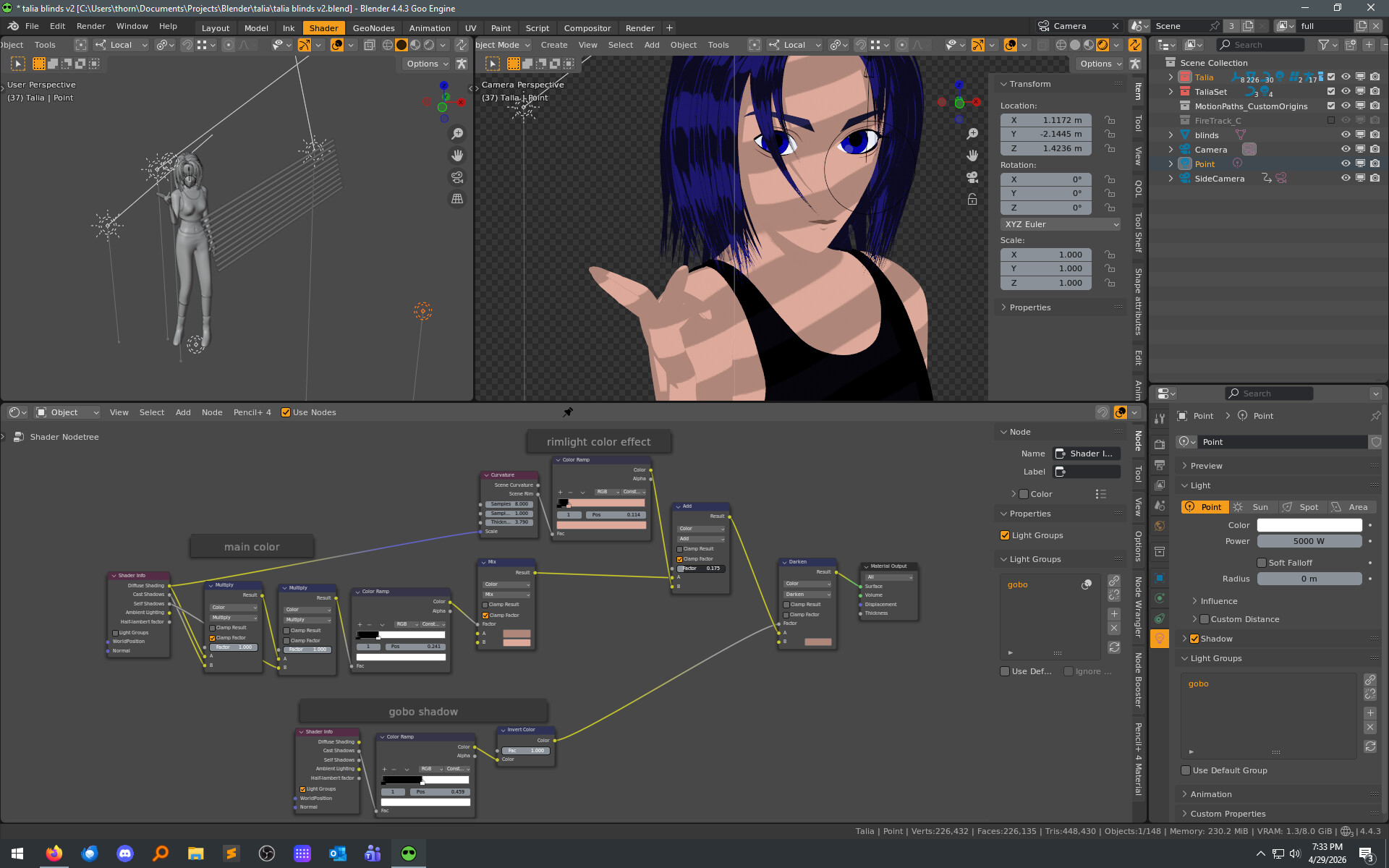
So, this gives me the girl color’s base everywhere i want, and lighted how i want, and I can put the gobo/light anywhere I want with it only making the darker slats and not adding it’s own diffuse lighting.
The composite is pretty simple. Background is a layer with a gradient, and blinds are also just regular AE effect. (Size and angle just matched by eye. Doesn’t have to be perfect.) The shadow is the source girl render from blender, filled with black, blurred slightly and moved over.
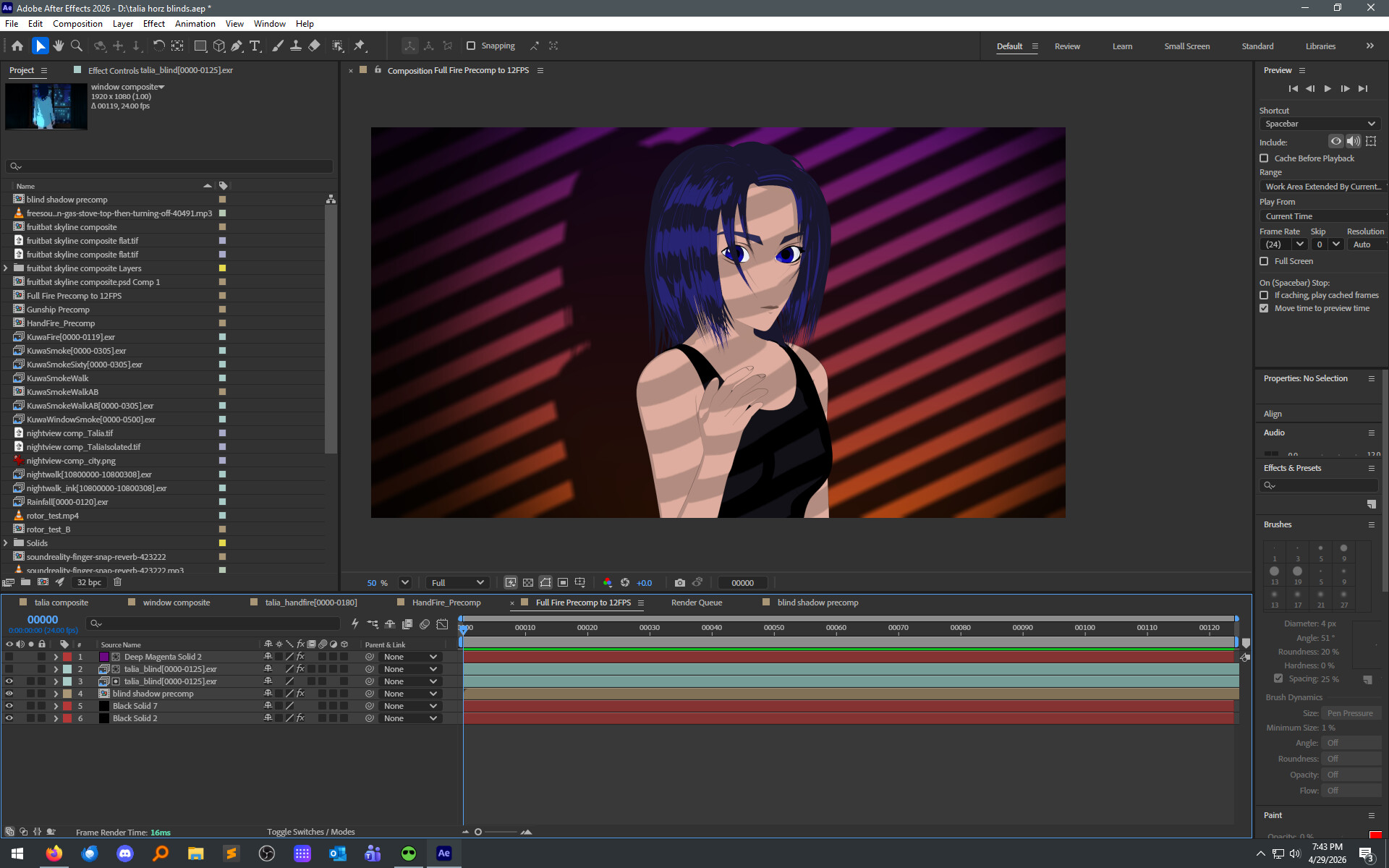
Then to make the color more interesting, I duplicate the girl layer. Using an AE plugin, I extract the color of only her shadows, then manipulate them a bit (expand border, blur) and drop them (multiply mode) over the original girl render. Then a splash of magenta on a layer over her (linear light mode), to color-match girl to background.

So … yeah, ultimately I’m really happy with what I got. The way I got there wasn’t the original plan, but - it worked nicely and is still pretty flexible at every stage.
If that doesn’t cover a question, please fire away. And thanks so much for taking a look at my art.
6 Likes
This may seem like a very weird comment, but I love her eye movements/expressions.
Even though it’s so stylized, these tiny animations and the pacing of them make her feel very natural to me.
3 Likes
I almost never show my personal art among real-life friends, coworkers, etc … but a few months ago, I showed one clip to someone who is both. Her first comment was “OMG, her eyes!”
Celshading can limit the subtleties you can get in face animation, because you can’t (as easily) rely on facial folds, creases, depth changes that you get with BSDF. To try and work around that, I’ve spent soooo much time working to get the shading and animation of the eyes to add life to her, though the eyes… so - i’m very! pleased that you like that detail. Thanks
4 Likes
Usually animated eye darts feel robotic- what’s your secret to making them look so natural?
1 Like
It’s a combination of two things.
First, there’s a method (i didn’t invent, picked it up somewhere) that is: move the darts in a triangular fashion. This is a basic mockup of that path motion:
A core idea of that method is that the eye (direction) is never travelling back over itself, or in a linear back-forth cycle, but using a triangle as the basic “look pattern”. This keeps it from looking so… A-B-C-D path animated, which is normally how we animate most everything else in 3D.
BUT, I also find that using that method exclusively also can tend to look … well, too procedural. Sort of how after enough time doing 3D, you can instantly spot a voronoi texture that hasn’t been taken beyond the basic settings.
So with that foundation, comes the artistic (acting) part - which is: what is she feeling, thinking, focusing or not focusing on? What’s her mood, state of mind? Those elements direct how often I dart, and how far the next dart travels.
And, I’m not afraid to dart from A → B-> A+.2 → C → A-.3… something. IE, I’ll cross back directly with a zig-zag, not a triangle. This helps kill the procedural look from establishing itself.
Oh, finally - i guess there’s a third element. Main Direction changes, Darts and Blinks and Head Turns are all timed with intention. Goes back to the “acting” above. And, i do act it out myself a lot… paying attention to where I look, how often my own eyes dart, when and why, how I blink, etc.
Those last two basically TLDR into: “you have have to stop setting keyframes as a XY value, but as a “alive” feeling.”
(PS: I always dart with constant keyframes, never linear or bezier).
6 Likes
Incredibly invaluable advice here. Going to bookmark and study
1 Like
Also, don’t be afraid to not dart, if and when you shouldn’t.
This clip I did a couple years ago - Thorn | sketchbook - #34 by thorn - the blinks, and direction were all intentional, as I mention in the previous post. (Though hopefully, I’m better at it now).
But I don’t think there are any darts in there; if there are, it’s very minimal. Why no darts… because when one is dancing alone, the eyes sort of focus on “nothing” at a distance point. Sort of like when we blank out a bit, staring into space.
And maybe i overdid it with the blank stare, i think i did get a comment to that effect. But, the solution to a dish being too salty usually isn’t “remove ALL the salt.” So on a redo, i’d pick some small dart moments - maybe when she looks away from the camera for a moment. So, keep “not darting” in your toolbox too.
1 Like
According to Ed Hooks (former actor, acting teacher, author of “Acting for Animators”),
Only three blinks per minute are necessary to physically take care of the human eyeball. All other blinks are calibrated to thoughts. When you complete a thought, you blink, even before you express that thought in words.
-.Ed Hooks
greetings, Kologe
5 Likes
I constantly have those moments of “I don’t know what this should look like, or what i want exactly, so… let’s do nothing until i know.” Which of course, means nothing gets done. Sometimes the best thing to do is just open the scene in question, start modelling, and keep going until it starts to click.
A few nights later, it starts to all fall into place. Still more to do, but getting easier now that I know what I’m after. 


7 Likes
… get started.
I’m very familiar with that effect, from narrative arts primarily though: (Comic) drawing, animation, writing. Never experienced it with “static” 3d content though, which made me think.
On second view, set dressing like this is pretty narrative, isn’t it?
While you work on it, you understand the place better, its history, mood, who drops by …
So … fits after all.
The narrator’s feedback cycle of self-inspiration all over again.
3 Likes
That’s so true. I knew it was a bar with bottles, but it kept just looking like an asset listing for liquor bottles on Blender market or something… which was just boring.
Once I threw a couple of characters in there, and then just start thinking about what is taking place in the room, I started to feel more about the room itself. “the barstool needs to look like this, because there would be a jacket hanging on the back of it”, and “it’s after hours/closed, so the lighting should be sort of dim.”
I also set up a few cameras with the shots blocked out, and that has saved me for modeling things that will never even be seen. So that’s a time saver. 
4 Likes
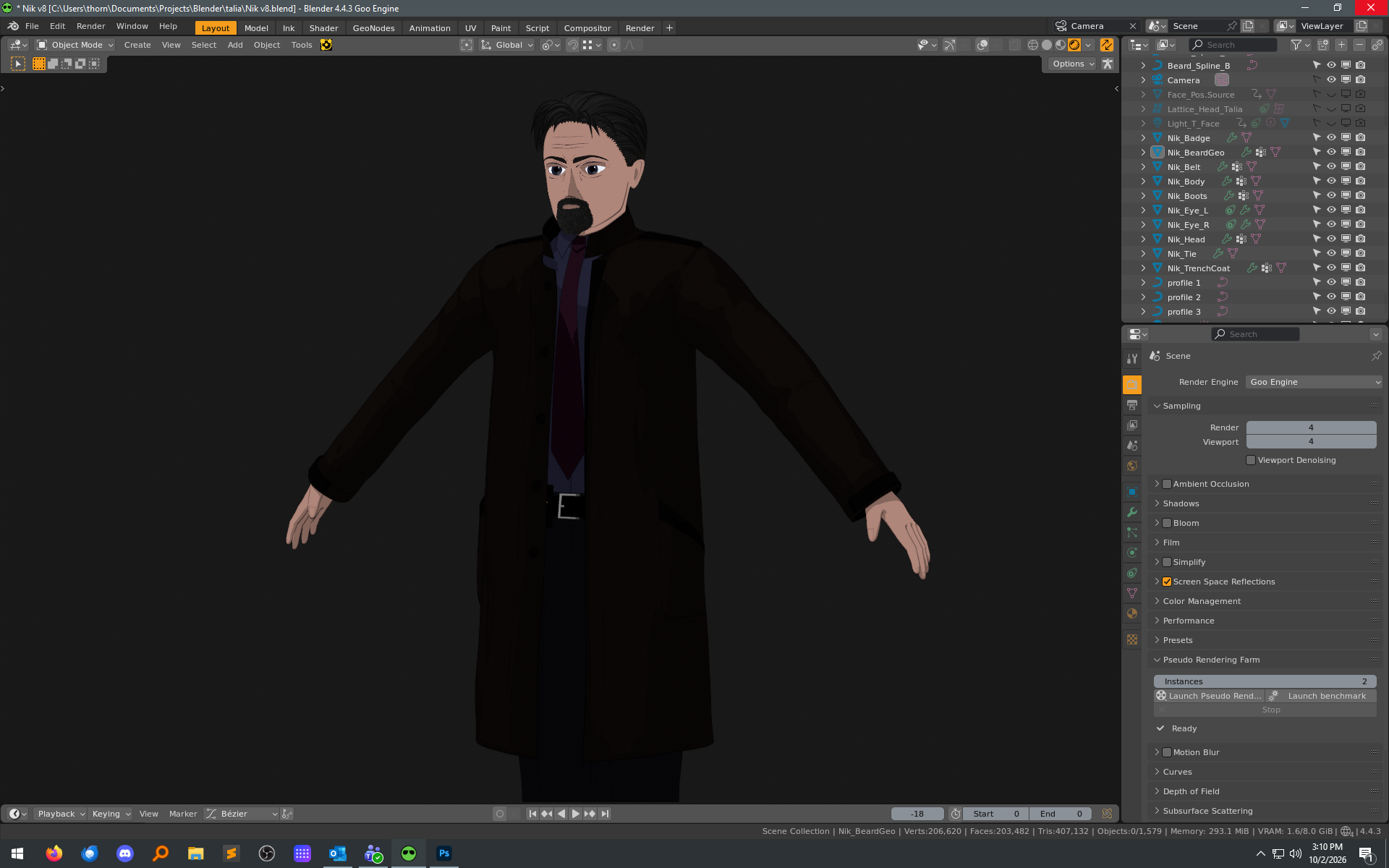
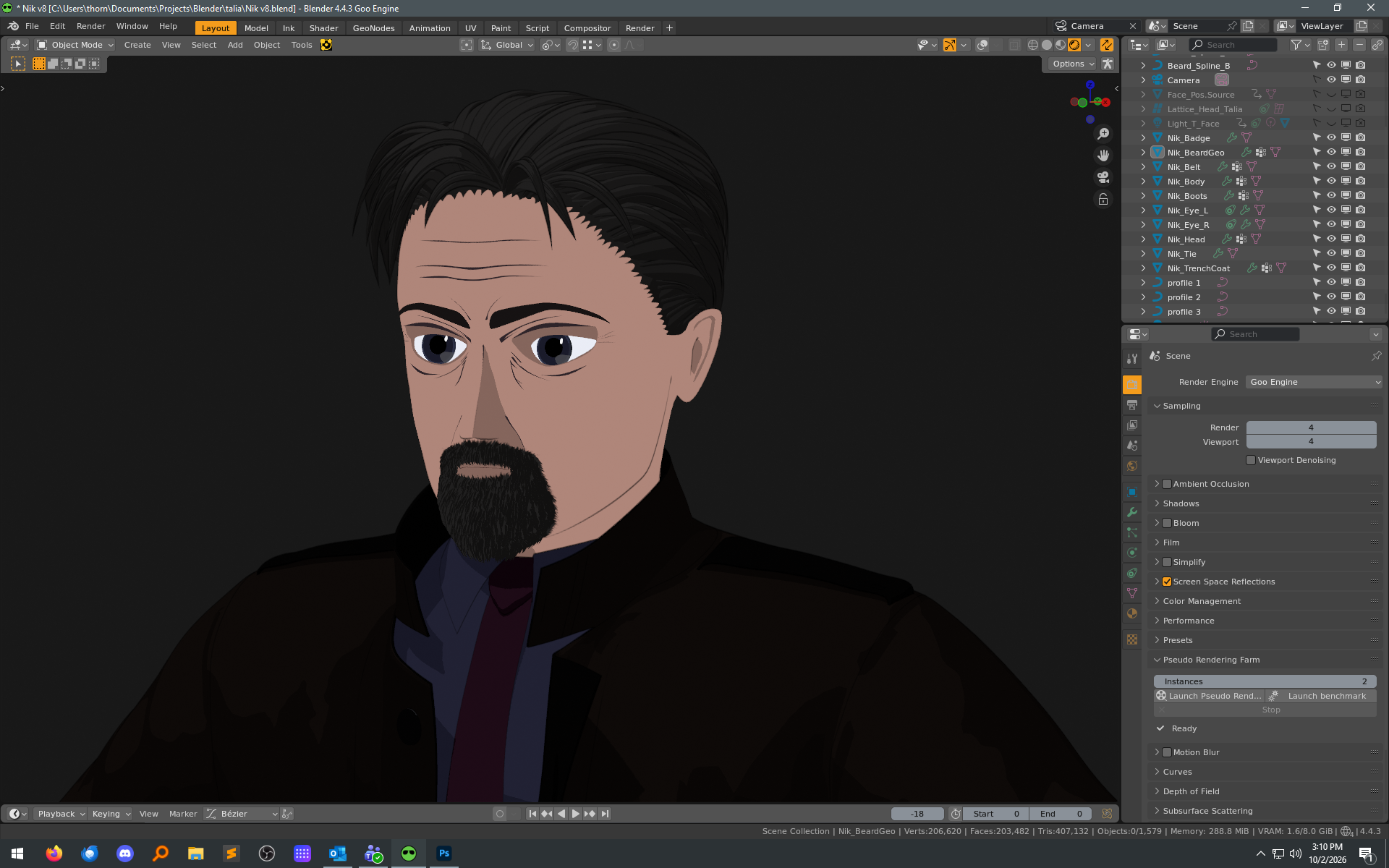
Summer is always my busiest season of the year at work, but in the beginning of August I started staring a the folder filled with reference images I’d been collecting and finally started to get a solid idea of where I wanted to go with working on my next character model. I already had too much to think about, but when inspiration starts hitting - make the time, and go with it.
Haven’t ever done a male model to this degree before; after 2-3 years of only doing female shapes, there’s definitely been a learning curve there.
Some nights and weeks had a lot of progress, and there would be a couple of weeks I’d not be in Blender at all. But now that Autumn is here, things are a bit more calm in the real world and I’ve had some time refine the look and get things ready for the rigging and final shading/lighting setups. Whether that happens by the end of October remains to be seen…
7 Likes