[WIP] Remesher algorithm with Compute Shader shenanigans

This is a work in progress thread because I thought it would be worthwhile documenting the whole development process of a new tool. future progress will be posted as I get to it.

I’ve been playing with compute shaders in blender for a while.
My verdict is: compute shaders are a absolute pain in to code.

Luckily, when they do run correctly… oh boy, do they run fast.

Anyways. its been a couple years since I had released Tesselator.

And while it worked “fine” for what my intent was at the time. I was heavily constrained by python’s speed, and I can tell you running several thousand particles in a dynamically self organizing system is not something python is made to handle.

Well, things changed… Its been a while that blender has added support for compute shaders and I didn’t even notice it, Apparently it was there since 4.2. And I’d be a fool to not try to use it to remake Tesselator from scratch and make it into an addon worthy of being called a remesher.

Unfortunatelly, blender’s gpu api is very barebones, it doesnt even support SSBOs, so I have been trying to use just image textures. it works, kinda. But I’m not complaining here since it has the bare minimum to get something that runs faster than python or C++.


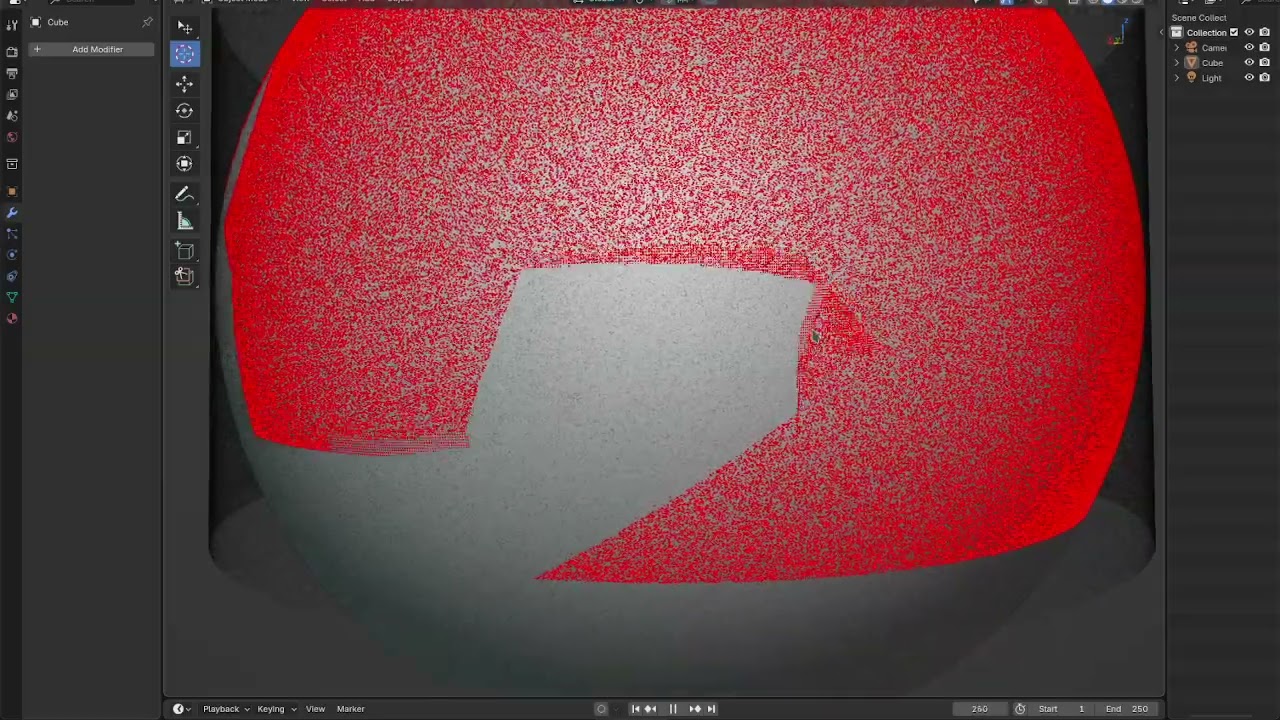
So, after having finally sorted out some issues with mesh storage, indexing using 2D coordinates and a few other shenanigans, I got this:

A million points constrained to the surface of a mesh. It works well enough that I think it will do to get a Tesselator-- Not-Actually-That-Slow Edition on the plans.

3 Likes

Been tweaking the surface walk pathfinder and now it kinda looks like a VFX of some sort.

2 Likes

Well thats awesome!
Are you interested in sharing an artical or posting some code examples?
And what type of constraints exists?
Just trying to learn from you :grinning:

I’ve been planning to write a article explaning what I figured out. but breaking down the code will take a while. it took 700 lines just to get the abstractions right to use textures to store arbitrary data without it looking too ugly.

1 Like

Lol! I hear ya on that.
Yeah, its been one of those areas I haven’t messed with yet outside of reading.
But the general idea is that you have to pass in data, use the compute shader to processes everything, save it to an image RGB = XYZ… is that the idea?

I guess you would have to send all the mesh data to the gpu as well?

1 Like

yeah, thats it. the annoying bit is that textures are square. so if you need to store vertices and reference them by indeex, you need to do a bit of math to pick the right texel. i’ve been using this function here:

ivec2 idx2coord_row(int idx, ivec2 imsize){
    return ivec2(idx % imsize.x, idx / imsize.x);
}

It takes a 1D index and converts it to a 2D coordinate to use access a image pixel.

but recently, I came up with this other one that uses a chunked indexing of 16x16 blocks, and within each block it overlays a small z-order curve instead of a simple row-by-row. I was hoping to improve cache performance by doing this but It didn’t change much in my tests.

uint morton_decode8(uint x){
    x = (x & 0x44u) >> 1 | (x & 0x11u);
    x = (x & 0x30u) >> 2 | (x & 0x03u);
    return x;
}

ivec2 idx2coord_block(uint idx, ivec2 imsize){
    uint w = uint(imsize.x);
    uint block_id = idx >> 8u;
    uint item_id = idx & 0xffu;
    ivec2 item_offset = ivec2(morton_decode8(item_id), morton_decode8(item_id >> 1u));
    
    uint wblock = w >> 4;
    uint w_mask = wblock - 1u; // assumes imsize.x is a power of two
    uint w_shift = uint(findLSB(wblock));

    return (ivec2(block_id & w_mask, block_id >> w_shift) << 4u) + item_offset;
}

So, I also make some helper macros to wrap image access funcctions using this, so the final pixel data access code looks like this:

# define IDX2COORD(im, idx) idx2coord_block(idx, imageSize(im))
# define IDX2COORD_TEX(im, idx) idx2coord_block(idx, textureSize(im))

uint morton_decode8(uint x){
    x = (x & 0x44u) >> 1 | (x & 0x11u);
    x = (x & 0x30u) >> 2 | (x & 0x03u);
    return x;
}

ivec2 idx2coord_block(uint idx, ivec2 imsize){
    uint w = uint(imsize.x);
    uint block_id = idx >> 8u;
    uint item_id = idx & 0xffu;
    ivec2 item_offset = ivec2(morton_decode8(item_id), morton_decode8(item_id >> 1u));
    
    uint wblock = w >> 4;
    uint w_mask = wblock - 1u; // assumes imsize.x is a power of two
    uint w_shift = uint(findLSB(wblock));

    return (ivec2(block_id & w_mask, block_id >> w_shift) << 4u) + item_offset;
}

ivec2 idx2coord_block(int idx, ivec2 imsize){
    return idx2coord_block(uint(idx), imsize);
}


# define load(im, idx) imageLoad(im, IDX2COORD(im, idx))
# define store(im, idx, data) imageStore(im, IDX2COORD(im, idx), data)
# define fetch(im, idx) texelFetch(im, IDX2COORD_TEX(im, idx), 0)

# define atomic_min_idx(im, idx, data) imageAtomicMin(im, IDX2COORD(im, idx), data)
# define atomic_max_idx(im, idx, data) imageAtomicMax(im, IDX2COORD(im, idx), data)
# define atomic_add_idx(im, idx, data) imageAtomicAdd(im, IDX2COORD(im, idx), data)
# define atomic_and_idx(im, idx, data) imageAtomicAnd(im, IDX2COORD(im, idx), data)
# define atomic_or_idx(im, idx, data) imageAtomicOr(im, IDX2COORD(im, idx), data)
# define atomic_xor_idx(im, idx, data) imageAtomicXor(im, IDX2COORD(im, idx), data)
# define atomic_compswap_idx(im, idx, compare, data) imageAtomicCompSwap(im, IDX2COORD(im, idx), compare, data)
# define atomic_exchange_idx(im, idx, data) imageAtomicExchange(im, IDX2COORD(im, idx), data)

Thats just one part of the equation though, I’l write some more detailed breakdown later but, I also had to figure out how to upload and retrieve texture that other than floats, I made a mini-transpiler to generate UBO struct definitions and python dtypes and a kind of preprocessor that spilices GLSL code together and builds it just in time to I can write inline GLSL in the middle of my python and have it kind of just work.

for example, the code that stores mesh data as textures looks like this:


from .shader_utils import *
import numpy as np
compute_inline_tmesh = compute_inline_partial(local_size=(128, 1, 1), include=['mesh'])

class TMesh:
    def __init__(self, verts, tris):
        assert verts.dtype == np.float32
        assert tris.dtype == np.uint32
        verts = verts.reshape(-1, 3)
        tris = tris.reshape(-1, 3)

        self.n_verts = len(verts)
        self.n_tris = len(tris)

        size = length_to_square(self.n_verts)
        new_verts = np.zeros((np.prod(size), 4), dtype=np.float32)
        new_verts[:self.n_verts, :3] = verts

        self.verts = Texture.from_array(new_verts, format='RGBA32F', size=size)

        size = length_to_square(self.n_tris)
        tris_input = np.zeros((np.prod(size), 4), dtype=np.uint32)
        tris_input[:self.n_tris, :3] = tris
        self.tris = Texture.from_array(tris_input, format='RGBA32UI', size=size)
        self.normals = Texture(size, format='RGBA32F')

        # flag degenerate triangles in case needed.
        compute_inline_tmesh(self.n_tris,
                             verts=self.verts.R,
                             tris=self.tris,
                             code='''//glsl
            uint idx = gl_GlobalInvocationID.x;
            uvec4 tri = load(tris, idx);

            vec3 va = load(verts, tri.x).xyz;
            vec3 vb = load(verts, tri.y).xyz;
            vec3 vc = load(verts, tri.z).xyz;

            vec3 x = cross(vb - va, vc - va);
            float d = dot(x, x);
            tri.w = int((d == 0.0 || isnan(d) || isinf(d)));

            store(tris, idx, tri);
        ''')

    @classmethod
    def from_object(cls, ob):
        mesh = ob.data
        mesh.calc_loop_triangles()

        obverts = mesh.vertices
        obtris = mesh.loop_triangles

        verts = np.zeros((len(obverts) * 3), dtype=np.float32)
        tris = np.zeros((len(obtris) * 3), dtype=np.uint32)

        obverts.foreach_get('co', verts)
        obtris.foreach_get('vertices', tris)

        return cls(verts, tris)
1 Like

Oh yeah, I see you have been going through it over there.
Hopefully your keyboard hasn’t given up on you yet lol.

Your efforts to create the abstraction from the bottom rung is looking nice though. I can definitely see you pushing your interface further once you test through some more of that R&D like your saying.

Do you think its possible (more so when you get near completion) that your utilities might be “generic” enough to handle many various cases?
Like - A function call that takes some source code (string), some input data, and a data class of some kind, and then basically populates the data class with the result? Or is that to generic for such a technology?

Thats what I’ve been trying to build first. If I don’t get this to work, making a lot of GPU-based code would give me a stroke. I have aleady made some decorators and stuff to just slap some glsl in the middle of the code and pass some arguments and it figures out the shader compilation, caching, parameters, texture formats and such under the hood. my whole code is built on top of this right now.

I’ll post a breakdown later. but I have to figure out how to simplify it a bit, its currently a 1000-line monstrosity of a module made mostly of spaghetti code.

Alright then, well I do appreciate the glimpse into your current status.
Very fascinating, especially as a fan of your old work too.

I guess the only thing of value I can think of for you, (and not saying you havnt), but now that you have tested this, possibly step back a moment and write down everything you want from it, what would be required for each thing, and see what commonalities exist, this would isolate your edge cases to be solved on the side and not confuse your efforst of simplification. Trying to fit edge cases into a design can make it feel, dirty. Might be easier just to have an edge cases module lol, just for those.

Anyway, looking good out there!

Oh, except some edge cases are built into the core of the module because the API doesnt leave alternatives. Like creating a texture and passing a data buffer to the construction only seem to work 95% of the time if the texture is too big. the other 5% are random occurrences where some pixels are partially zeroed out. I have no idea if thats a driver bug or a synchronization glich but I had to implement my own chunked data uploading code that uses UBOs. Its like, utter jurry rig and very slow, but at least works 100% of the time.

Then another issue is that GPUTexture.read() returns a non c-contiguous buffer object with messed strides that requires a full copy and some raveling and reshaping in numpy to unshuffle the texels. Thats just a bit too slow, so I settled for using the ctypes python api to hack into the object with PyObject_GetBuffer() and extract a reference to the internal pointer to build another buffer object from it with correct shape and strides.

Seriously though. Blender developers intend to remove the bgl API but barely gave any attention to its supposed replacement, its kinda sad.

1 word… Damn.
Reaching into the depths of Mordor.

Are you restricted to the packages that ship with Blender?
Might be worth side stepping to find an external solution and bring that back to home plate with you.

Look, I went through an epidemic myself with Blender in a few ways. Fighting just the deepest of constraints while flirting with the goal in sight the whole time. Just got to know when its meant to be and when its not.

I think Blender scripting offers a lot, but I will say, developers like you are not accounted for on the day to day. I would assume their goal is to open up as much as they can possibly manage, and then if its not enough, bring in what you need.

Something like this might bring the right options to the table for you.
Maybe?
I had looked around for ways to speed up python back in the day and there is a number of technologies out there like this.

Sorry to add another reply in here, but C++ is an option for you.
Use PyBind11 to build it as a python module.
I got that working without much effort really.

Well, its because I kinda want to make the addon self-contained as much as possible so using blender’s own stuff works better for me. I was using C++ annd Cython for my previous addons but then it becomes tricky to support MacOS machines since I dont own one to serve as testbed.

I think I got the gpu code mostly figured out. Its messy but works well enough.

1 Like

Yeah, I follow you on that.
Ready to go out of the box is a nice feeling.
Look forward to your updates!