Ive been very busy moving to a new home so did not find time to fix the issue with the export button in the latest version. I hope to find some time soon to make a fix for it.
4 Likes
Great, thanks, and good luck with the move!
I got a fix for this but since it turns out there are many scenarios to be covered it would be great if you could use it for a bit and see if there is anything unexpected happening.
3 Likes
Hey @kromar, what about mesh offset while sending it to ZBrush, which I mentioned above?
I have not forgotten about this but dont have the time currently to work on it. Probably in a couple weeks everything should have settled down and i can pick up some more development again.
2 Likes
Out of curiosity, how do most people set their export setting to send it to Zbrush with polygroups?
since I use creasing a lot I ended up buying another addon that applies materials based on hard edges, since applying materials manually would’ve been a major pain, and same with the 2 other export options.
You can assign face maps in blender, they will transfer as polygroups in Zbrush.
I am too lazy myself to do it manually, if I need polygroups on ‘hard edges’ or creases, I do an unwarp by hard edges(UV can be a mess, just no overlaps). After that in Zbrush do auto groups with UV
One UV island → one polygroup
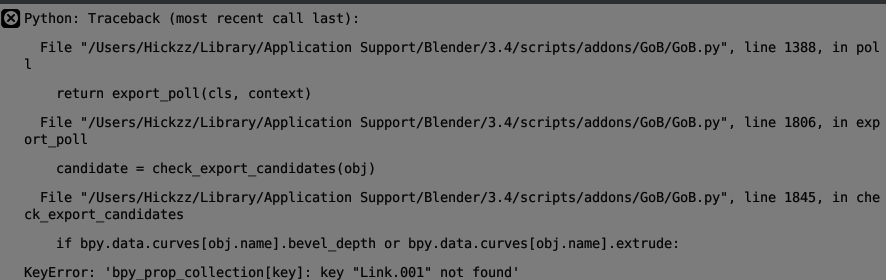
Did you open an Issue for this at the GoB Github?
Nope, not yet.
It would be fixed sooner, as the add-on dev doesn’t check posts over here very frequently. And maybe it’s not a bug, but something he can solve for you.
Im following but not always have the time to provide quick fixes now adays. I want to have a look at a couple of reports this weekend and hope to get some things fixed.
5 Likes
Note in ZBrush, there is a Preferences > GoZ option, Import as SubTool, which controls whether the imports are managed within the active Tool as Subtools, or each Blender Object to its own Tool.
If you have that option ON, then on the Blender side you can still get the “each Object its own Tool” behavior by Ctrl+LCLICK on the Export button.
2 Likes
@Hickz i am not able to reproduce this issue with GoB v3.5.95, can you provide a blend file with a mesh which causes this issue? would be great if you could attach it to the github ticket: https://github.com/JoseConseco/GoB/issues/386
1 Like
@Hickz thanks for sending me the file, i was able to reproduce the issue and fix it. I created a new release which contains the fix.
6 Likes
Thank you! Much appreciated
2 Likes
It seems like if the model has UDIM UV sets, the UV flipping during the export messes up with the UDIM tile placements. This idea works when the UVs are between 0-1 but the flipping seems to flip UVs that are beyond 1 to -1 on scale. So the 1001 tile becomes 0981. I guess each tile has to be flipped on its own local y axis and not on based on the global location.
i am aware of this issue and am working on a rewrite of the whole orientation system but i have very little time and making little progress. The UV mirror issue is on that list as well as i am aware its a issue that breaks the usage of GoB.
3 Likes
No worries, I thought I would bring it up in case it did not catch your attention before.
1 Like
I have noticed that Blender 3.5 does not export vertex colors to ZBrush. When I export a model with vertex colors from Blender to ZBrush, the vertex colors are not preserved in the exported file. In Blender 3.4 it works just fine.