Try Surface Deform.
Further clarification:
Try Surface Deform.
Further clarification:
Wasn’t expecting such a quick reply, thanks
Am I right in thinking mesh deform is the same as surface deform? I’m not able to find a modifier called surface deform in 4.0. It seems to have the same or similar options anyways, as well as the same icon
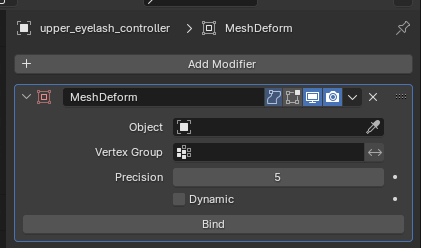
Ah, I see it. My eyelashes are controlled by a curve, and I am deforming the curve to follow the eyelid. However, the surface deform modifier does not seem to be available on curves.
Yeah I’m not sure if it would work on curves. I duplicate the eyelid mesh, separate selection (P), and apply it to that.
Yea wasn’t the best way to do it I realized. Spent way too many hours trying to brute force it, lol. After following your advice and just taking the eyelid and using a hair particle system with a surface deform modifier I got it to work much faster and better. Never used the groom system before but I think it turned out okay. Thanks, you’re doing awesome work taking the time for everyone asking questions
Hello Chris, sorry if the trduction is not phew I speak French, I start a new project and I wanted to know the main steps to make an ultra realistic human like you with the scultpure, the rig all that?
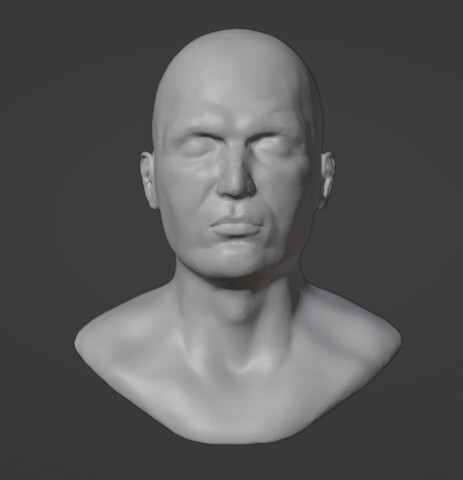
That’s kinda broad, don’t know if I can summarise easily in a single post…
How about: research, study, model, sculpt, texture, rig, test/animate, research some more, study harder, remodel, retexture, re-rig, retest — scrap everything and start again — research and study even harder… etc etc.
Can’t overstate the research and study parts (both on the anatomy and software/technique sides of things).
You forgot… and practice, practice, practice, practice and then to a litte practice… 
Oh… and have a look in the real word… 
Thank you for taking the time to answer me, and I will take into account your advice for the continuation of my project
Hey Chris I have a question, do you use multiresolution to have a high poly model that is a low poly model or is it displacement maps?
Do I keep the details of a character with by unsubdividing in multiresolution modifier or use the bump map displacement?
Are you trying to make a low poly model look high poly without subdividing it, or are you trying to decide between multires and displacement maps for detailing?
Trying to figure out what you do with your human model to have a face rig with all the detail. The multiresolution modifier to make it high poly but not applied to have the low poly or the details are the bumb displacement maps? Or maybe its both.
Multires is more immediate since you don’t have to bake, but you can attain a higher level of detail with displacement maps (with Displacement and Bump enabled) by adding painted detail.
I’d use both; multires for sculpting general detail, displacement/bump map for painting pore-level detail. You can always bake the multires and add it to the displacement map later if need be.
This was set up for rendering about a year ago, but I postponed it in the hopes that the hair jitter bug would be addressed while I tended to some other things.

Sadly, when I revisited, the bug was still present - in fact even moving Clump before Surface Deform as suggested in the bug report feedback doesn’t fix it… but I realised I could just disconnect the scalp hair and eyebrows from the body, since they don’t actually deform in this instance anyway.
I had to remake the eyelashes with hair particles though, and there’s still some twitching in the eyebrows and vellus, but obviously the makeup is supposed to be the main attraction here - and that posed some considerable challenges of its own.
Creating the basic effect was simple enough (tutorials abound), but to get the glitter to glint properly I needed the voronoi displacement to override the skin pores with facets (like glitter flakes), instead of being mixed with them, which diffuses the effect somewhat. Implementing this unearthed a baffling problem though, in which the displacements completely turn off when a few face wrinkle masks are active. So I tried reconfiguring large chunks of the skin, makeup and wrinkle nodes so that the displacement textures are mixed before being converted to vectors instead of afterwards.
While this appears to have mitigated the issue somewhat, it’s also introduced an equally perplexing one: the mesh turns black when there are more than four makeup node trees mixed together. I have no idea whether there’s some limitation on the number of nodes you can string together before things conk out, or I’m just using them wrongly. Maybe all this sounds familiar to somebody?
On another note, as of this render I’ve switched the SSS from Random Walk to the new Random Walk (Skin).
Well… i had this idea that it is time for some more “human progress”… ( a lot of text “lately” :wink")
…and this again knocked my sock soff.
This is soooo

Incredible work, as always!
I think Blender has a maximum of around 400 nodes, but I can’t find where I read that (maybe stack exchange…?), I have to look it up to confirm. How does your node tree looks? Maybe you could bake some of the nodes to textures?
EDIT: I found this bug report and apparently the stack limit is 256
Interesting! Thanks for letting me know, I had searched for similar issues but nothing materialised. This does appear to be responsible, as rendering on CPU with Open Shading Language checked fixes it (but drastically slows the rendering of course). That stack limit seems very restrictive… surprising that it’s not more commonly encountered. All the more reason to keep nodes as efficient as possible I guess.
I’d have posted a screenshot, but there are multiple node groups with a lot of intertwining going on, so it’s a bit tricky present in a readable fashion. The shader needs to remain customisable, so baking isn’t an option unfortunately. I’ll have to see if I can trim some more fat somewhere.
As a silent stalker of this threat, what you have been doing is insane.
I saw this article today. https://80.lv/articles/chris-jones-casually-unveils-the-most-lifelike-blender-made-facial-animation/
hahaha us 

