Clear and logical, thanks for the info.
Well luxcore has it in viewport… And it uses a tilebased/stripbased denoising in final render to overcome memory usage on large images.
I’m running a big comparison test. Between Blenders denoise, IntelOpenImage Denoise, AI Clear, AI gigapixel, AI Clear+AI Gigapixel( all working from 128spp data), and a 2000spp nearly ground truth.
Would it be ok to post the images here? i dont want to spam the thread with a load of images if you don’t want.
2 Likes
Hi, I think it would be nice to have an own thread for it.
I made several tests with denoise last days, too.
There are other tests in different threads, may better to publish in one thread independent wich denoiser is used.
Cheers, mib
Link to denoiser test thread.
1 Like
Intel Open Image Denoise released on GitHub -> Intel Open Image Denoise released for 2.81
i hope that tjis title change is okay for everyone ?
1 Like
For Linux users. OIDN is currently working on Blender buildbot builds!
I thought the whole point of low quality high performance denoisers like OIDN or Optix denoiser is interactive preview. For final renders, offline denoisers would generally do much better job. Of course we are talking about the more sophisticated ones, like Corona denoiser, not rudimentary ones, like Cycles native denoiser.
Having OIDN only as a postprocess effect defeats a lot of its purpose. Other renderers implementing OIDN generally apply it interactively each few passes.
Also, I am kinda confused why if there’s a better quality setup from LordOdin, why hasn’t that process been built in into original implementation instead of requiring users to randomly lurk on BlenderArtists and stumble upon it.
1 Like
Having a denoiser in the compositor is incredibly useful in my opinion. It allows you to experiment with the settings/setup without the need to always render the complete image. Judging what kind of setup makes sense is pretty much impossible at this point. I am not sure what a good solution would be for that.
The developers are aware that viewport denoising would be useful too. It seems to be more involved, that’s why there is “only” the compositor for now. The first step has been done, I don’t see what the problem with that is.
2 Likes
I wonder why we don’t have LUT’s in the compositor too.
4 Likes
Along with filmic OCIO transform
It’s coming, mathieu told me when I asked him on the e-cycles thread.
@rawalache
1 Like
For those wanting to have a go at OIDN in 2.81, here’s a short ‘n’ easy video tutorial:
4 Likes
Not sure if that is the best way. Most people are using denoising passes:
https://developer.blender.org/D4304
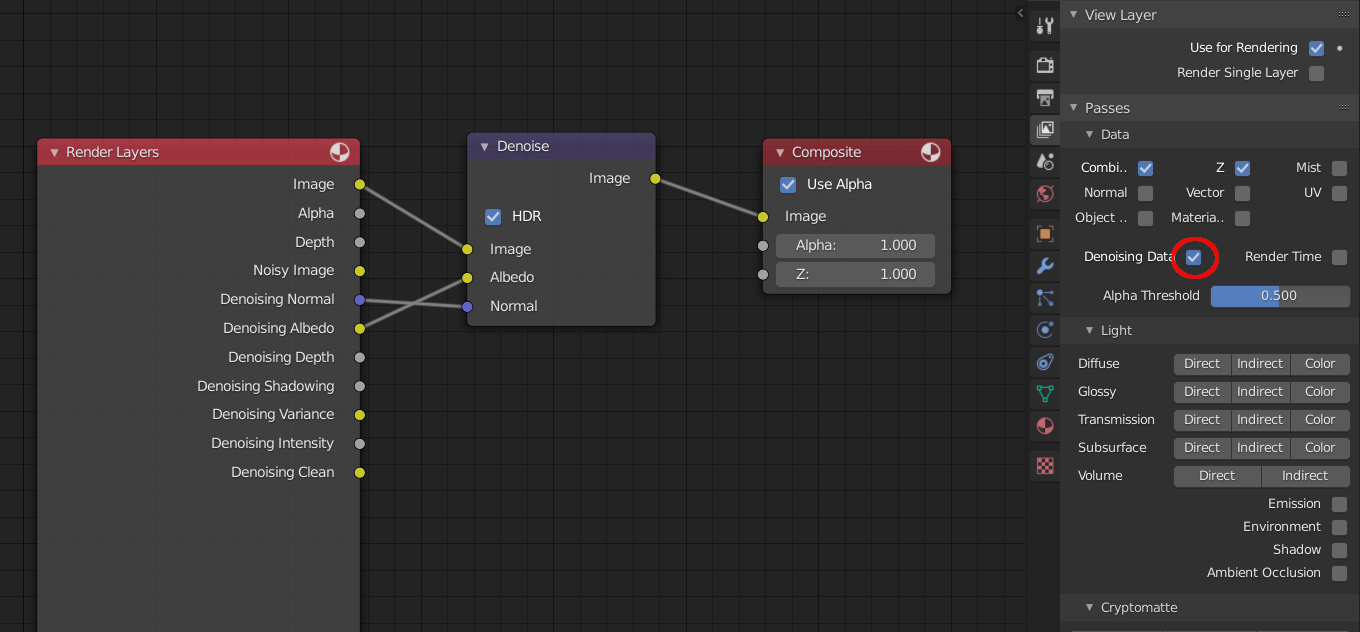
You must enable Denoising Data from View Layer tab in Properties Editor.
Edit:
This is the simplest configuration:
5 Likes
OK, thanks for the tip. 
I was just about to suggest the same. The denoising node is even labeled “Albedo” which makes it easy to find and connect 
1 Like
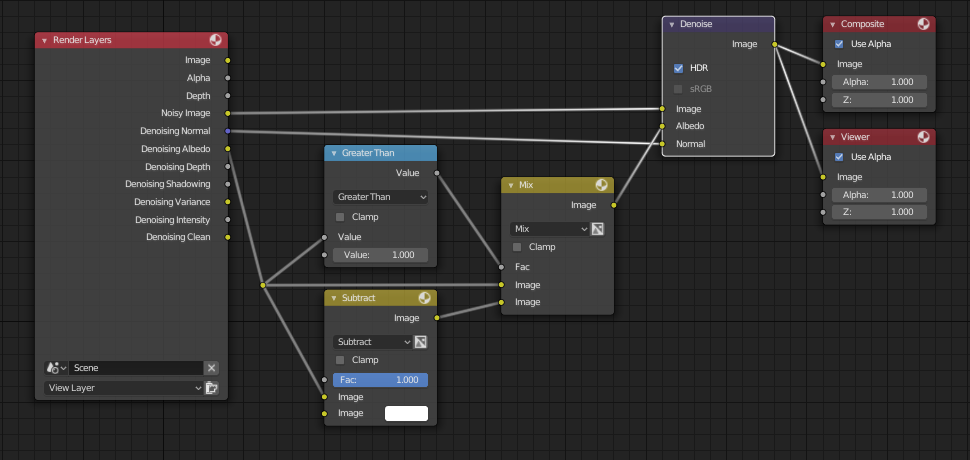
Thanks. Could you maybe post a screenshot of the correct Compositor node setup? That’d be great. I suspect this screenshot still has old names, or not?
2 Likes
I just tried both setups (quickly) and the one you posted via youtube video gave me significantly better result. Not sure if I made that node setup from developer link right thou. Will have to test it more later.
1 Like
I’ve plugged the Albedo directly into the Denoise node. But as I use E-Cycles I used the denoise tree that the E-Cycles addon creates which give better results.
1 Like
Are you sure? Please, do tests with scenes where we can all do the same tests:
https://blenderartists.org/t/cycles-development-updates/1110067/1012
I don’t get good results with those youtube nodes.