- select active coll objects: Add an “Option” where, to what? A new operator? In the Object Context Menu?
- More O&P combos: Maybe, adding to list, but not a prio atm.
- MSOA extend: Maybe, adding to list, but not a prio atm.
I was playing with new tools today and I’ve found a few quite handy use cases for ZeroScale_Normal.
Some ideas for you guys:
3 Likes
I mean when i click "Select Object With Display Type: " for example ‘Bounds’ to select only objects in active collection. It is possible to do?
Also is possible to do for You to set display type to multiple selected objects at once?
active coll sel: ah I see. I could add a toggle for that.
multi set: No need, it is built in: Select all objects you want to set value on. Hold ALT when set display type as usual in the properties panel.
1 Like
Wow! Superb update! Thank you, man!
2 Likes
Anyone found a solution on how to get duplicate work like in Modo?
So, the thing I do in modo is selecting some parent items, then choose duplicate hierarchy (linked optional).
Blender however requires first to select all items, which is tricky if you select more than one parent. Also Blender does not work on hidden objects. It doesn’t select them or do any operation on them (only delete can be set to do that).
So any chance that a script comes up which does that like in Modo ?
I dont know if there is any such “hierarchy duplicate” already. I might do one at some point (currently too busy with other things)
1 Like
Is there any tool in Blender that can slide sloops closer together or move adjacent loops further apart (like 3ds Max’ Looptools)?
If not, it may be a nice addition to Kekit…?
2 Likes
I suppose you’ve already tried this “Niche Loops” addon shown at the end of the video?
3 Likes
I should have added, that I’m looking for this as a modal tool. 
So no panel based adjustments.
Just a proposal, if it doesn’t exist already.
1 Like
I dont know if there is one already. Tbh 95% of the time a simple scaling would do the job, and then just do two GG’s for the outlier cases. (I might look into it, I have wasted time on far more useless scripts  , but pretty low prio.)
1 Like
Yeah, no worries. Only if you feel like doing it.
1 Like
Niche Loops is a nice find!
If you like it, you may be interested in Make Corner End as well.
2 Likes
I m using machine tools for that - it has a group option that has been added recently.
I may have missed something so excuse me if that’s the case. I’ve recently updated from a much older version (1.35) and noticed that when selecting a snapping type with the radial menu it no longer enables it at the same time. When switching modes it’s almost always with the intent of using the new snapping type so it felt more intuitive to automatically enable snapping too. Could this become optional? If not I assume it’d be easy enough to compare the two .py files and adjust that behaviour on my end.
Eitherway, thank you immensely for this addon.
1 Like
Hey!
Yeah, that was a while ago ;> I actually don’t remember what the code was back then, and I seem to be missing a few old versions in the backups as well)
Just to be sure; You are referring to the Snapping Combos? The other snapping options in my pie menu are the blender default snapping panels basically, I don’t think I ever added anything to their behavior.
As for the Snapping Combos, yes, I might as well turn on snapping. Probably as an option.
tho, I am currently refactoring the entire kit (version 2!) so it might be a while ;>
1 Like
I just leaf that here, as Modo user a likely to use the Emulate 3 Button Mouse option, to get alt rotate view work.
This however screws the alt+ click to apply a property change to all selected.
However the whole Modo like navigation key definition is easy to add to the existing, without changing anything.
The only thing I have to figure out are the Modo camera navigation extra shortcuts…
I am refering to the Snapping Combos yes. I was looking through the old ke_pie_menus file and comparing the content. You still have a section for “ct.use_snap = True” in the current version but I’m guessing thats not part of the “SET1” etc code you have in place now. With any luck I can throw “bpy.context.scene.tool_settings.use_snap = True” in the right place and not break everything.
Thanks again though, looking forward to whatever magic you add.
1 Like
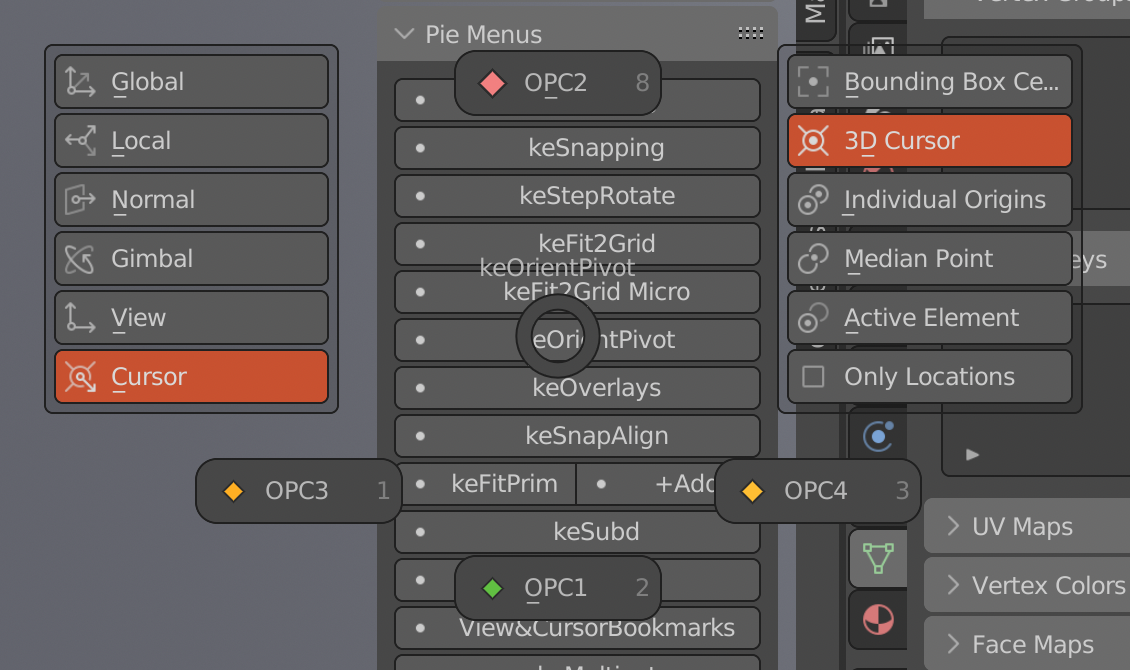
Is there a way to make my own OrientPivot combo and put it into the pie menu?
and also can you please add buttons for combos in a sidebar menu so it would be easier to assign a shortcut for a dedicated combo. I tried to do it via scripts but it didnt work (i assigned |“bpy.ops.view3d.snap_cursor_to_center()” to a hotkey with no result)
as for hotkeys - https://imgur.com/a/Jt73Wh6 just assign 'em this way
2 Likes