oh! thanks a lot man!
Check the bookmarks section:
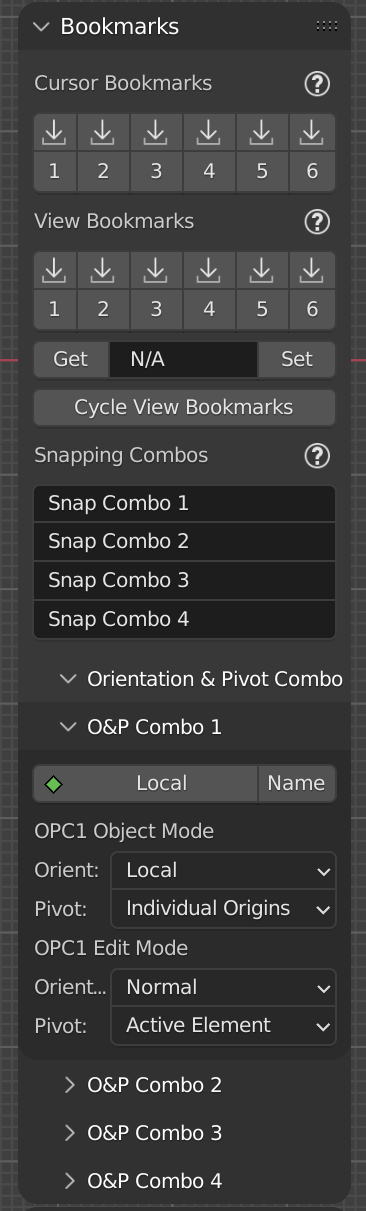
At the bottom there are various options for the OPC buttons, and yes, you can rename them.
As for the hotkeys to these buttons, you can also enable Python tooltips
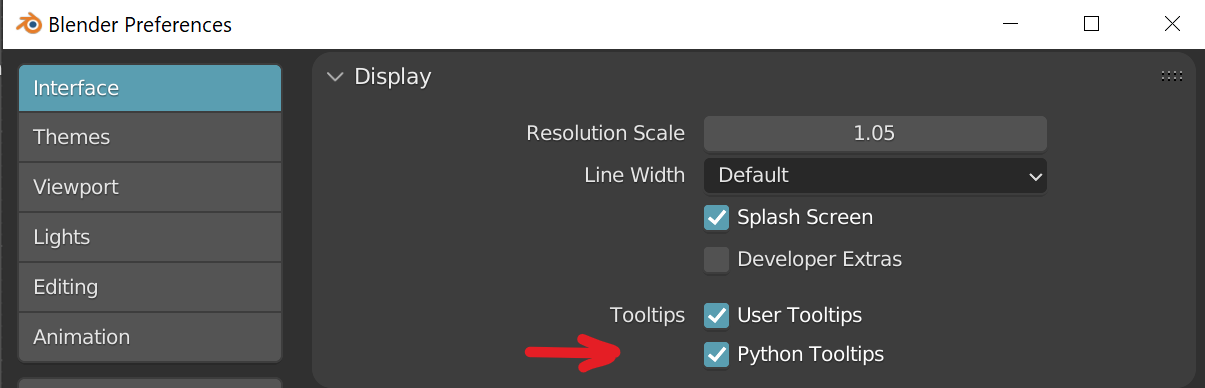
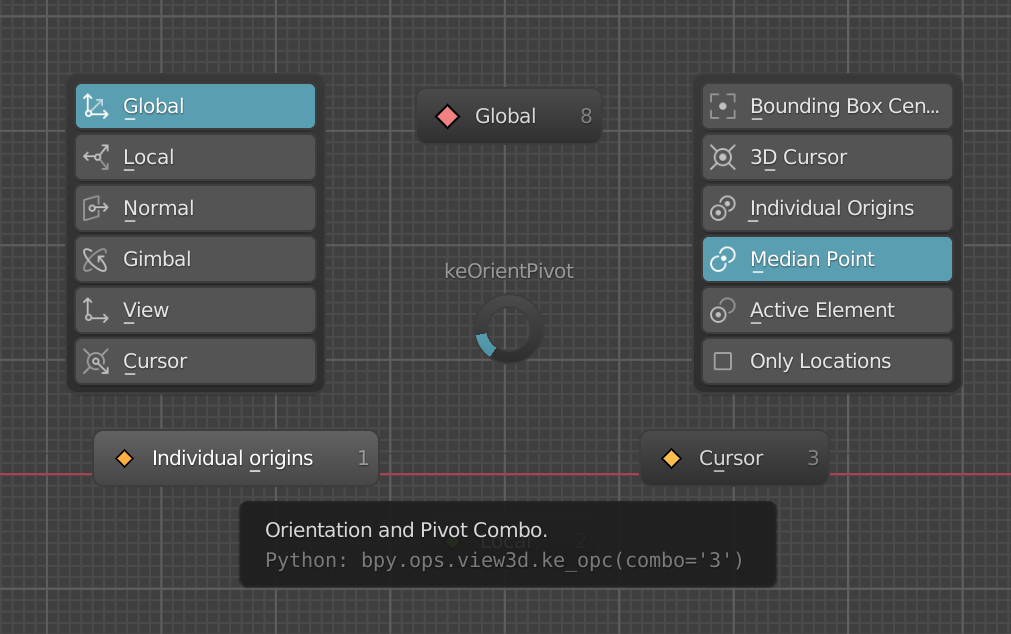
That’ll show you the command name which you can place in the respective keymap category. In this case 3D view (as bpy.ops.VIEW3D.ke_opc) indicates. The bracket items (Combo=‘3’) can be set in the keymap editor. So you only need the “view3d.ke_opc” part to invoke the hotkey.
2 Likes
@Hologram @fleewortep
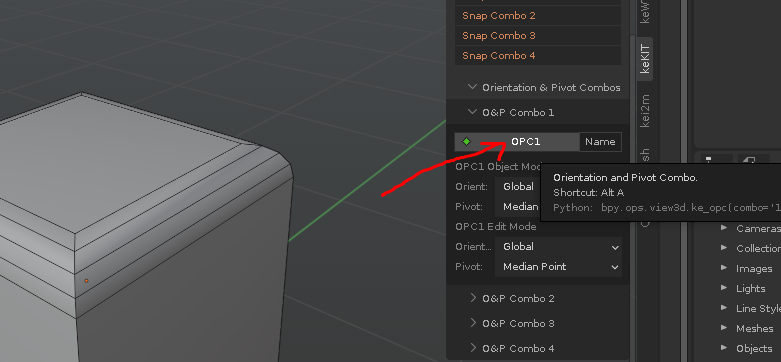
There is no need to go manual scripter ;>
Just RMB in the menu here (and setup combo and naming for them etc):
3 Likes
i can’t thank enough you, guys!
Hey Kjell,
Regarding Select Inverted Linked. Could you add support for Object Mode also?
To make it run standard Invert: bpy.ops.object.select_all(action=‘INVERT’)
1 Like
No. It’s a mesh-context operator ;>
But i can change it to View3D to support this. shortcuts will need to be updated. (next release)
1 Like
Thanks! It would be great to have one tool for all the modes 
1 Like
hmm, the default ( the vanilla invert op) in object mode would then select all other objects regardless of type; lights, volumes, cameras etc.
Is this really needed? Maybe in object mode the type of object selected determines which types are selected…that is not as easy to do (as 2 clicks for “all types invert”: select all, unselect the one you are pointing at) edit: p.s. I’m not doing props-options for this ;> but maybe operator options…
Well. For me it isn’t a problem - while modeling I have lights and cameras turned off by default.
So it would be interesting to know what do others think regarding it.
You proposed a good idea! I think it should be up to you - do you have time on this additional functionality or not One thing I would mention is the tool should consider solids and wires as one type of objects.
Found a bug(probably). But perhaps it’s on my side only.
DirectLoopCut crashes Blender if I use it on an edge:
It happens with my config with Blender v3.1.2, v3.0 . But with clear default B 3.0 all works.
hmm, might be some bmesh fail-to-update issue. Does it happen if you toggle edit/object mode before the 2nd cut? (you are also trying to cut a floater edge without it selected (wont work, but should just be a warning popup))
test2: Remove/comment out line 314 (bm.free()) from ke_direct_loop_cut.py
It happens after the first cut. In some cases simultaneously, in some after a second or two.
But it looks like this bug related with Maxivz Interactive Tools. You probably remember, we discussed once its function for storing selections like in Modo for vertices|edges|polys.
Got this error message:
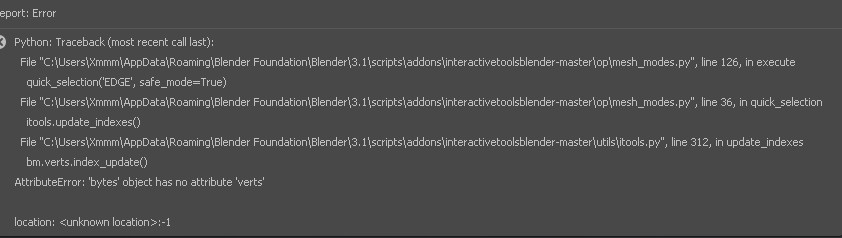
Tried, still crashes.
oh, i was confused as to what could possibly interfere…
that makes sense. if i remember, it stores indices in object properties and expect them to remain. this is a bad idea (which I believe the author also recognized as a potential issue). addendum: I suppose you can run constant is_valid checks and what not…but fundamentally it is trying real hard to force blender to work in a way it is just not meant to 
I wash my hands of this ;D
I 'm not sure that is under the hood, but here is the description of this tool:
https://maxivz.github.io/interactivetoolsblenderdocs.github.io/selection/#sticky-selection
Yeah, you weren’t optimistic regarding this tool. So definitely should wash your hands ;D
Anyway thanks for the ideas! 
Hey I just found a crash in context sensitive move (ke_mouse_axis_move) in sculpt mode. Happens every time in 3.1 stable and 3.2 alpha on factory defaults. I had a hotkey for it that would sometimes fire during edit mode transform so it took a while to figure out exactly where the crash was coming from. This seemed like the best place to report it. I couldn’t figure out exactly what in the code was causing the crash, otherwise I would have made a bug report to developer.blender.org as well.
confirmed, will fix.
edit: Well that was interesting. You can’t actually launch the transform tool from python at all in sculpt mode. Probably a blender bug. You can use the built-in move tool, but for python we’re out of luck here. The only options I have are 1: disable 2: switch to object mode. I will go with 2. (it will be momentary, you’ll only see the screen flash and then return to sculpt mode)
“fixed”
3 Likes
@Kiellog hi! have new specific suggestion you might be intersting in xD
its isolation with nearby objects (by distance radius) - im currently working on large scene with lots of object and sometimes its hard to check out how them interacts because other scene objects block the view, so i need exit to obj mode, select and isolate this part of scene, or select blockers to hide… i think you get what i mean) what do you think?
edit: clipping region doesnt suits because of i need to work in material preview mostly. and using it in my case also tricky
1 Like
Awesome! I still had to create conflicting dummy hotkeys to block the operators in sculpt mode because it was distracting and throwing object scale off. I tried adding apply scale in the modal sculpthack part but it runs before the transform is confirmed and doesn’t do anything. At least it doesn’t crash anymore, thank you!
yeah, that could be fun. adding to list :>
ed: it was fun ;>
preview:
4 Likes
Wow, man. Its a magic! TY!!!
1 Like