Kjell, can we save the state(opened/closed) and the new order of the panels(Modelling, Bookmarks etc)?
You can do this with your startup-scene. (for all the scene tabs (edit, scripting, shading etc)
Just arrange as you like and save the scene. (in some cases the module loading may affect order, not sure. I prob wont be adding any more options as the startup-scene usually works fine)
1 Like
Oh. Thanks! I completely forgot about the start scene. Tried all the “save” options except this one 
Yup, recently did this myself and it works (even if you use Simple tabs). Just make sure to cover all workspaces and/ or editors. All my panels were completely jumbled and flipped in order, not sure why that happened. I think the 3.0 or 3.1 switch was the cause.
Hmm…There is some mess with sub-tabs. 2 of them are outside of the main tubs, several are rearranged.
I think at some point something was broken in my setup ;D

@Hologram yeah, Simple Tabs is very handy addon, use it a lot.
The sub-panels are “parented” upon registration (blender start), it might be problematic messing with them.
Despite the fact that Simple Tabs is really cool addon helping organize side tabs, it is the reason of the mess with sub-panels in keKit unfortunately.
Toggling OFF-ON either Simple Tabs or keKit solves the problem temporarily. Until I press refresh and update buttons in Simple Tabs.
Posting it here to keep you informed.
Do you use the latest SimpleTabs 1.1.8? For me it does not seem to cause your issues. Atleast, I have never seen those. Maybe you should increase the timer for when SimpleTabs intervenes. Perhaps it kicks in too early.
E: 1.1.8, not 1.1.9.
I checked the latest version before all body movements 
It was/is 1.1.8 on Gumroad.
Where did you get 1.1.9?
No, I don’t think it’s related to the timer/delay because it happens after I manually press refresh +update buttons.
You know what would be cool: an array on curve modal!
This process is way too tedius to set-up. I honestly don’t understand why there is no dedicated modifier for this. I think you should be able to select an object to array and a curve to array on, run the modal, adust count, relative offset, fit type, axis and boom.
Manual process
On a similar token, sweeping along a curve could also be simplified massively, imo.
Especially, when you consider moving the arrayed items and sweep profiles to a dedicated collection after the fact. Just like how HardOps moves booleans to a separate collection.
keKit 2.0 BETA is now available! (DL from gumroad as usual, available in ‘content’)
Uninstall old kit. Install from zip. (should work with upgrades in the future too, fingers crossed  )
)
Here are some highlights:
- Entire kit rewritten (but not the operators ;> same shortcuts! except Select Invert, see below ;> )
- The kit is now modular - Enable/Disable which ever module you need (in addon-prefs)!
- keKit Prefs location path changed to ‘Config’ (where your userprefs file is)
- Custom tab location (bad timing! should™ work when blender-bugs are fixed! But I’ll probably remove the feature for the full release to save me the headaches)
- keymap export/import has been removed. it only exported kekit keys so was of limited use anyways.
+Tool updates
- New Unbevel (no vector select edge rings) → Rebevel + autoring
- Local by Distance - from selected, local mode. video.
- New Clean-up Tools (Rewrite) (selection mode, tiny-edges, bugfixes)
- Ground or center - ignore selection collision
- Select invert now also has an object mode feature = Operator change (now ‘view3d’)
- 2 additional opc combo slots (tot 6)
- 2 additional snap combo slots (tot 6)
(note: pie menus are not yet updated for 6 slots)
More details later in full release
- Snapping combos + element list auto-on option
9 Likes
Do shortcuts still work, I mean do the command line still find the right script?
Beside this shift+ctrl move to duplicate is really missing in Blender
You can add this yourself, either use Blender’s default duplicate operator or the ones in Kekit, map them to Ctrl+Shift+LMB press or release and thinker with the input methods the way you see fit. You can definitely get that to work as I did that myself.
yes. only one change (in the post above)
i updated via manual files overwriting. also placed old prefs file into config folder (hotkeys file deleted). everything works as expected! thank you for update!
2.0B is finally here! 
Thank you Kjell for your continuous work!
Especially for the updated Select Inverted! I really like it. It looks like you included all the necessary options for customization of the tool.
I’ve noticed a couple of things:
-
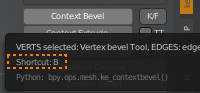
If I uninstall/install keKit the standard way via blender’s addons tab than all assigned hotkeys work but description for them are lost (on the right panel). To avoid it I have to manually delete/copy the kit’s files.
-
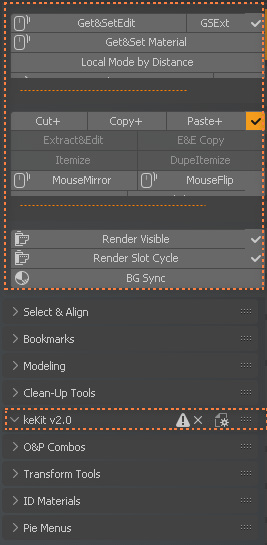
Get&SetEdit doesn’t work in Edit mode
-
Unbevel
-
Tab location(prob in my config only):
I think it’s related either the mentioned bug or Simple Tab addon.
1 Like
Cheers! Thanks for the report 
install - Hmm. “description for them are lost (on the right panel)” I dont quite understand what this means?
getset - Will check
unbevel - whoops, will check
tabs - yeah no it does not work atm. (RMB on tabname in add-on prefs and restore default)
Normally if we assign a hotkey to a tool than we have info about this shortcut on the right N-panel
That does only work on shift+alt+click, but not on dragging. When dragging the object/mesh it jumps on the grid space and view axis.
In that case, you should check the Ctrl and Shift hotkeys, Ctrl enables snapping by default, you may want to switch precision movement (Alt) with snapping (Ctrl) and check for other possible conflicts. That are either caused by Ctrl, Shift or a combination thereof.