I encountered this as well, did a manual install to v2 to make sure I kept all the settings but it didn’t keep the toggles, so just had to go through and make sure they were on. I think the icons were clear enough.
Ooh I did have copy of the prefs in the config but also one the in scripts folder it seems. My bad, maybe it was reading the one in the scripts folder instead oops!
hmm, no 2.0 should just check the ke_prefs.json in config. there is output during startup on what prefs i used in the console, if you could try the old file in config (removing temporarily any new file) with blender launched from console that would be helpful.
You’re totally right, I think it was reading the old prefs after the new install, and after I put the toggles back and saved, it saved a new copy the config folder.
well, no ;> it never read the old file, it just used the defaults since it could not find any file in config, (why the settings were not as you set them) and then saved this into a file in config (maybe). you then changed the prefs and saved (overwriting this new file in config, if there was one there).
for any one curios:
in the console, there are 3 possible messages regarding the prefs:
Using Default Preferences (note: this will be used if no file is found)
Old/missing items - User Preferences File Updated
Using Custom User Preferences
(pretty self explanatory)
i might add some function to read the old folder to make things easier for upgraders.
(checking both locations, and then preferring config if there is one there)
That’s weird … I use the save prefs icon at the top of panel when I change things but I do also save the blender prefs too so I guess it used the default prefs that doesn’t save the toggles? So the prefs file in the config folder is from version 2 and the keymap and prefs json file in the scripts folder is where the previous version saved the files?
I was playing with stuff a few days ago and everything is no longer where it was so it’s a little hard to tell sorry!
blender preferences does not save kekit prefs. you have to use the prefs icon in the keKit panel.
If you dont mind, i have added an “upgrade” feature for the next beta version, so if you want to try, you could remove all the new prefs files, and put your old one in the old place, and it should work automatically. the new version will be up soon.
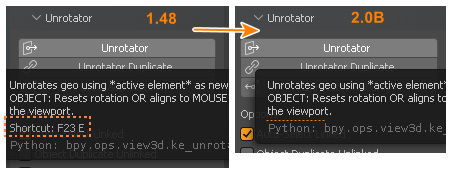
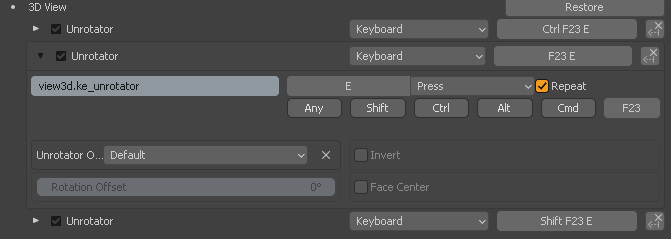
Hmm… I’ve tried several backups with the exact same steps(uninstall keKit->save->install->restart Blender->enable keKit->save) but couldn’t replicate the same behavior. Almost all tool-tips are there, except Unrotator+Unr Dup+Unr RotOnly. But the unrotator family has some tricky hotkey:
Restarting doesn’t help - still no tooltips for Unrotator.
There is no such problems at all if I manually delete/copy keKit via standard Windows explorer (my favorite way for updating addons).
The reason I even mentioned this issue is that some-some keKit and Blender versions ago I had the same bug. Hotkeys are working, but no tool-tips. And I had to manually reassign all of them to return those tool-tips
v2.001 Beta is now on gumroad. You should uninstall (or manually delete) the old keKit folder.
changes:
now looks for old ke_prefs.json prefs file in old location and attempts auto upgrade (to config location) - if an old prefs file is found (note: File found in config takes priority).
custom tab location feature removed (might be revisited when blender bugs are fixed. might.)
auto-activate snapping combos (only, not regular snap menu items) option in naming menu (bookmarks)
unbevel - ngon error fix
fitprim cylinder segment drops to 3 bug fixed
Removed old py files (unused files cluttering up the folder)
@Kiellog ,
Besides Unrotator, the same thing for Mouse Mirror & Flip (it has standard but unique hotkey).
And I completely forgot to mention one important thing - settings like Duplicate are not inherited:
This is expected blender behaviour. It was the reason i made a custom kekit shortcut exporter/importer. I have not decided if i want to bring that back yet. I am very tired of dealing with props and prefs ;>
ed: I’ll probably stick with the old manual update instructions (but emphasis on REMOVING the old folder, not just overwrite) and never touch the shortcuts again ;D
I think you shouldn’t worry about it too much Half of well known and PAID addons has compatibility issues if updating them through blender’s native uninstall/install. You’ve developed a collection of incredibly useful and unique scripts inside of keKit. And we already have 100% working way for updating it. As you said, there should be just strict instruction how to do it right, and you’re good to go. Why spend time on something you’re tired of?! There are a lot other things you can do instead