btw guys we needdd to see this guy back, https://www.youtube.com/channel/UCrGoOmaUF1rp0Q5FUxcx3jw doing sculpting like a pro, with mostly using blender (and recently using zbrush for extra detail) and subtance, i hope multires gets done and other features, i havent seen him a while…
5 Likes
I never understood why there is no primitive for that. C4D once had a plugin for egg objects. 
2 Likes
Every time I see some new 3D-Coat video, I feel the itch again to return to it. I’ve worked with it for some time, and it has got some kick-ass tools and features. It’s just that the actual sculpting doesn’t feel as fluid and pleasant as the ZBrush brushes. I also think the UI is a bit cluttered, with too much text labels. But then again, I also think the many tiny checkboxes inside initially closed rollout menus for essential functions in Sculpt Mode are becoming cluttered.
Look at what work people can do in 3D coat and you’ll be amazed.
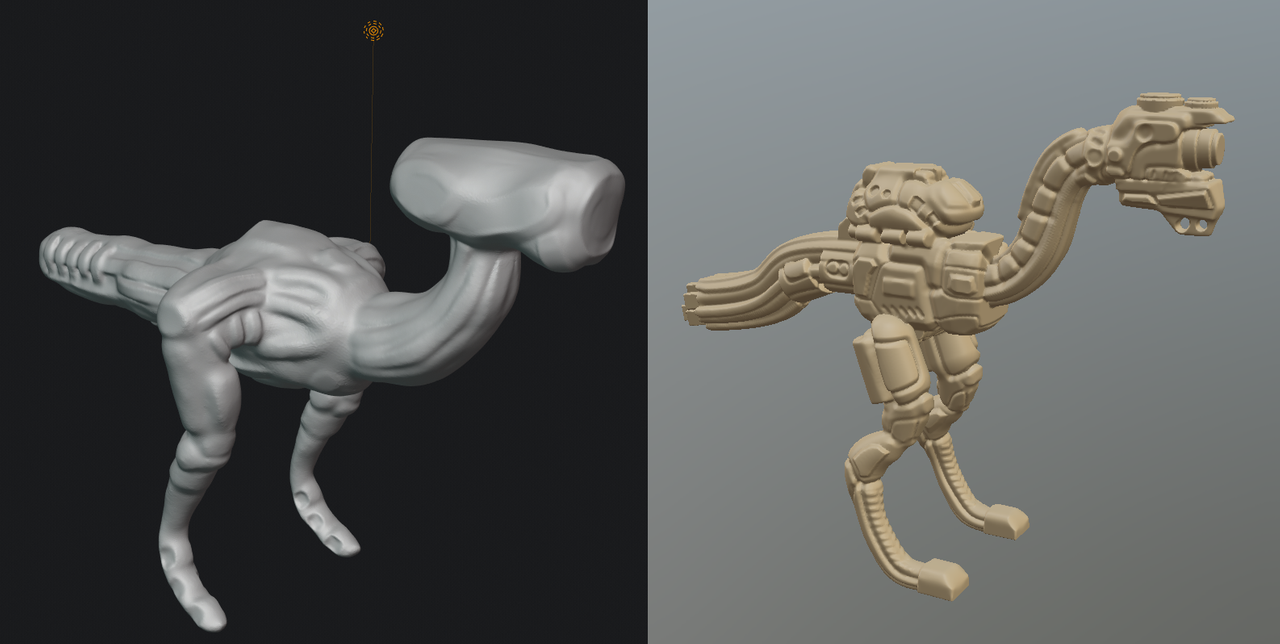
I made quick concepting in Blender 2.83 and 3D coat, to compare how much and how fast they are for prototyping.
Result is Blender is really missing many essential sculpting brushes :
- extract tool
- extrude from mask
- split brush
- insert mesh brush
- curve tool mesh create
- curve path for brushes (draw, extrude and so on)
- splines, polygon and shapes
- pose tool need better masking, need to be used for moving , scaling not only rotate things
- sub tools quick selection panel, instead of using Blender switch to objects and select
- and more lacking
Definitively Blender is not there after trying quick concepting, so indeed keeping 3D coat and Zbrush instead.
It will take some time, but i hope Blender will get those essential brushes for advanced users.
3 Likes
Blender is not Zbrush or 3DCoat, so don’t try to use it like those. Use edit mode and other tools to get the result you want instead of religiously trying to do it all in sculpt mode. Those apps only have sculpt mode, so they have a bunch of “brushes” that aren’t brushes at all and are better handled outside sculpt mode.
17 Likes
Concepting is all in sculpt mode from long time in Zbrush or 3D coat.
For hobby that’s ok, for pro work you need to work fast with right tools.
Not necessary better handled outside of sculpt, for example insert mesh take some seconds and it’s lot more intuitive without needing to constantly switch to modeling like you do in Blender.
BTW i just hope Blender will improve getting some more brushes.
But if people are happy with actual brushes and don’t want more that’s good and i don’t mind (as i can use 3D Coat or Zbrush).
Guerilla games is all in Zbrush for many things, they have partners for retopo and UV work.
I guess Blender sculpt mode focus on organic or characters scultping, and perhaps don’t want to expand to more advanced brushes and that’s ok.
But some essentials things like curve or spline are really lacking for example, and i don’t see interest Blender adding sculpt mode if it’s to only do basic sculpting and have to constanlty switch to modeling mode for things that became standard in scultping.
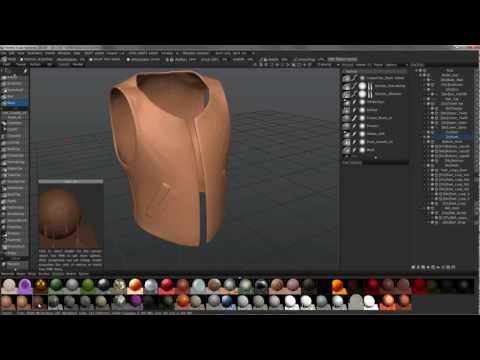
BTW that’s just my view on Blender sculpting to become viable for advanced users, everyone have it’s own opinion indeed and their own needs that are not the same.
3 Likes
The executives at Pixologic must still have a very low view of Blender’s sculpt mode if they think whittling the program down to almost nothing (with practically no notable technology other than Sculptris) is enough to be competitive (which doesn’t even give you things like brush falloff and precise control over brush size).
It might have some merit against 2.79, but not so much against 2.90 alpha (they need multires, textures, falloff, and higher polygon counts at least)
2 Likes
That is not the problem.
Blender users want advanced brushes.
But honestly, there is no benefit to rewrite all tools Blender already has in order to have them accessible in Sculpt mode.
It does not take minutes to switch to another mode. You just have to click on Layout or Modeling Workspace tab.
That is faster than scrolling down toolbar to make it display another dozen of tools.
So, why developer would have to maintain 2 versions of same tool ?
Under Mask menu, there is a Mask Extract operator and several Mask Slice operators.
That was requested by community.
But currently, developers are working on a basic Add primitive active tool based on blueprint addon.
It is hard to expect such thing when the basic tool for edit and object mode, is not even there.
- curve tool mesh create
Same need is covered by Skin modifier.
Skin modifier also allows to create a basic armature for basemesh.
That was allowing people to quickly pose their sculpt during 2.5,2.6,2.7 period.
But to create curvy shapes, you can also simply used extruded Curves converted to meshes or Metaballs.
- curve path for brushes (draw, extrude and so on)
That is not the same thing. But there is a Curve Stroke Method for brushes.
So basically, at least, we have ability to project 2D Curves from viewpoint.
But that would be welcomed to be able to use 3D Curves as guides.
- splines, polygon and shapes
You can create any spline, polygon and shape that you want using Add Curve and Add Meshes addons.
There is no need for that in Sculpt mode.
- pose tool need better masking, need to be used for moving , scaling not only rotate things
Many people already said it. Pose Brush will be improved a lot in 2.90.
Pablo added another Rotation Origin type (Face Set FK) and 2 others Deformation modes (Scale/Translate, Squash/Stretch).
Pose Brush is not supported by Multires modifier.
Currently, it is only useful on a basemesh rebuilded using Voxel Remesher.
But this need was covered during years by other tools, armature modifier, Proportional Edit Tool in mesh edit mode or Laplacian Deform modifier in object mode.
And now, in Sculpt, there are transform tools that can be combined with mask tools.
After Box Mask, Lasso Mask and Mask Brush added by psy-fi in 2.72, Pablo added a dozen of mask operators in Mask menu.
- sub tools quick selection panel, instead of using Blender switch to objects and select
2.8 keymap config and defaults are not helping, here.
In 2.7, there was no lock for object modes and right click select was used.
Just one right click on an object was sufficient to be able to sculpt it.
If you are using right click select and disable Lock Object Mode, that is still possible in 2.8.
Pablo showed a demo about sculpting on multiple object. But to do that, he created a shortcut that he did not add to master, yet.
But, he already did it. So, that will be added at some point.
Default keymap of Sculpt mode is far from being great.
Pablo added a lot of tools but he did not really shared an efficient keymap.
When using masking and transform tools, user is supposed to move pivot point by using pivot operators inside Sculpt menu. They have no shortcut.
But for instance, Pivot to Surface under Cursor operator is unusable without a shortcut.
So, sculpt mode does need some polishing but he does not really not so much tool additions.
5 Likes
On the contrary, I think they made a correct analysis.
Blender has so many complex brushes and tools, for sculpting, now.
That is no more an easy first access tool to discover sculpting.
When beginners will massively discover sculpting through such simple app.
When they will become serious about sculpting ; they will be more inclined to buy Zbrushcore or Zbrush (closer to what they already know) than switching to Blender.
4 Likes
I agree. I also think Pixo wants to lower the threshold for beginning sculptors with ZBrush Core Mini, and gradually lure them to big bro ZBrush, via ZBrush Core.
I also think the recently introduced 30-day trial version of the full ZBrush version is a good move. Until that came out, ZBrush was unreachable for people who wanted to try it and see if they like it.
1 Like
Good reading about some tools you mentionned, i’ll have to try.
Again i understand most Blender users mainly familiar with modeling so they won’t mind switching to modeling and do some work.
While others will find counter intuitive to have to switch instead of having very intuitive brushes for splines or quick insert meshs for example and other features.
I tested it,doing the speed concepting i made, i was 10 times faster with faster possibilities in 3D coat, than having to switch constantly between sculpt and modeling.
Also about interface, panel tabs are lacking for alpha masks browsing, sub tools quick access tab and many others, this makes a whole difference of productivity and workflow.
Blender team is working on many things, while Zbrush team work is fully focused on making best scultping features and tools. That’s the difference.
I’m not saying Blender is not capable, but scultping is not the main or best Blender area, it’s not the same workflow as 3D coat or Zbrush that are designed from start for most efficient sculpting tools and features.
I checked out reviews and people using Core on YouTube. I didn’t even know it existed before seeing Core Mini having an “Upgrade to Core” button in the announcement videos. After seeing the types of limitations being put on Core, I am not surprised why I haven’t heard of it until now. Having less features I can understand, but deliberately lowering performance for a paid for product is really inexcusable.
Core is entry and a very small subset, for people to try Zbrush and do some doodle, it’s mainly for hobby or to discover sculpting, it’s really not a serious tools , it has never been intended for big sculpting or pro scultping work.
So i think performance and limitations really does not matter considering category users Core is designed for.
It’s that kind of business mindset that kills these types of products from the get go. Instead of offering an experience that could be used professionally but without the more advanced tools, the business removes the main selling aspects of their software like performance just to force people to upgrade even if they would be completely satisfied with the features available.
Frankly, Core would be almost perfect for me and I would gladly spend the money on it if it had the same performance as normal ZBrush. So instead of spending the money, I will just straight up ignore the product.
1 Like
If Core has almost all features you need, why not using Blender for sculpting because it has lot more than Core ?
I baught Zbrush from 3.5 with free upgrade to 4 R8 never having to pay for upgrades.
I really don’t think Pixologic to be the worst company about the pricing.
You pay for quality and avanced features and for their team to continue working on it and improving it.
Well, to be fair, Pablo has done both at the same time. While he was working on the cloth stuff he also worked on MultiRes features and Vertex Painting in Sculpt Mode. He also has been waiting for Sergey to finish a lot of the base work for MultiRes, which I think is the main reason we got all these additional side features.
There is a huge list of patches done by Pablo that the other devs haven’t reviewed that address some core issues despite him adding revisions on multiple occassions. The reviewing process is taking very long and the list just keeps piling up. The odd thing is that they don’t seem to prioritise which patches should be reviewed first based on importance, since some patches from months ago have been just ignored while more recent ones get addressed. There is no system to it all. Hopefully the new 2.90 roadmap will actually address this by putting some actual priority on the important stuff and not just whatever pops up in the review feed.
I sure hope so! As much as I like the sculpting feel of ZBrush, I just can’t stand the UX design. Core Mini seems like a step in the right direction, even if it’s very small. 
The reason I want Core with normal ZBrush performance and Core Mini quality of life improvements is that it would be enough for me in a Blender -> ZBrush -> Substance Painter -> Blender workflow. I would do a huge bulk of the work in Blender and then use ZBrush to push the sculpt a bit more before moving to Substance Painter to texture and finally back to Blender for rendering or adding final touches. While MultiRes is getting a lot better, ZBrush still has better performance and workflow with its SubDiv system.
I don’t consider Pixollogic a bad company for its pricing. While I do think regular ZBrush is a bit too expensive, you most certainly get a quality product. They have also been historically been very generous with its pretty much lifetime support of updates regardless of when you paid for it, which can’t be said about a lot of companies. I am simply saying that ZBrush Core could be a lot more enticing for people like me if they didn’t reduce its performance. I do find it inexcusable that they reduce performance for Core, since it would make it a very nice product if that single restriction was removed.
This touches something I can’t help feeling for quite a while now: since Blender funding and the amount of active developers started skyrocketing with the 2.8 release, I think Blender development has lost a clear and coherent direction. It’s as if Blender has been injected with steroids and its muscles are now growing out of control. I’ve got that feeling particularly when looking at Sculpt Mode, where quantity seems to overrule a fine-tuned implementation with well thought-out usability.
Of course, Pablo is a genius and he’s the saviour of previously long-dormant Sculpt Mode progress, but I think it would improve the Sculpt Mode experience if a few more artists next to Pablo would be actively asked to participate in how tools and functions could be made more user-friendly, so Sculpt Mode can turn into a fluent creative experience and a true joy to work with. Right now I’ve got that feeling when working with ZBrush, but I’d cheer if Sculpt Mode would offer the same level of pure sculpting joy.
6 Likes
It’s 2020 and blender still lacks the most important primitve, I simply had to fill that gap. 
EDIT: Have a look here Egg Object for Blender
13 Likes
I understand, everyone has it’s prefered workflow.
It’s really not expensive if you do professionnal scultping work as you’ll get lot of money return and without having to pay upgrades.
3D Coat is also an amazing tool i use a lot and it’s not expensive for 100$ in promotion, to get a full sculpting suite, advanced retopo and painting with procedural materials.
In case you don’t do lot of sculpting, or not get enough money income from your sculpts or do as hobby, indeed Blender or 3D coat are perhaps a better choice if you don’t want to spend too much money.
BTW there is choice, and there is more like Modo allowing some sculpting or Autodesk Mudbox people don’t talk a lot about.