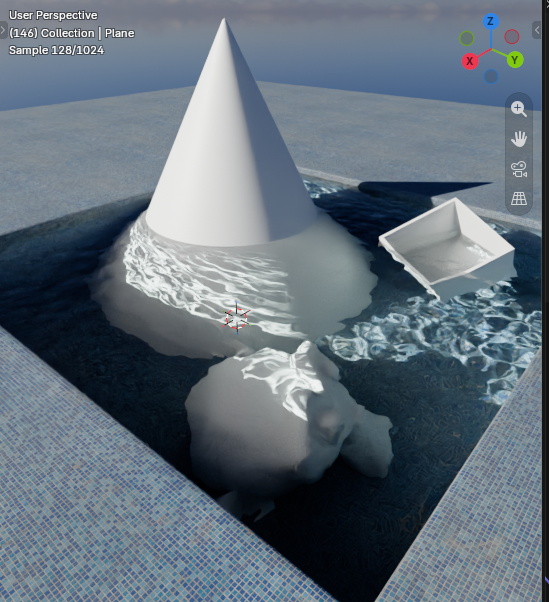
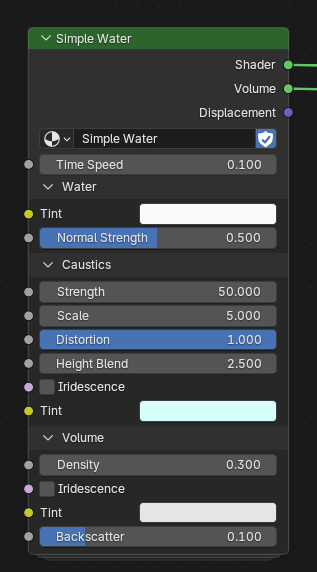
I made a simple water shader for my most recent render, then decided to work more on it so i have a quick solution for adding water in my future projects. Then i thought, why not put some additional time in it and share it with the community once it’s done? So i work on it with the idea of releasing it on my Patreon page for free once it’s done. I share my progress here so i can get some feedback on the features i work on. My goal is not to make a super realistic water shader, but have something that looks good, has enough customization options and is easy to use.
Progress (22.08)
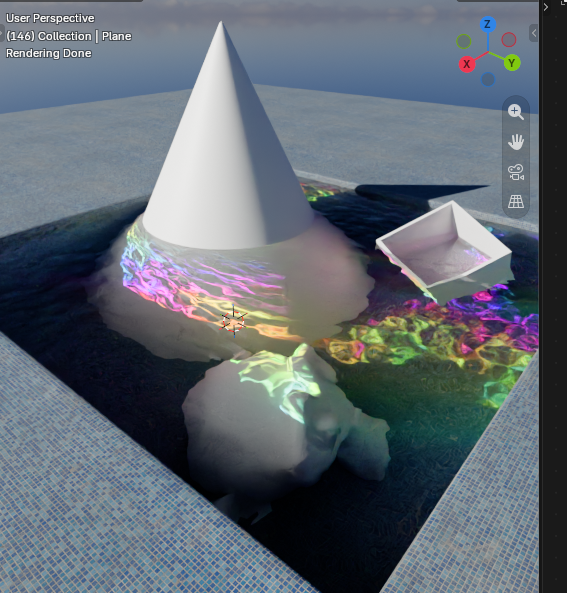
Experimenting with iridescene like effects and adding more color options
Added support for detail normal and custom distortion textures. You can add your own textures on top to further customize the look of the water surface. I will include the animated procedural ripple effect in the material so you can use it. Images show the use of both new features. Still a lot to work on, i keep you all updated.
And as always critique is appreciated and also if you have cool ideas i could add to this shader. Have a great day.
I started working on displacement. It is very early progress but i wanted to share what i have so far. For the displacement texture i took inspiration from a substance designer article written by Zahar Scherbov. I plan to adjusting the texture a bit so it looks better, add more handles to customize it and add foam generation to it.
Besides that i am thinking of changing the current implementation of the distortion feature so it affect the displacement channel. This would allow to make the waves have a custom shape which i think would be really cool. After i am done with that i will clear the graph so it’s easier to understand.
This is the current graph and i plan to add little notes to it later so others have an easier time understanding how it works.
Most features i wanted to add are working so far. For the foam i decided to output a mask which can be used to mix with a seperate shader slab so you have more control over the foam material.
I also thought about adding fake particles below the water surface to fake floating particles which can look really cool. This can be easily archieved by a parallax effect.
I renamed some handles and removed useless inputs to make the node more accessable.
I also noticed that the iridescence effect is quite expensive to render, so i will try to optimize the shader cost for that later.
All renders are done with only 100 samples and 4 light bounces using Optix Denoiser.
Exposed some settings to adjust foam distribution and you can now swap between AO or geometry node based edge detection.The new geometry node system requires little setup and higher mesh density, but results in renders up to 3x faster compared to the previous AO method.
Render times (stylized renders are just compositor filters i added for fun and don’t add to render time):
old method: 01:52m
new method: 00:37m
showing the setup for enabling geonode system. You just add the geonode to your water mesh, select the collection with your scene meshes and add an attribute.
Foam mask and normals are now outputs, so you have total control over the foam and can use textures instead of a solid color. It is also more performant than the previous method i used.
thanks haha. Its funny that this shader is called “simple water” because that was the original idea. I think with using geometry nodes now i could add some more features like underwater particles. If anyone has feature requests tell me, since again this is for the community so i wanna make sure most people are happy with the result
working on a new feature i call “wave types”. Allows you to mix and blend between different wave types. For now i planned to add deep ocean, rogue and beach waves. But might extend the list later. I also improved the visual look and adjusted the logic for the wave generation a little. The video shows a very early proof of concept.
Oh and i forgot.. the tesselation now also works with the distortion layer. So you can shape the waves however you want. Download a heightmap of an apple and you have your own iWater. (i will share some pictures showcasing that feature later).
I plan to work on more features like automatically adjust wavelength and height based on height difference to ground surface. I also want to make the tesselated waves react to the scene objects, similar to the foam. So they can bend around objects and maybe even fake some echo waves caused by collisions with an object (depends on if i can manage to do that). As always i appreciate you for reading this and feedback is always appreciated.
I will release this once it’s done on my patreon and gumroad. The asset will be completly free to use and i don’t ask for anything. Just that you have fun using it.
Quick update on my current progress. After thinking for a day about it i decided to move the tesselation logic from the shader into the geonode system. There are some reasons for it.
1. While tesselation is GPU accelerated, the geometry nodes run on the CPU: This reduces the load on the GPU which can speed up render times. Some test renders i did showed faster render times (by roughly 5-7 seconds) and reduced vRam usage by up to 1gb compared to the GPU tesselated mesh.
2. The geomnode subD mesh can interact with other modifiers like shrinkwrap. This can be used for example to add bouyancy to a seperate mesh which isn’t as easy to archieve if the waves are GPU tesselated.
3. Geometry nodes allow me to intigrate other systems more easily into the water shader. For example particle systems or modifiers.
To ensure the performance in viewport doesnt break, i am working on a simple LOD system. I also try to mimic the adaptive subdivision feature which i used previously for the waves, so the is no quality difference between GeoNodes and material displacement.
I was unsure if i wanna do this because this means a lot of work for me and that i have to rewrite some wave logic i already made, but when i release this shader for free i want it to be as good as i can get. I will keep the old tesselation system in the shader still, so if you dont wanna use geometry nodes you dont have to. But i will focus more into the geometry system for now.
I am working on a simple dynamic tesselation feature to reduce the load on the GPU, especially for large bodies of water. It’s nothing too crazy but can improve performance by a lot. In the example below the tris count went from roughly 550k to 120k. All geometry nodes i make for the water shader will be shipped alongside the water material itself, so you dont have to worry about making them yourself.
If you wonder why i dont delete the faces that are outside the view like other camera culling systems do, it’s because we want to keep them so the waves inside the camera view can reflect those areas. You can optionally delete them entierly if you dont need them.
Little Update:
While browsing through the geonodes i found the 3D to screenspace node by coincidence. With that i quickly build this setup to detect if a position is inside or outside the view plane. Previously i used the raycast node because the tutorials i saw online use that. But my method doesnt require raycasts so it calculates faster + it automatically works with any FOV or render resolution which makes the graph much simpler. I have to say that my programing experience i got from using unreal engine helped me here a little haha. After using the new system my vieport immediately went from 15 to 21 fps
i finished the LOD system, did some optimization and cleanup. I also started porting some of the previous features over to geonodes like foam distribution. I will work on the waves next, importing all the wave generation logic from the material shader into geonodes.
I updated the foam to make it look a little nicer. I also work on making the whole water system more modular so if someone wants to, they can extend this in the future.
This week was the original plan, but i am a little busy this weekend and decided to delay it for next week. This also gives me time to improve the quality and performance further and also add some additional features. As long as you follow this topic you wount miss the release.
It will be released on my gumroad and patreon. For free with commercial use. I will add a donation option but its not mandatory.