Damn I have 20 addons XD Could you say what are you suspecting might be the problem so at least what addon could cause the problem? Or maybe what addon is doing exactly in bg? Basically I don’t do the code dissection?
-there is some error coming from node_presets and then something about substance in blender. so i would try to disable those and see if it fixes anything.
I will try both of those are not something I use in blender actually. Might be one of them deff.
Hello!
Have this error with latest gob, zbrush and blender 
Python: Traceback (most recent call last):
  File "C:\Users\KonstantinM\AppData\Roaming\Blender Foundation\Blender\3.0\scripts\addons\GoB-3_5_66\GoB.py", line 1267, in invoke
    bpy.ops.scene.gob_export(as_tool=as_tool)
  File "C:\Program Files (x86)\Steam\steamapps\common\Blender\3.0\scripts\modules\bpy\ops.py", line 132, in __call__
    ret = _op_call(self.idname_py(), None, kw)
RuntimeError: Error: Python: Traceback (most recent call last):
  File "C:\Users\KonstantinM\AppData\Roaming\Blender Foundation\Blender\3.0\scripts\addons\GoB-3_5_66\GoB.py", line 1183, in execute
    self.exportGoZ(PATH_GOZ, context.scene, obj, f'{PATH_PROJECT}')
  File "C:\Users\KonstantinM\AppData\Roaming\Blender Foundation\Blender\3.0\scripts\addons\GoB-3_5_66\GoB.py", line 895, in exportGoZ
    goz_file.write(pack('<H', groupColor[map.value]))
IndexError: list index out of range

location: C:\Program Files (x86)\Steam\steamapps\common\Blender\3.0\scripts\modules\bpy\ops.py:132


location: <unknown location>:-1
oh, looks out its my mesh problem, because it works on the cube…
Debug the mesh, found the face map on my mesh cause this erorr
1 Like
anything that was special with the facemap? would be great to catch that error with the addon so others do not run into it.
2 Likes
Just wondered is it possible to use Alembic with GoB instead of .obj? I noticed that Alembic files import a lot quicker into Blender in general.
1 Like
Nothing special, just regular one.
Sorry, i can not share the file
Just make scene with similar issue if you understood bug reason…
I can’t repro it 
GoZ i snot using obj but a proprietary .goz binary format. unless a custom GoZ exporter for a other format is made this is not possible. Im aware of some performance issues when importing but they are not so trivial to fix.
In any case it requires rewriting of big parts of the addon.
2 Likes
Version: Blender 3.0 / Zbrush 2022 / GoB-3.5.66
Bug report: Importing (from zbrush to blender) doesn’t work properly. (it’s ok in reverse or to other software.)
Description: After clicking “goz” button in zbrush, back in blender clicking “Import” button only changes the icon and nothing other happens. Then click “Manual” button will load the last object exported from blender, and if no exported from blender then nothing happened when importing. The goz objects “test4.GoZ”, “test4.ztl”, “test4.ztn” exported by zbrush were created properly on folder “C:\Users\Public\Pixologic\GoZProjects\Default”, obj information recorded also properly in file “C:\Users\Public\Pixologic\GoZBrush\GoZ_ObjectList.txt” like “C:\Users\Public\Pixologic\GoZProjects\Default\test4”, while blender just can’t import them.
Console Info:
ACTION: MANUAL
Importing: (‘C:\Users\Public\Pixologic\GoZProjects\Default\test1.GoZ’, ‘test2’)
name: b’\x89\x13\x00\x00’
Vertices: b"\x11’\x00\x00"
Faces: b’!N\x00\x00’
UVs: b’\xa9a\x00\x00’
Import UV: True
Import Polypaint: True
Import Mask: True
Import Polyroups: False True
Unknown tag:b’B\x9c\x00\x00’
Info: GoB: Imoprt cycle finished
GOZ: clear import cache 0.0
I have tried to reinstall Blender, ZBrush and GoZ GoB, but still can’t solve this problem, help!
if the button changes color it means the import is active and everything you send from zbrush should automatically be loaded into blender.
From the console log you posted it looks like the import is happening so i will need more details on what exactly you are doing to be able to reproduce this issue.
As a first step i recommend resetting GoZ in zbrush and running the GoZ installer, that is the most common issue when something is not working.
you can find a guide in this ticket https://github.com/JoseConseco/GoB/issues/275
Thanks kromar, I just found the answer: I have two system, one is win7 installed on driver C, another is win10 on driver D. Zbrush was also installed from win10 on driver D same as blender. GOB use os.environ[‘PUBLIC’] + “/Pixologic” as PATH_GOZ as “D:\Users\Public\Pixologic”. But Zbrush use “C:\Users\Public\Pixologic” as PATH_GOZ . Maybe pixologic hard-coded this path, anyway I just manually hard-coded this path in gob.py
@pzkpfwiii thanks for describing the issue you encountered, i implemented a custom path that you can specify. it would be great if you could test if this works for you.
https://github.com/kromar/blender_GoB/archive/refs/heads/custom-public-path.zip
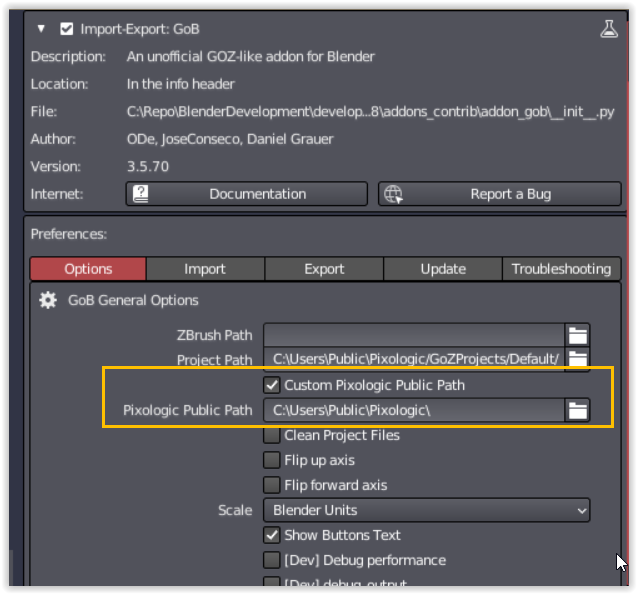
2 Likes
The link sadly doesn’t work.
@Duo_Matrix the fix is already back in the master, and comes with v3_5_72
https://github.com/JoseConseco/GoB/archive/refs/heads/master.zip
4 Likes
a new release is out, v3_5_86, thanks for all the reports and feature requests!
changelogs for 3_5_85 can be found in the link below, all changes are included in 3_5_86
5 Likes
Plz, provide, is there a way to properly update without losing settings. And thank you for great work!
You should not lose the addon settings when updating the addon. If you update blender it can happen that you forget to transfer the settings of the precious version.
If that is the case i wrote a addon to backup and restore the settings which might help with transfering old settings to a newer blender version.
1 Like
Hm. I installed it through prefernce addon tab- “install” and finally got two versions of addon in list - one is old setted up, and one is new with default settings…