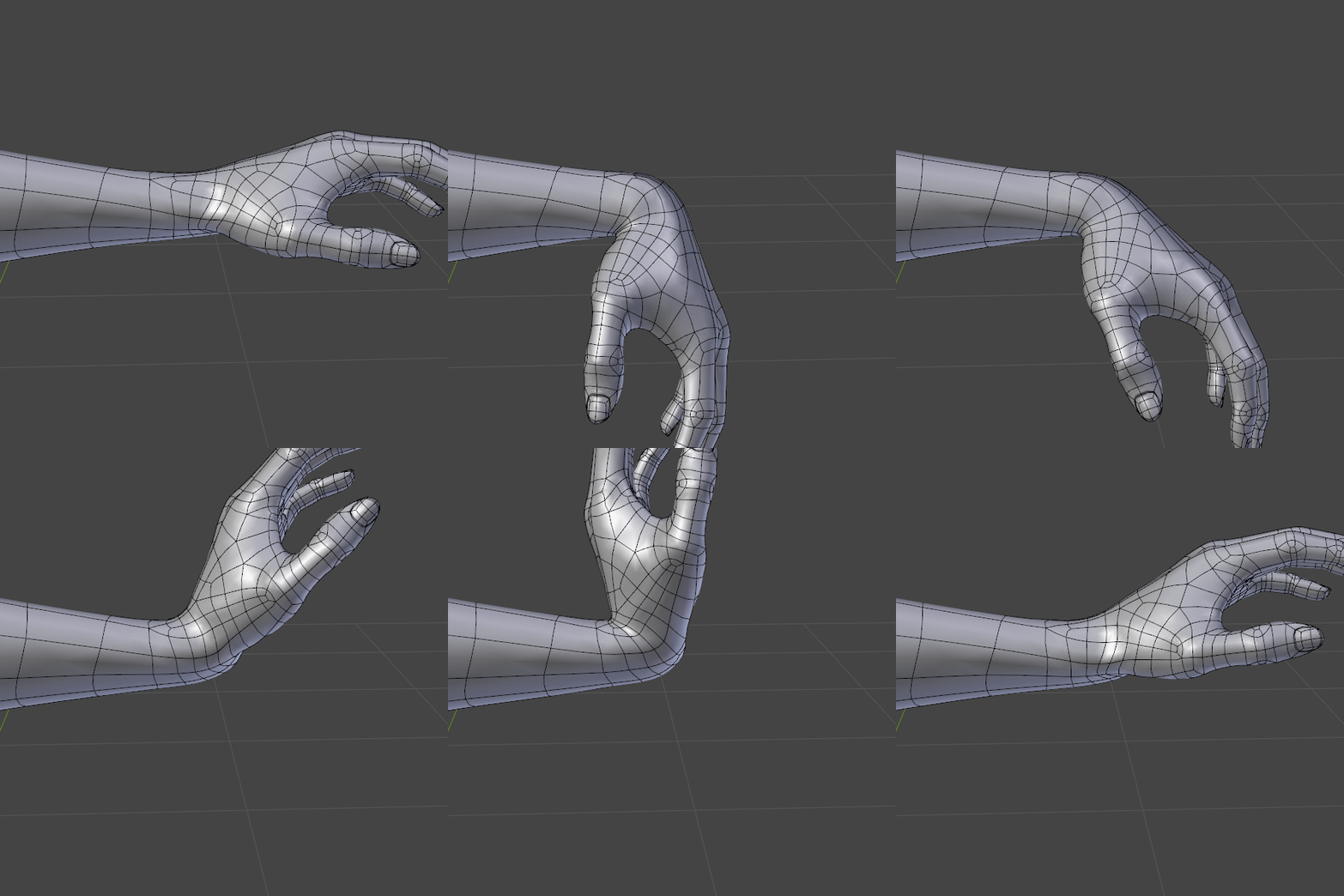
Well, you can expect penetration to occur in any instance where parts of the body would push against other parts, since there are no muscle sims or collision solvers for them to interact with.
However it turns out the controls for dislocating the shoulder and hip joints (and rotating them I just discovered!) can also be used to mitigate the deformation issues. You’d still need to do some sculpting to get it perfect though.
Hey Chris, even if, as you said, you still to do some sculpting to get it perfect, it looks already really great!!. Thanks for taking the time to show it.
In the second pose in the right wrist there seems to be some issue with the deformations?.., can you clarify…
What progress have you made with the tension map?. Are you going to use the tension map also on the hands, shoulders area and knees?
I didn’t spend much time posing the hand properly, but yeah the wrist deformations could definitely be improved.
I’m close to revisiting tension maps (I might even get around to it today). I intend to use them on the face, hands, and anywhere else that needs wrinkles, provided I can actually get them to work…
I just fixed the wrist deforms - they were in pretty bad shape, so I must have either broken them at some point or forgotten to do them properly in the first place…
My mind is set on tension maps — there is no plan B!
The only alternative I can think of so far is to use bones and shape keys to directly drive the opacity of predefined parts of an image, but I don’t know whether that’s possible or practical at this point. I’ll probably put in a feature request, however based on their workload I expect it would take some time to implement even if they were interested, so I’ll need some sort of stopgap in the interim.
If they’re not interested though, and the add-on remains in its current state, then I’m not sure if I’ll even be able to reach the level of my old LW wrinkle tests, let alone surpass them.
What about taking the mesh geometry to an older version of Blender (or lightwave) where the “Tension Map” feature works just for that task and then bake out the map sequence?
Or do you want to have the wrinkles maps reacting live, while animating, to the face expressions expressions with a normal map?
Have you tried setting up drivers to mix between normal maps based on the shape keys? It’s not the same as the tension maps, but it could be an acceptable workaround I think.
@yolao The wrinkles form part of the expressions, so it would need to be visible while animating, or at least easily previewable. Otherwise, apart from the arduousness and inefficiency of baking 4K textures for every frame, I wouldn’t want to be forever tied to an older version of Blender. Lightwave is out of the question for a number of reasons, not the least of which is that the version I have doesn’t do baking. I’ll relegate that to plan F or so.
@julperado That sounds like what I was suggesting about driving the opacity of an image (or more specifically, two of them). Do you mean having a separate image for each shape key though? That would also be extremely inefficient, since there are a lot of shape keys. That’s maybe a plan C.
I would say sculpt them in but that would require the new multires and its not really optimized. Sculpting is great but the rest is quite slow with it even when its not activated…
I think the only options you have is either poke the dev from the tension map addon and show him your work or create a proposal in right click select to offer it to the blender devs which i highly doubt they will start coding on it since it has never been requested before.
So after that i am looking forward to the face animations and can you say which shapekeys are needed for the face? or what are the absolute basics for a face?
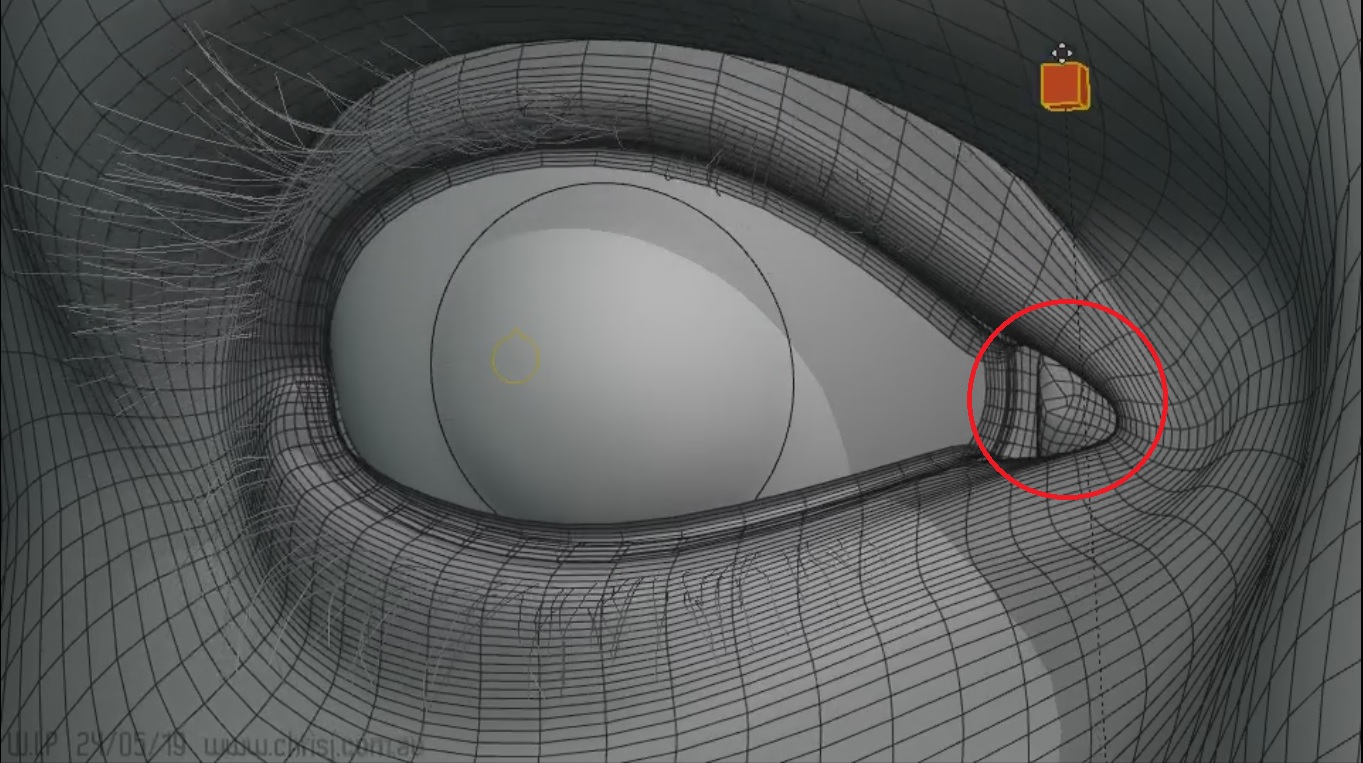
This is amazing!!. Can you tell me please how did you make the lacrimal gland to follow the eye movement?.. did you make shape keys drive by the rotations of the eye?
Also, are the lacrimal a separate object…, does it share skin weights from the main geometry of the face?..
Thanks
1 Like
MichaelColina
(The "Mr. Polygon Punisher" is your)
674
hello Chris a question do you place the subdivision modifier after or before the armature modifier because am wondering which is the right way tho? also how did you make the eyelids to “shrinkwrap” to the eyeball?
@ArtPomelo I saw talk of being able to use Multires on shape keys - if that works like I assume it would, that might be an alternative. It still wouldn’t be nearly as effective as tension maps though, which could be used for bump maps, colour, gloss etc. even on low density meshes. Having it built in would of course be preferable, so I’ll shoot for that first.
So far I’m up to about 50 shape keys for the face, not including the 5 I have for each eyelid, so I won’t name them all here… but many of them are the same as the FACS ones (which I found out about some time after I came up with my set).
If you mean the tear line, that’s described in the very post you replied to (which makes me think you’re probably referring to something else). It’s part of the same object and shares the eyelid weights and conforms to the eyelid shape keys.
I put the armature before the subdiv (or maybe Blender did that for me). Reversing them messes up the correctives, and who knows what else.
Hi Chris, sorry, English is not my language. What i wanted to know please is if this part that i marked here is part of the same object and if it shares the same weights, in case is a different object, and if it has shape keys attach to the eye rotations… i just repeating my self here…
Ah you mean the caruncle. It’s part of the same object, and has its own weights and its own bone that follows the eyeball around to a degree, like the eyelids.
Unfortunately so far shapekeys on multires aren’t supported due to them being a complicated issue for the undo system. I reported it as a bug earlier and the lead dev on the multires modifier (sergey) clarified that it’s not a bug, but it’s not been included either and it should make it into the master branch at some point. But so far, nothing. If there’s any news about it or someone gets a workaround I’d love that!



 It’s part of the same object and shares the eyelid weights and conforms to the eyelid shape keys.