Blockquote
InteractionOps-master
Just rename it to InteractionOps, and it should be root folder for the rest of folders and files.
PS: We have to figure out how to setup custom download on github. 
Blockquote
InteractionOps-master
Just rename it to InteractionOps, and it should be root folder for the rest of folders and files.
PS: We have to figure out how to setup custom download on github.
Add-on updated.
Added:
Download : github
Thank you.
Hi there,
Addon updated :
Thank you.
It is more convenient to keymap to 1 to 5 keys. Although I can modify the keymap, the additional functions of F4 have to be switched to F3 and F4.
It is more convenient to keymap to 1 to 5 keys. Although I can modify the keymap, the additional functions of F4 have to be switched to F3 and F4.
Yes and no, iOps using function buttons for avoiding intersections with other must have add-ons and minimize remapping by user.
So if you have MACHINEtools, HardOps or Boxcutter installed you do not need to rebind anything. Especially with MACHINEtools.
Many thanks.
Hi there, i had some free time and recorded visual origin feature of iOps:
Visual origin allows to put origin based on object boundBox, so it’s more clear working with origin now.
Thank you.
Awesome tool, thank you!
Is there a way to also align the “origin rotation” to the “normal orientation” of the selected face/edge ?
Hi, could you please illustrate the desired result?
Change the orientation of the (object’s)origin, acordingly to the active gizmo orientation.
In this case, the gizmo is set to “normal”.
After using such command, my origin, should look exactly like the gizmo in the picture.
And should have the same position of course 
Should be easy to implement, stay tuned.
https://github.com/TitusLVR/InteractionOps/raw/releases/iOps_1.5.1.zip
Please try. By default the operation is assigned to Alt + F5. I couldn’t figure out exact way Blender calculates normal’s X and Y axis, so sometimes they are flipped.
Duuude! That works perfectly. Thank’s so much, even the edges are working flawlessly
Do you have gumroad or something similar? I would like to give you a coffee 
It’s so strange, that blender is missing this at all, it’s such an important feature to set your origins precisely
For donate you can use this page:
Hi, we have combined some things together into one single panel:
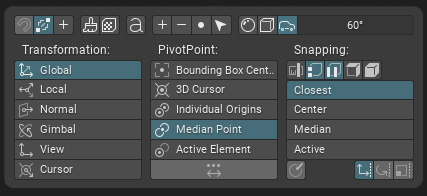
Features:
Advantage it’s a panel and it doesn’t close like a pie menu so user can select and make multiple actions when it’s open.
Many thanks!
Good idea to combine these elements, I was never really satisfied with these menus.
However I’ve noticed a massive viewport performance drop whenever the IOPS TPS panel is expanded. Using 2.80.
Yep, when you expand it’s lag a bit and it’s a bug i think, but idea was bind it to shortcut and call like popup panel when you need and when it’s like popup it doesn’t lags. I have to find a way for hiding it from N tabs somehow.
Nice, actually that was how I expected it to work initially.
Is it already implemented as a popup? If yes, how can it be called?
So i just upload version which hides iOPS panels from “N” tabs. and if you want assign shortcut .
Thank you!
PS: there is one more panel IOPS_PT_iops_transform_panel
Works like a charm. Also, as a former 3ds Max user, I’m very happy with the transform popup. 
One suggestion though: it’s great that the object’s transforms can also be changed in Edit mode, but it would be nice to have the location of the selected verts there as well. The popup would completely remove the need to search the N tabs for the original Transform panel.
Wow! Not sure how this one flew under my radar! I’ll certainly need to check it out!
Mr. Titus, had you seen my thread about keymapping Transformation Orientations to F-keys, and MACHIN3 actually swung by and pointed out that one cannot directly bind keys to Transformation Orientations, but he showed a workaround that allows one to do this? I have had basically zero time to try and do this, but if either or both you and MACHIN3 could add this functionality as part of iOps and/or Machin3Tools, so that folks could switch between Global, Local, Normals, etc, by just hitting one key (for me these would absolutely be F1, F2, F3, F4, F5) this would rock big-time. Below is my thread.


